
Quick Answer
Product video lighting is the setup that makes the product proof visible, believable, and consistent across ecommerce ad variants. Start with the proof job, not the lamp. Use one soft main light, keep the background darker than the product, control reflections, lock white balance, and review the final cut on a phone before publishing. Good lighting should help shoppers see the product faster; it should not hide weak claims or make the item look different from the product page.
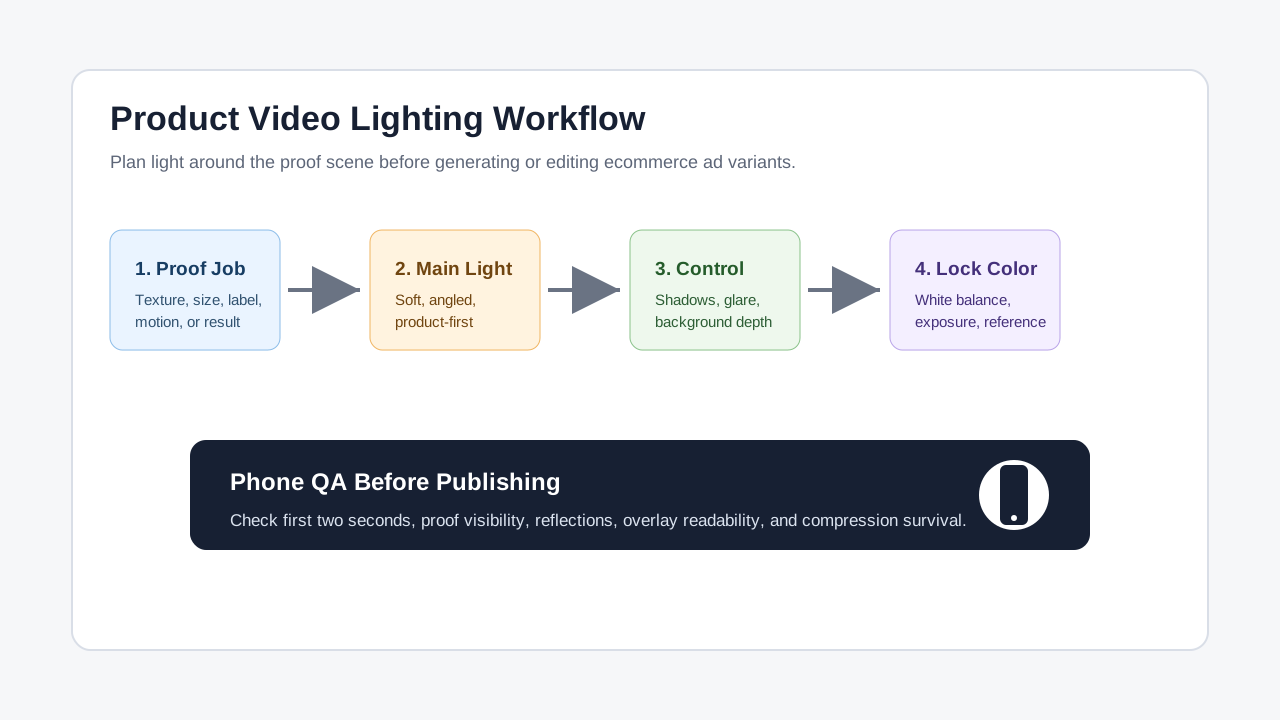
If you already have a shot list, lighting is the QA layer that decides whether every proof scene can survive fast scrolling, muted playback, compression, and small-screen viewing. Pair this guide with the product video shot list template, then create variants with ShopShot's AI video generator.
Why Lighting Matters For Ecommerce Product Videos
Lighting is not just a production detail. In ecommerce ads, lighting controls what the shopper can verify in the first few seconds: texture, scale, finish, color, ingredients, parts, packaging, and before-and-after proof.
Platform guidance keeps pointing in the same direction even when it does not use the word "lighting." TikTok's creative best practices emphasize vertical, visible, platform-native creative. Meta's ad creative inspiration pushes high-resolution visuals, product focus, and mobile-first execution. Google Ads guidance for responsive display ads recommends high-quality product images, while YouTube's ABCDs framework asks advertisers to capture attention early and reinforce key points through sight and sound.
The practical ecommerce lesson is simple: if the product cannot be identified quickly, the ad starts behind. Lighting should make the product readable before the voiceover, overlay, or CTA has to explain it.
What Counts As Product Video Lighting?
For ecommerce, lighting includes every visual decision that affects product clarity.
| Lighting element | Job in the ad | Common ecommerce failure |
|---|---|---|
| Main light | Makes the product shape and key detail readable | Harsh shadows hide the feature being sold |
| Fill light | Softens shadows without flattening the object | Product looks washed out or artificial |
| Back light or edge light | Separates the product from the background | Dark items disappear into the set |
| Background light | Adds depth and keeps the scene intentional | Background becomes brighter than the product |
| Reflection control | Keeps glossy surfaces readable | Phone, ring light, or room reflection appears in packaging |
| White balance | Keeps color consistent across variants | Product color shifts between shots |
| Exposure | Protects highlights and shadows | White packaging clips or black texture disappears |
The goal is not to make every video look like a studio commercial. The goal is to make the product truth easy to see.
Build The Lighting Plan Before You Shoot
Use this workflow before filming, generating variants, or editing AI-assisted product videos.
1. Name The Proof Job
Every product scene should prove one thing. Examples:
- The fabric texture looks breathable.
- The lid seals with one push.
- The serum texture is lightweight.
- The organizer fits three items, not one.
- The before-and-after is visible without exaggeration.
Once the proof job is clear, lighting decisions become easier. Texture needs side light. Glossy packaging needs reflection control. A dark product needs background separation. A color-sensitive product needs locked white balance.
For proof planning, use the product video proof points guide.
2. Choose One Main Light
Most small ecommerce shoots should start with one soft main light. Place it slightly above the product and off to one side. Then add fill only if shadows hide the proof.
| Product type | Starting light setup | Watch for |
|---|---|---|
| Matte beauty packaging | Large soft light from front-left | Flat labels and no edge separation |
| Glossy bottles | Soft side light plus black or white reflection cards | Ring-shaped reflections on the bottle |
| Apparel and fabric | Soft side light to reveal texture | Color shift from mixed light sources |
| Electronics | Controlled side light and clean dark reflection | Screen glare and clipped highlights |
| Food and beverage | Soft directional light with gentle fill | Product looks dry, gray, or overprocessed |
| Jewelry or metal | Small controlled highlights and clean flags | Sparkle hides shape or looks fake |
Do not add more lights until the first light has a clear job. Many product videos look cheap because every surface is lit equally.
3. Control The Background
The product should be the brightest or clearest thing in the frame unless the creative concept has a specific reason. A bright background can make the product feel weaker, especially on mobile.
Use three checks:
- Squint at the frame. The product should still be easy to find.
- View it as a thumbnail. The key shape should survive.
- Convert a screenshot to grayscale. The product should not blend into the background.
For thumbnail-specific checks, use the product video thumbnail template.
4. Lock Color And Exposure
Batch creative testing fails when every variant has a different color cast. If one hook uses warm window light, another uses cool LED light, and a third uses auto white balance, the test is no longer only about the hook.
Before shooting:
- Turn off mixed room lights.
- Use one color temperature when possible.
- Lock white balance on the camera or phone.
- Lock exposure once the product is placed.
- Shoot a quick reference frame for color-sensitive products.
For post-production corrections, connect this workflow with the product video color grading guide.
5. Review The Final Ad On A Phone
Lighting that looks fine on a desktop monitor can fail on a phone. Check the final export at normal brightness and low brightness.
Look for:
- The product is identifiable in the first two seconds.
- The key proof scene is not hidden by shadow.
- Highlights are not clipped on white packaging.
- Glossy reflections do not distract from the label.
- Skin, fabric, food, or product color does not look misleading.
- Text overlays remain readable against the lit background.
- The exported file still looks clear after compression.
For export-specific checks, use the product video export settings guide.
Lighting Patterns For Ecommerce Ads
Different ad jobs need different lighting patterns. Use the product category and buyer stage to choose.
| Pattern | Best for | Lighting plan | Risk to avoid |
|---|---|---|---|
| Clean PDP proof | Amazon, Shopify, landing page support | Soft even light, neutral background, accurate color | Too flat to show texture or shape |
| UGC-style demo | TikTok Shop, Reels, creator-led ads | Natural-looking soft window or LED light | Dark room or noisy shadows |
| Texture reveal | Apparel, skincare, food, home goods | Side light that shows surface detail | Harsh contrast hides half the product |
| Gloss control | Bottles, electronics, packaging, jewelry | Large soft source, flags, clean reflection cards | Ring light reflection or visible room |
| Before-and-after proof | Cleaning, beauty, repair, fitness accessories | Matched light across before and after scenes | Different lighting exaggerates the result |
| Offer or bundle shot | Kits, multipacks, seasonal offers | Bright product area, controlled background depth | Background props compete with the bundle |
The before-and-after row deserves special attention. If lighting changes between the before and after shot, the ad can look misleading even when the product claim is true.
Phone Lighting Setup For Small Teams
You do not need a large studio for many ecommerce product videos. A small team can create a repeatable setup with a phone, a soft light, a stable surface, and a simple background.
Use this low-friction setup:
- Place the product on a clean surface near a wall or backdrop.
- Put one soft light or diffused window light at a 45-degree angle.
- Turn off overhead lights that create mixed color.
- Use white card to lift shadows only if needed.
- Use black card to remove ugly reflections from glossy packaging.
- Lock exposure and focus on the product.
- Record one proof shot, one hand-use shot, and one close-up detail shot.
This setup works well for small catalog batches because it is repeatable. The same lighting can support PDP clips, TikTok Shop demos, Meta retargeting ads, and AI-assisted product-video variants.
For Shopify-focused workflows, use ShopShot's Shopify tool. For marketplace-specific assets, connect product clips with ShopShot's Amazon tool.
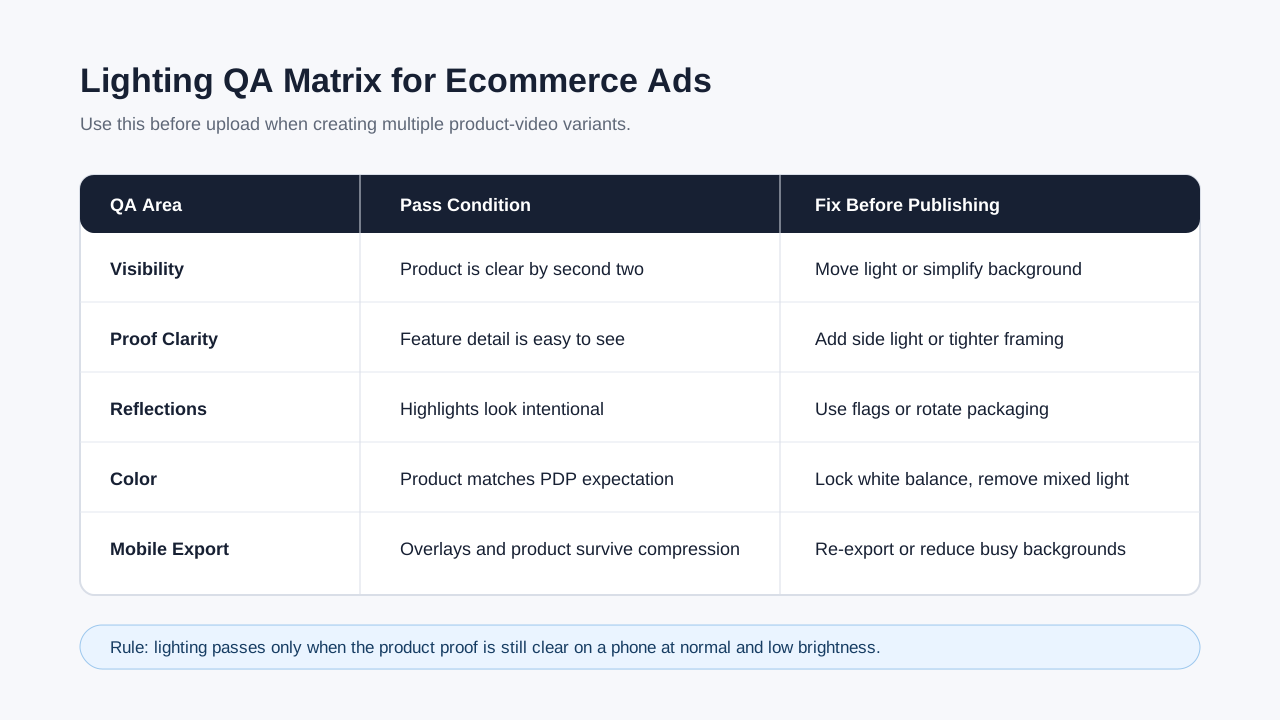
Lighting QA Matrix
Run this matrix before upload, especially when creating many variants from one product shoot.
| QA area | Pass condition | Fix before publishing |
|---|---|---|
| Product visibility | Product is recognizable in the first two seconds | Move main light, simplify background, or change first frame |
| Proof clarity | The feature being sold is easy to see | Add side light, closer framing, or a cleaner demo angle |
| Shadow control | Shadows add shape without hiding detail | Add fill card or move the light closer to soften it |
| Reflection control | Glossy surfaces show intentional highlights | Move light, use flags, or change camera angle |
| Color accuracy | Product color matches PDP expectations | Lock white balance and remove mixed light |
| Overlay readability | Captions and price text remain readable | Darken background area or change overlay placement |
| Variant consistency | Hook tests use the same product look | Reuse the same setup and reference frame |
| Compression survival | Final export remains clear on mobile | Re-export with better settings or reduce busy backgrounds |
Common Lighting Mistakes
Using a ring light for everything
Ring lights can be useful for faces, but they often create obvious circular reflections on bottles, screens, plastic windows, and glossy packaging. If the viewer notices the light before the product, change the setup.
Mixing window light and room light
Mixed light makes color correction harder. A product may look warm in one corner and green in another. Turn off overhead lights or block window light so the scene has one dominant color temperature.
Making the background too bright
A bright background can feel clean, but it can also pull attention away from the product. Keep the product clearer than the background, especially when a CTA, price, or proof point appears.
Hiding weak proof with dramatic lighting
Dramatic shadows may look premium, but they can weaken ecommerce proof. If a shopper cannot see the material, size, label, result, or use case, the lighting is working against the sale.
Changing lighting between test variants
If one variant is brighter, warmer, or more premium-looking than another, your hook test is contaminated. Keep lighting consistent when testing script, CTA, voiceover, or offer changes.
How Lighting Fits An AI Product Video Workflow
AI-assisted video does not remove the need for good product inputs. It makes input quality more important. Clean source images, consistent lighting, and clear proof frames give the generation or editing workflow better material to preserve.
A practical ShopShot workflow:
- Build a product truth file from PDP facts, approved claims, reviews, and offer details.
- Shoot or select product images with clean, consistent lighting.
- Build a shot list around proof scenes, not generic beauty shots.
- Generate or edit product-video variants in ShopShot.
- Check lighting consistency, color, captions, export quality, and landing-page match.
- Publish only variants where the product proof remains clear on mobile.
For TikTok Shop demos, use ShopShot's TikTok Shop tool after the lighting and proof checks are clear.
FAQ
What is the best lighting for product videos?
The best starting point is one large soft light placed slightly above and to the side of the product. Add fill, reflection cards, or background separation only when they help the product proof become clearer.
Do ecommerce product videos need studio lighting?
No. Many product videos can be made with a phone, diffused window light or a soft LED, a stable surface, and a clean background. The key is consistency, color control, and proof visibility.
How do I avoid glare in product videos?
Move the light away from the camera angle, use a larger diffused source, add black or white reflection cards, and slightly rotate glossy packaging until the label is readable.
Should lighting be different for TikTok and product pages?
The proof should stay accurate, but the style can change. TikTok Shop clips can look more native and handheld, while product-page videos usually need cleaner, steadier lighting that shows details without distraction.
Can AI improve badly lit product footage?
AI tools can help polish or repurpose footage, but they cannot reliably recover every lost detail, clipped highlight, or misleading color cast. Start with clean lighting so generated variants stay believable.
Sources Checked
- TikTok Ads Manager: Creative best practices
- Meta for Business: Ad creative inspiration
- Google Ads Help: Best practices guide for responsive display ads
- Google / YouTube for Business: ABCDs of effective video ads
- Current SERP review for ecommerce product video lighting and product video best-practice content.
Conclusion
Good product video lighting makes the buyer proof easier to trust. Choose one proof job, start with one soft main light, control shadows and reflections, lock color, and review the final cut on a phone. When lighting, captions, sound, export settings, and landing-page claims agree, ecommerce teams can create product-video variants that are easier to test and easier to scale.