
Quick Answer
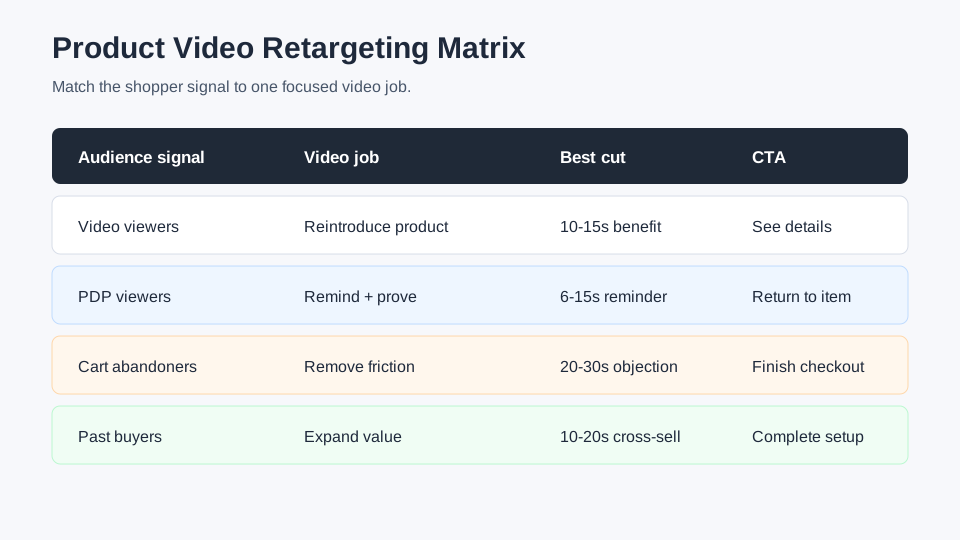
Product video retargeting ads work best when the video matches what the shopper already did. A product page visitor usually needs a short reminder plus one reason to return. A cart abandoner needs friction removal, proof, or an offer. A past buyer needs a cross-sell, replenishment, or new-use video. A video viewer who never visited the site needs a stronger product reveal before the CTA.
Do not run the same cold product video to every warm audience. Build a small retargeting creative matrix: one 6-second reminder, one 10-15 second benefit cut, one 20-30 second objection answer, one review or proof cut, and one product-bundle or next-step cut. Then map each cut to the audience and window where it makes sense.
Why Product Video Retargeting Needs Different Creative
Retargeting is not just a media-buying setting. It is a creative decision.
Cold shoppers are still deciding whether the product deserves attention. Retargeted shoppers have already shown a signal: they watched a video, viewed a product page, added to cart, opened an email, interacted with TikTok Shop, or bought something before. The ad should respect that context.
If the viewer already saw your main ad, starting again with the same hook wastes seconds. If the viewer abandoned checkout, a lifestyle intro does not answer the concern that stopped them. If the viewer bought a starter kit, another first-purchase video may feel irrelevant.
For ecommerce teams, product video retargeting ads should answer one of five jobs:
| Retargeting job | Viewer signal | Best video role | Common mistake |
|---|---|---|---|
| Reminder | Product page visit or high video watch | Bring the product back into memory | Repeating the cold hook |
| Objection answer | Cart or checkout abandoner | Remove one purchase blocker | Showing generic lifestyle footage |
| Proof | Multiple visits or comparison behavior | Show review, demo, before-after, or use case | Making unsupported claims |
| Offer recovery | Cart abandoner or email clicker | Explain the reason to act now | Hiding the offer until the end |
| Expansion | Past buyer | Cross-sell, refill, bundle, or new use | Targeting buyers with a first-time pitch |
The goal is not to make retargeting videos longer. The goal is to make them more specific.
If you are still building your production system, start with the broader ecommerce video ad testing plan, then use this guide to assign the winning cuts to warm audiences.
Build The Retargeting Audience Ladder First
Before editing video, define the audience ladder. The ladder keeps you from creating too many cuts for tiny audiences or showing aggressive offers to people who barely know the product.
| Audience | Typical source | Creative temperature | First video to test |
|---|---|---|---|
| Video viewers or social engagers | TikTok, Instagram, Facebook, YouTube | Warm-ish | 10-15 second product reveal |
| Product page viewers | Store analytics, pixel, catalog events | Warm | 6-15 second reminder plus proof |
| Add-to-cart visitors | Pixel, platform event, Shopify audience sync | Hot | Objection answer or offer recovery |
| Checkout abandoners | Store event, email list, ad audience | Hot | Short friction-removal video |
| Past buyers | Customer list, shop activity, CRM segment | Existing customer | Cross-sell, replenishment, or bundle |
Google's retail dynamic remarketing documentation describes the core idea well: past site visitors can be shown ads tailored to what they viewed, and retail advertisers can use product information from Merchant Center and feed data for more relevant ads. TikTok's Custom Audiences can be built from sources such as website activity, app activity, customer files, engagement, and Shop Activity. Meta's Custom Audiences and catalog-ad workflows serve a similar retargeting role, though some official help pages are login-gated.
For creative planning, treat those audience systems as inputs. Your video still has to answer the shopper's next question.
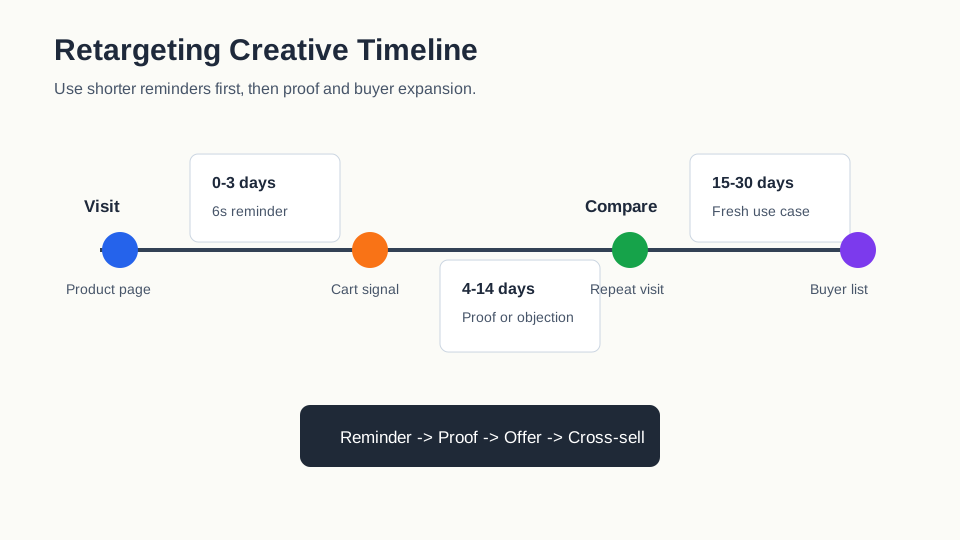
Use A 7 / 14 / 30 Day Creative Window
Warm audiences decay. A shopper who left a product page yesterday is not the same as a shopper who browsed three weeks ago.
Use this simple window:
| Window | Shopper mindset | Video angle | CTA |
|---|---|---|---|
| 0-3 days | Still considering | Product reminder, cart recovery, offer clarity | "Complete your order" or "See the details" |
| 4-14 days | Comparing options | Proof, review, demo, objection answer | "Watch the demo" or "Compare the kit" |
| 15-30 days | Losing memory | Fresh use case, bundle, seasonal reason | "Shop the collection" or "Find your fit" |
| 31+ days | Cold again unless buyer | New concept or prospecting-style refresh | "See what's new" |
Short windows deserve direct creative. Longer windows need a stronger reintroduction.
Match Video Cuts To Retargeting Intent
A practical retargeting plan can be built from five product-video cuts. ShopShot teams can create these from the same product inputs: image set, product page bullets, offer, reviews, common objections, and platform format.
1. The 6-Second Product Reminder
Use this for product page visitors, long video viewers, or cart visitors who already know what the product is.
Structure:
| Second | Scene | Job |
|---|---|---|
| 0-1 | Product visible in use | Trigger recognition |
| 1-3 | One benefit or proof point | Remind them why they cared |
| 3-5 | Offer, variant, or availability | Give a reason to return |
| 5-6 | CTA | Send them back to the product page |
This cut works best when the product is visually obvious. It is weak for complex items that need explanation, sizing, compatibility, or setup details. For those, use the objection-answer cut below.
See the product video length guide if you need a deeper export plan for 6, 15, 30, and 60 second versions.
2. The 10-15 Second Benefit Cut
Use this for video viewers, profile engagers, email clickers, and softer website visitors.
These people are warm, but they may not remember the product clearly. The video should reintroduce the product quickly, then show one benefit.
Example structure:
| Time | Scene | Script role |
|---|---|---|
| 0-2s | Product and problem in one shot | "Still dealing with messy cables?" |
| 2-6s | Product use | Show the fix clearly |
| 6-11s | Proof | Review snippet, before-after, or feature callout |
| 11-15s | CTA | "See the color options" |
Do not pack three benefits into this cut. Retargeting is often more persuasive when each video answers one reason to return.
3. The 20-30 Second Objection Answer
Use this for cart abandoners, repeat visitors, or shoppers who viewed comparison pages.
This is where many ecommerce retargeting ads underperform. The audience is hot, but the video keeps selling the broad dream instead of answering the blocker. The blocker is often specific:
| Objection | Better video answer | Weak answer |
|---|---|---|
| "Will it fit?" | Sizing, dimensions, compatibility, model comparison | Lifestyle montage |
| "Is it durable?" | Stress test, material proof, warranty clarity | Vague "premium quality" claim |
| "Is it worth the price?" | Cost-per-use, bundle value, review proof | Bigger discount only |
| "Will it arrive in time?" | Shipping cutoff and in-stock message | Generic product demo |
| "Can I return it?" | Return policy explained plainly | No policy mention |
Keep claim language precise. For regulated or sensitive categories, avoid medical, financial, or guaranteed-result claims unless your product page and legal review already support them.
4. The Review Or Proof Cut
Use this when shoppers viewed reviews, product details, or multiple products in the same category.
A proof cut can be:
- A product demo with the key mechanism visible.
- A before-after layout for visual products, if the claim is supportable.
- A customer review excerpt with product footage.
- A comparison against the old way of solving the problem.
- A product-page proof point such as material, capacity, battery life, or bundle contents.
Keep the video grounded in proof the shopper can verify. Instead of saying "everyone loves it," show the specific review line, star rating context if allowed, and the product moment that makes the review believable.
For a stronger proof library, use the product video proof points guide before writing the retargeting script.
5. The Cross-Sell Or Replenishment Cut
Use this for past buyers.
Past buyers are often wasted in retargeting because brands keep showing first-purchase ads. That is a missed opportunity. Buyer retargeting should answer a different question: what should they do next?
| Buyer segment | Video angle | Example CTA |
|---|---|---|
| Bought starter product | Accessory, refill, care kit | "Complete your setup" |
| Bought one color or style | New variant or matching item | "See the new shade" |
| Bought consumable | Replenishment reminder | "Restock before you run out" |
| Bought giftable item | Seasonal or bundle angle | "Build a gift set" |
| High-value customer | Premium bundle or launch preview | "Shop the early release" |
This audience also needs exclusions. If someone just bought yesterday, do not immediately push the same product at a discount unless the business intentionally supports post-purchase price matching.
Platform Notes For Retargeting Video Ads
The audience mechanism changes by platform, but the creative logic stays consistent.
| Platform | Useful retargeting input | Creative note | Watchout |
|---|---|---|---|
| Meta | Custom Audiences, catalog audiences, engagement | Use short proof cuts for feed, Reels, Stories, and catalog retargeting | Official pages can be login-gated; confirm exact setup in Ads Manager |
| Google Ads | Dynamic remarketing, Merchant Center feed, website tag | Feed relevance can personalize product info; video should still explain why to return | Dynamic ads and Shopping ads have different policies |
| TikTok | Custom Audiences, website activity, engagement, Shop Activity | Use native-feeling clips, product shopping context, and short offer reminders | TikTok Custom Audiences require enough matched users before serving |
| Shopify ecosystem | Cart and customer behavior feeding email or ad audiences | Use cart recovery, replenishment, and product education cuts | Coordinate ad claims with PDP, email, and checkout copy |
For TikTok Shop sellers, TikTok's Shop Activity audience can be used for people who interacted with your TikTok Shop, and TikTok lists Video Shopping Ads among available ad formats for that audience type. That makes product-specific video cuts especially relevant.
For Shopify sellers, abandoned cart email timing can inform ad retargeting too. If your email sequence already sends a discount after a certain delay, avoid showing a conflicting ad offer at the same time.
If your creative needs platform-specific exports, pair this article with the product video aspect ratio guide so each retargeting cut fits the placement.
A Simple Production Workflow In ShopShot
Use this workflow when you need retargeting creative fast, but still want each video to match the audience.
- Export the audience ladder from your ad account or store analytics.
- Pick the top three warm segments by value: product viewers, cart abandoners, and buyers.
- Pull the product page URL, images, reviews, offer, shipping notes, and top objections.
- Write one script for each retargeting job: reminder, proof, objection, offer, cross-sell.
- Generate short video variants from the same product assets in ShopShot's AI video generator.
- Export 9:16 first for TikTok/Reels/Shorts, then adapt to 1:1 or 4:5 if the platform mix needs it.
- QA every cut for claim accuracy, readable captions, product visibility, CTA clarity, and landing-page consistency.
- Launch with audience exclusions so buyers do not keep seeing abandoned-cart ads.
- Review performance by audience, not just by campaign average.
This keeps the production system small. You are not making 30 videos. You are making five clear answers for five shopper states.
Retargeting Script Templates
Use these as starting points. Replace the bracketed ideas before publishing.
| Audience | Template | Best length |
|---|---|---|
| Product page viewer | "Still comparing travel mugs? Here is the leak-proof lid detail people notice first. See the full size and color options." | 10-15s |
| Cart abandoner | "Left the desk lamp in your cart? Quick check: it includes the clamp, USB-C cable, and 30-day returns." | 6-15s |
| Repeat visitor | "If you are deciding between the mini and full-size kit, start with counter space. Watch how each one stores after use." | 20-30s |
| Review reader | "This is the part customers mention most: the organizer keeps chargers visible without covering the outlet." | 15-30s |
| Past buyer | "Already have the starter bottle? Add the refill set to keep the routine going for another month." | 10-20s |
Strong retargeting scripts are specific. Weak ones sound like a second cold ad.
Measurement: Judge Each Audience Separately
Do not average all retargeting into one performance number. A buyer cross-sell audience, cart abandoner audience, and video-viewer audience have different baseline intent.
Track the basics:
| Metric | What it tells you | Creative response |
|---|---|---|
| Hold rate or video watch time | Whether the first seconds match audience intent | Change opening scene or shorten the setup |
| Click-through rate | Whether the CTA and reason to return are clear | Move proof or offer earlier |
| Add-to-cart recovery | Whether product viewers are warming up | Add comparison, fit, or value proof |
| Checkout completion | Whether hot audiences trust the next step | Clarify shipping, returns, payment, or offer |
| Repeat purchase rate | Whether buyer retargeting is relevant | Test cross-sell, refill, bundle, or new use |
Retargeting videos often fail because the product is hidden too long. Put the product, problem, and reason to return in the first two seconds unless the audience is past buyers who already recognize it.
Pre-Publish QA Checklist
Before launching product video retargeting ads, check the creative and the campaign together.
| Check | Pass condition |
|---|---|
| Audience match | The video references the right shopper state without sounding invasive |
| Product visibility | The product appears in the first two seconds |
| One job | The cut answers one reminder, proof, objection, offer, or cross-sell job |
| Caption clarity | The video makes sense without sound |
| Claim support | Proof points match the product page, policy, and source material |
| CTA | The button and spoken/text CTA match the landing page |
| Exclusions | Recent buyers and irrelevant segments are excluded where needed |
| Landing page | The page continues the same offer, proof, and product variant |
| Format | Aspect ratio, safe zones, and length fit the placement |
For CTA options, use the product video CTA examples and pick one action per cut.
FAQ
How long should product video retargeting ads be?
Most ecommerce retargeting cuts should be 6-30 seconds. Use 6 seconds for reminders, 10-15 seconds for product page viewers, and 20-30 seconds when cart abandoners need proof, fit, shipping, return, or value answers.
Should retargeting ads use discounts?
Not always. Discounts can help cart recovery, but proof, shipping clarity, bundle value, comparison guidance, or a stronger product demo may protect margin better. Test the reason for returning, not only the incentive.
Can I use the same video for cold ads and retargeting?
You can reuse the same footage, but the edit should change. A cold ad needs a broad hook. A retargeting ad should move faster, show the product earlier, and answer the shopper's likely next objection.
What audiences should ecommerce brands retarget first?
Start with product page viewers, add-to-cart visitors, checkout abandoners, high-intent video viewers, and past buyers. Keep the plan small until each audience is large enough to measure without over-segmenting.
Do retargeting videos need product-feed data?
Not always. Product-feed data helps platforms personalize product information, especially in dynamic retail campaigns, but the video creative still needs a clear reminder, proof point, or offer that fits the audience.
Conclusion
Product video retargeting ads should feel like a helpful next step, not a repeated cold pitch. Start with the shopper signal, choose one job for the video, then build the shortest cut that answers that job clearly.
If you already have product images, PDP copy, reviews, and an offer, you have enough source material to create a retargeting matrix. Use ShopShot to turn those inputs into short video variants, then test the cuts by audience: reminder, proof, objection, offer, and buyer expansion.
Sources Checked
- Google Ads Help: About dynamic remarketing for retail
- Google Ads Help: Dynamic remarketing feed setup
- TikTok Ads Manager: About Custom Audiences
- TikTok Ads Manager: About the Shop Activity audience
- Meta Business Help: About Custom Audiences
- Meta Business Help: Create Advantage+ Catalog Ads
- Shopify: Abandoned Cart Emails Best Practices and Examples