
Quick Answer
Product video sound design is the plan for how voiceover, music, sound effects, silence, captions, and CTA audio support the product proof in an ecommerce ad. Start with the buyer message, not the soundtrack. Decide what each scene must prove, keep the video understandable when muted, use clean audio when sound is required, match captions to spoken claims, and review the final export on a phone before publishing.
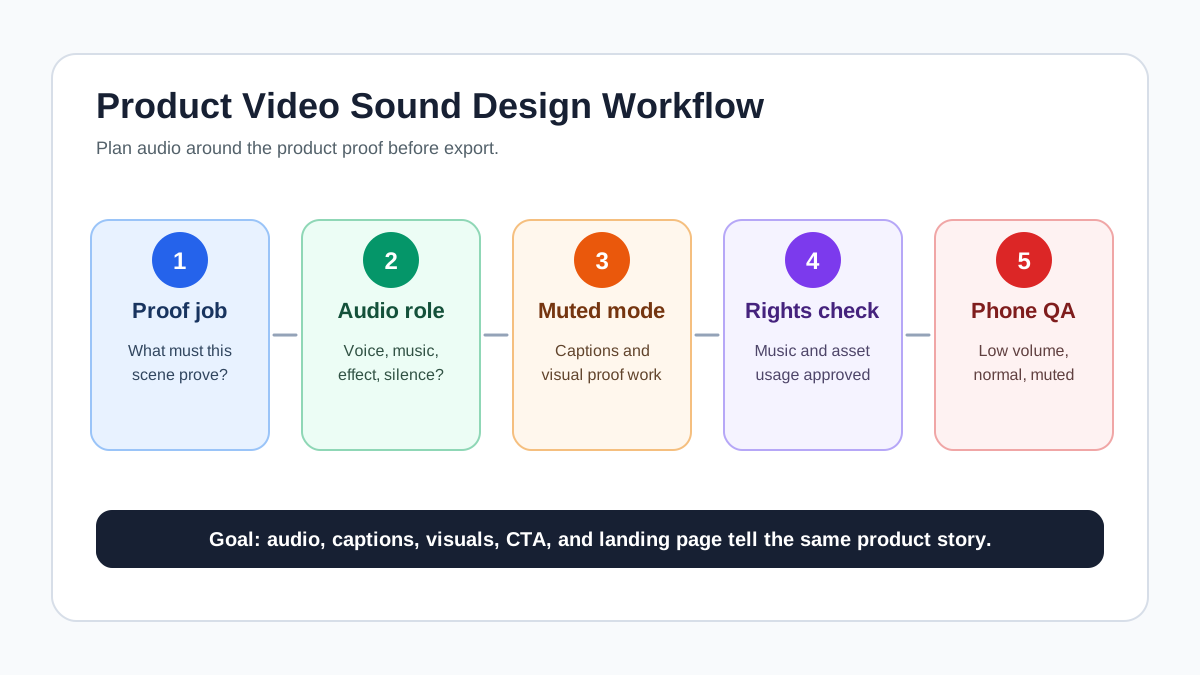
If you already have a script, use sound design as the layer that decides what the shopper should hear, read, and understand in each scene. For faster production, pair this workflow with ShopShot's AI video generator, then run final checks with the product video export settings guide.
Why Sound Design Matters For Product Ads
Sound is not just polish in a product ad. It can make a claim clearer, make a demo easier to follow, or make the video fail when the voiceover is muffled, the music hides the proof, or the audio says something the product page does not support.
TikTok's ad format policy explicitly expects ads to contain audio and says poor-quality audio, such as unclear or muffled sound, is not acceptable. The same policy also says ad captions, text, images, video, CTA, and landing page need to be consistent. That matters for ecommerce because audio is often where teams accidentally make a stronger claim than the product page can prove.
Google's YouTube creative guidance also treats audio as part of the message system. Its ABCDs framework recommends using audio and text to reinforce key points, pairing visual brand presence with audio mentions, and supporting CTAs with voiceover. The practical lesson is simple: audio should clarify the sale, not compete with the product.
For Meta placements, many viewers still encounter videos in sound-off environments, and official Meta help surfaces captions and sound recommendations across video ad guidance. Treat Meta as a dual-mode environment: the ad should work without sound, but the sound-on version should still feel intentional.
What Counts As Product Video Sound Design?
For ecommerce, sound design includes every audio decision that affects whether the shopper understands the product and trusts the ad.
| Layer | Job in the ad | Common ecommerce failure |
|---|---|---|
| Voiceover | Explain the buyer problem, product proof, offer, or CTA | Reads like a feature list with no visible proof |
| Music | Set pace and energy without hiding product details | Too loud, off-brand, or unlicensed |
| Sound effects | Make product motion, texture, or result easier to notice | Fake effect implies a result the product does not deliver |
| Native product sound | Show material, click, spray, motor, zipper, or texture | Background noise makes the product sound unclear |
| Captions | Carry spoken claims for muted or low-volume viewing | Captions do not match the voiceover or are too small |
| Silence | Give the shopper room to notice proof | Dead air feels like a broken edit |
The right question is not "What sound is trendy?" The better question is "What does the buyer need to understand in this scene, and should audio carry that job?"
Build The Sound Plan Before Editing
Sound design works best when it starts before the final edit. If the audio is added after the video is locked, the team often covers weak scenes with louder music or a rushed voiceover. That creates a polished but unclear ad.
Use this five-step workflow.
1. Name The Proof Job Of Each Scene
Every scene should have one proof job. Examples:
- Show the product size next to a hand.
- Demonstrate the before-and-after result.
- Explain why the material matters.
- Show the bundle or offer.
- Tell the shopper what to do next.
Before choosing music or voiceover, write the proof job in plain language. If a scene has no proof job, cut it or turn it into a transition.
For proof planning, use the product video proof points guide before you write the audio script.
2. Choose One Primary Audio Job
Each scene can have several audio layers, but only one should be primary.
| Scene type | Primary audio job | Secondary support |
|---|---|---|
| Product reveal | Short brand or product mention | Music bed, light motion sound |
| Problem scene | Voiceover or caption states the pain point | Low music tension |
| Demo scene | Native product sound or clear voiceover | Minimal music |
| Proof scene | Voiceover explains the proof source | Caption repeats the exact claim |
| Offer scene | Voiceover or caption states the offer | Music lift |
| CTA scene | Spoken CTA and onscreen CTA agree | Music resolves |
Do not make voiceover, captions, and overlays all repeat the same sentence. They should work together. A demo scene might use the voiceover to say "The angled edge reaches the corner," the caption to say "angled silicone edge," and the product sound to make the motion feel real.
3. Write For Sound-On And Sound-Off Viewing
Many product ads need to survive both modes. Sound-on viewers should hear a clean message. Sound-off viewers should still understand the product from visuals, captions, and overlays.
Use this rule: if muting the video makes the buyer lose the product claim, the claim needs a caption, overlay, or clearer visual proof. If turning the sound on makes the claim feel exaggerated, the voiceover needs rewriting.
For caption-specific checks, use the product video captions QA guide.
4. Check Music And Rights Before Export
Music can carry pace, but it can also create legal and platform risk. Do not pull a popular track into an ad unless the usage rights fit paid advertising, the target market, and the platform.
For AI-generated or licensed music decisions, use the music licensing for AI-generated video ads guide. Keep a simple asset log that records the music source, license type, usage limits, campaign name, and export date.
5. Review On A Phone Before Publishing
Desktop speakers can hide problems. Review the final ad on a phone at low volume, normal volume, and muted.
Listen for:
- The first two seconds are understandable.
- Voiceover is not buried under music.
- Product sounds are clear enough to feel real.
- Captions match the spoken claim.
- CTA audio and onscreen CTA say the same next step.
- No audio layer promises a different result than the landing page.
Sound Design Patterns For Ecommerce Ads
Different ecommerce ads need different audio patterns. Use the product, platform, and buyer stage to choose the right one.
| Pattern | Best for | Audio plan | Risk to avoid |
|---|---|---|---|
| Voiceover-led demo | Products that need explanation | Clear voiceover, light music, captions for claims | Voiceover describes proof the video never shows |
| Native sound demo | Physical products with satisfying motion | Product sound, minimal voiceover, short captions | Background noise or fake effects reduce trust |
| Music-led montage | Fashion, beauty, accessories, lifestyle bundles | Licensed music, quick captions, product labels | Music hides weak product differentiation |
| Founder or creator talk | Trust-building, new products, complex offers | Natural voice, light room tone, readable subtitles | Over-scripted delivery feels like an unsupported testimonial |
| Caption-only ad | Retargeting, simple offers, silent environments | No critical voiceover, strong overlays, subtle music | Tiny captions or too many words per frame |
| Localization version | Multi-market campaigns | Native voiceover or subtitles, market-specific CTA | Translation changes the product promise |
If the video uses a creator, affiliate, or AI presenter, keep disclosure and claim review in the storyboard. Sound can make an endorsement feel stronger, so it should not outrun the proof.
Voiceover QA: Make The Claim Match The Scene
A product video voiceover should not be a product-page paragraph read out loud. It should guide attention to what the shopper can see.
Use this simple structure:
- Stop the scroll with a specific buyer problem.
- Name the product or category early.
- Point to one visual proof moment.
- Explain the benefit without exaggerating.
- End with the same CTA shown on screen.
Example:
| Weak voiceover | Better ecommerce voiceover |
|---|---|
| "This premium organizer is perfect for every home." | "If your sink area gets crowded, this organizer keeps the sponge, brush, and soap in one dry tray." |
| "Our bag is made with amazing quality." | "The zipper opens flat, so you can see every cable before you pack." |
| "You will love these results." | "Here is the stain before one pass, and here is the fabric after rinsing." |
The better versions are not louder. They are more specific and easier to verify.
Music And Sound Effects: Use Them To Support Proof
Music should support pacing and mood, but it should not carry the product claim. Sound effects should make real product motion easier to notice, not invent a result.
Good use cases:
- A soft click when a magnetic lid closes.
- A light spray sound during a cleaner demo.
- A zipper sound when a travel pouch opens.
- A short musical lift when the offer appears.
- A quiet bed under a founder voiceover.
Risky use cases:
- A dramatic "sparkle" sound that implies a cleaning result not shown.
- Loud music that hides product instructions.
- Stock whooshes on every cut.
- A viral song used in a paid ad without ad usage rights.
- A sound effect that makes a plastic product seem like metal or glass.
Sound effects should pass the truth test: if the buyer asked "does the product really do that?", your ad should be able to point to the scene, not the audio trick.
Platform Audio Checklist
Use platform rules as guardrails, then make ecommerce-specific decisions.
| Platform or use case | Sound design priority | Ecommerce QA check |
|---|---|---|
| TikTok Shop and TikTok ads | Clear audio, native pace, product and landing-page consistency | Voiceover, caption, product, price, and CTA all match the listing |
| Meta feed, Reels, and Stories | Works muted and sound-on | Captions or overlays carry critical spoken claims |
| YouTube Shorts | Fast hook, product shown early, audio reinforces message | Brand or product is clear before the viewer can skip or scroll |
| Product detail page video | Clarity over trend | Audio does not distract from dimensions, materials, use, or setup |
| Retargeting ads | CTA and offer clarity | Spoken CTA matches the button and destination page |
| Localized versions | Native language and natural rhythm | Voiceover, subtitle, offer, currency, and landing page are aligned |
For market-specific versions, connect this article with the product video localization guide. For TikTok Shop product workflows, use ShopShot's TikTok Shop tool. For Meta creative planning, use ShopShot's Facebook ads tool.
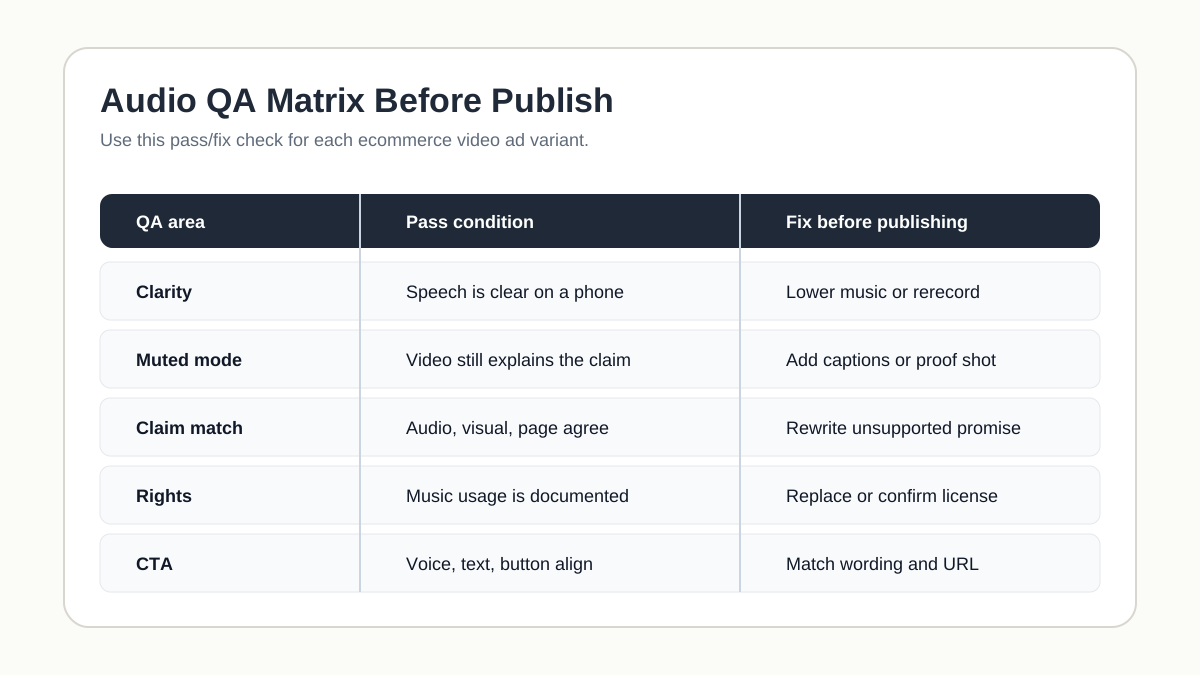
Audio Review Matrix
Run this matrix before upload. It is designed for ecommerce teams that batch multiple variants.
| QA area | Pass condition | Fix before publishing |
|---|---|---|
| Message clarity | The first two seconds explain the product or problem | Add a voiceover hook, caption, or clearer first shot |
| Audio quality | Speech is clear on a phone at low volume | Lower music, re-record voiceover, remove noise |
| Sound-off mode | The ad still makes sense muted | Add captions, overlays, or stronger visual proof |
| Claim match | Audio, captions, visual proof, and landing page agree | Rewrite unsupported claim or update landing page proof |
| Music rights | Paid usage rights are documented | Replace track or confirm license scope |
| Product truth | Effects do not fake material, speed, result, or quality | Use real product sound or remove the effect |
| Localization | Spoken language and subtitles are natural for the market | Native review before export |
| CTA | Spoken CTA, onscreen CTA, and button lead to the same next action | Align wording and destination |
Common Mistakes
Treating music as the hook
Music can create energy, but the product still needs a visual or spoken reason to stop scrolling. If the first two seconds only have a trending sound and a generic product shot, the ad may feel native but fail to communicate.
Letting voiceover outrun the proof
If the voiceover says "removes stains in seconds" but the video only shows a clean shirt, the audio has created a claim gap. Show the before shot, the action, and the result, or soften the wording.
Using captions as decoration
Captions are not just a design style. They carry meaning for muted viewing, accessibility, and review. Keep them readable, synced, and consistent with the voiceover.
Ignoring the landing page
Audio can introduce a product benefit, price, shipping promise, comparison, or guarantee. The destination page needs to support that same promise. TikTok's ad consistency rules are a useful reminder: the ad and landing page should not tell different stories.
Reusing one audio mix everywhere
A TikTok Shop cut, Meta feed cut, YouTube Shorts cut, and product-page video may share the same product proof, but they should not always share the same audio mix. Change pacing, caption density, music volume, and CTA timing for the placement.
How ShopShot Fits The Workflow
ShopShot is useful when a team needs many product-video variants but wants the message to stay controlled. Start with product images, PDP facts, a script, or a storyboard. Then create variants for different hooks, proof order, captions, voiceover notes, and CTAs.
A practical workflow:
- Build the product truth file from PDP facts, reviews, and approved claims.
- Write the script or storyboard for the core ad.
- Decide the audio job for each scene.
- Generate or edit controlled video variants in ShopShot.
- Add captions, voiceover, music, and sound effects only where they support proof.
- Review sound-on, sound-off, and landing-page consistency before export.
This keeps sound design connected to conversion, not just style.
FAQ
What is product video sound design?
Product video sound design is the process of planning voiceover, music, sound effects, silence, captions, and CTA audio so an ecommerce video ad clearly supports the product proof and buyer message.
Does every ecommerce product video need sound?
Not every viewer will hear the sound, but many platforms still expect a complete video experience. Build the ad so it works muted, then make the sound-on version clearer and more persuasive.
Should I use music or voiceover in product ads?
Use voiceover when the product needs explanation, proof, or a guided demo. Use music when the visuals already explain the product and the ad mainly needs pace, energy, or mood. Many ads use both, but one should lead.
How loud should music be under voiceover?
There is no single platform-safe number for every ad. The practical test is whether the voiceover remains clear on a phone at low volume. If a shopper misses the claim or CTA, the music is too loud or the voiceover needs rerecording.
Can AI-generated sound effects or voiceover be used in ads?
They can be useful, but review them like any other ad asset. The voice should be clear, the effects should not fake product performance, and the usage rights, disclosure needs, and platform requirements should be checked before publishing.
Sources Checked
- TikTok Advertising Policies: Ad Format and Functionality
- TikTok For Business: Ad creative policy best practices
- Google / YouTube for Business: ABCDs of effective video ads
- Meta Business Help and Ads Guide pages for captions and sound recommendations were checked, but several pages were login-blocked during verification, so this article uses only conservative Meta guidance.
Conclusion
Good product video sound design makes the buyer message easier to understand. It does not make unsupported claims louder. Plan the proof first, choose the audio job for each scene, keep captions aligned, verify music rights, and review the finished ad on a phone before publishing. When sound, captions, visuals, and landing page agree, the video is easier to trust and easier to scale.