
Quick Answer
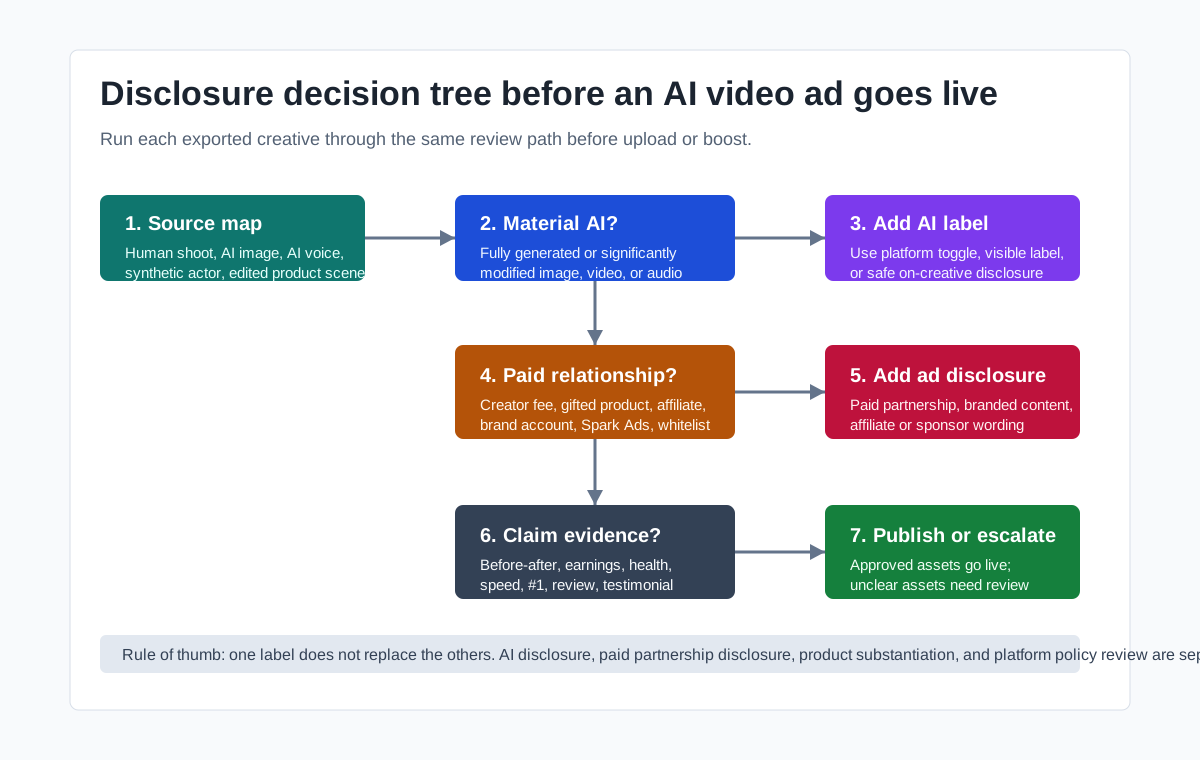
Use an AI video ad disclosure checklist whenever an ecommerce ad includes a realistic synthetic person, AI-generated voice, fully AI-generated media, or product footage that has been significantly changed by AI. The practical workflow is simple: map every scene by source, decide whether AI materially changed what shoppers see or hear, add the correct platform label, keep paid partnership disclosure separate, verify product claims against evidence, and store the review notes with the final asset.
AI disclosure is not the same as sponsored content disclosure. A TikTok Spark Ad from a paid creator may need a commercial content label even if the video is not AI-generated. A Google or TikTok ad made with generative AI may need an AI label even if no creator relationship exists. If the video shows an AI actor saying or demonstrating something that looks like a real testimonial, you also need a separate claim, consent, and endorsement review before publishing.
Why AI Video Ad Disclosure Now Belongs in the Creative Brief
Ecommerce teams used to treat disclosure as a final media-buying step. That is too late for AI video ads. A label decision depends on choices made during creative production: whether the person on screen is synthetic, whether a real creator's likeness or voice was cloned, whether a product demo was materially altered, whether the video makes a result claim, and whether the campaign will run on TikTok, Google, YouTube, Meta, Amazon, a product page, or an affiliate post.
The rules are also moving from broad guidance to product-level controls. Google added AI content label settings across advertising products in July 2026, with visible overlays in some geographies and a "How this ad was made" panel in My Ad Center. TikTok Ads Manager includes an AI-generated content disclaimer toggle for ads that contain completely AI-generated or significantly AI-modified image, video, or audio. New York's synthetic performer disclosure law took effect on June 9, 2026 and requires certain ads that include AI-generated synthetic performers to disclose that fact.
That does not mean every cropped product photo or color-corrected video needs a heavy legal review. It means ecommerce teams need a repeatable decision record. If you use ShopShot's AI video generator to turn product images, product-page notes, or scripts into video ad variants, build disclosure decisions into the same brief that covers hook, proof, offer, CTA, format, and landing page.
The Disclosure Triggers to Check First
Start by asking what the shopper is likely to understand from the ad, not which tool created it. A small AI crop can be low risk. A realistic AI presenter claiming to have used a skincare product is high risk. The difference is materiality, identity, and consumer understanding.
| Trigger | What to ask | Likely action |
|---|---|---|
| Synthetic performer | Does the ad show a human-like presenter who is not a real identifiable person? | Add AI or synthetic performer disclosure where required; review local law |
| AI-generated voice | Does the voice sound like a real person, creator, customer, or public figure? | Confirm consent, avoid fake endorsement, label if platform or law requires |
| AI-modified product demo | Did AI change the product result, before-after effect, body, skin, fit, size, or environment? | Substantiate claims, consider AI label, align landing page proof |
| Paid creator or affiliate | Was the person paid, gifted a sample, given commission, or otherwise connected to the brand? | Add paid partnership, branded content, affiliate, or sponsor disclosure |
| Platform AI control | Does Google, TikTok, Meta, YouTube, or another platform ask whether AI was used? | Use the platform control honestly and keep a record |
| Product claim | Does the ad promise speed, savings, health effects, beauty results, durability, ranking, or earnings? | Require evidence before launch; do not rely on disclosure to fix a weak claim |
The safest working rule is: if an ordinary shopper could reasonably think the scene is real human performance, real product use, or a real customer experience, and AI materially created or changed that impression, label and review it.
Platform Map for Ecommerce AI Video Ads
Google Ads and YouTube
Google's AI content label settings let advertisers mark assets as created or edited with AI. Google says ads marked this way can show details in the "How this ad was made" section of My Ad Center across Search, YouTube, and Discover. In some geographies, including the EU, India, and New York, visible labels can appear directly on ads. Google also notes that using the setting does not guarantee legal compliance, so ecommerce teams still need their own review process.
For product video ads, check these before upload:
- Was any image, video, or audio asset created or materially edited with generative AI?
- Does the campaign target places where visible AI labels may be required?
- Will asset enhancements crop a label that you placed directly in the creative?
- Did the ad change the product result, customer story, or human performance in a way that needs evidence?
If you add your own label, do not place it in the extreme corner where responsive rendering may crop it. If you upload a YouTube video from inside Google Ads, expect an AI-use question for YouTube's own disclosure workflow. Pair this review with format QA from the product video aspect ratio guide, because a label that is readable in a desktop preview can be lost in a Shorts or mobile crop.
TikTok Ads and Spark Ads
TikTok separates commercial content disclosure from AI-generated content disclosure. For commercial content, TikTok tells advertisers to turn on the Commercial Content Disclosure setting when posting content that promotes a brand, product, or service. For ads in TikTok Ads Manager, TikTok also offers disclaimer toggles, including an AI-generated content disclaimer for content that is completely AI-generated or significantly modified by AI.
This matters for ecommerce because the same video can have two separate disclosure needs:
| Scenario | AI disclosure? | Commercial disclosure? |
|---|---|---|
| Brand account posts an AI presenter product demo | Usually yes if materially AI-generated | Yes, because it promotes the brand's product |
| Paid creator posts a real unboxing with no AI edits | No AI label unless AI was materially used | Yes, paid partnership or branded content |
| Spark Ad boosts a creator video with AI voiceover | Review under TikTok organic disclosure and branded content rules | Yes, because it is sponsored or commercial |
| Minor color correction on a real product clip | Usually lower AI-disclosure risk | Yes if the post promotes a brand or product |
TikTok's advertising policy also warns against misleading claims, inconsistent ad and landing page information, fake interactive elements, and undisclosed AI-generated content. Do not use the AI disclaimer as a way to publish exaggerated before-after results, unrealistic product effects, or synthetic endorsements. For TikTok Shop campaigns, keep the ad, product listing, offer, and checkout details consistent with the creative. The TikTok Shop tool page can support production, but final policy review belongs with the brand.
Meta, Facebook, and Instagram
Meta's public Business Help pages can be login-gated in some browsers, so verify the current controls inside your own Ads Manager account before relying on a saved checklist. The accessible Meta materials and snippets reviewed for this article indicate that Meta uses AI info labels and detection signals for certain AI-created or AI-edited ads, with particularly explicit disclosure rules around social issues, elections, or politics. For ordinary ecommerce product ads, the operational takeaway is still clear: do not hide material AI editing, do not imply a real endorsement that did not happen, and review any platform prompt honestly.
For ecommerce teams, the highest-risk Meta creative patterns are:
- AI actor videos that look like founder, customer, or influencer testimonials.
- AI-translated or dubbed videos that make a creator appear to speak words they did not approve.
- Product demos where AI changes the result, appearance, size, fit, texture, or usage context.
- Retargeting ads that reuse creator content without clear usage rights or campaign scope.
If a video will run on Facebook or Instagram, keep a source note for each scene and verify whether the asset triggers AI info, branded content, partnership, or rights-management review. For broader Meta production checks, use the Facebook ads tool page and the product video retargeting ads guide.
Owned Channels, Product Pages, and Email
Owned channels can feel safer because there is no platform upload prompt. They are not risk-free. The FTC's Endorsement Guides and social disclosure resources focus on whether consumers can understand material relationships and whether endorsements reflect honest experience. If a product page or email uses AI-generated testimonials, synthetic customers, AI reviewers, or a fake founder-style narrator, disclosure alone may not solve the problem.
For owned channels, keep these rules:
- Do not create fake customer reviews, fake star ratings, or fake testimonials.
- Do not make an AI actor claim personal product experience.
- Do not use a real person's likeness, voice, or performance without rights and consent.
- Do not hide an affiliate, creator, or paid relationship below a collapsed caption.
- Do not make the product look materially different from what the buyer receives.
The safest owned-channel use cases are clearly illustrative: product explainer scenes, feature walkthroughs, size comparisons, packing steps, offer reminders, and stylized use-case examples. If you need a broader creative compliance pass, connect this checklist to the product video compliance checklist and the music licensing guide for AI-generated video ads.
A 12-Step AI Video Ad Disclosure Checklist
Use this as a preflight before the video is exported, uploaded, or sent to a creator, agency, or media buyer.
1. Create an asset source map
List every major scene, voice track, image, generated character, product shot, text overlay, music bed, and edit source. Mark each item as real footage, customer-supplied asset, stock asset, AI-generated, AI-edited, AI voice, creator content, or brand-owned content.
This turns review from memory into evidence. It also helps when a winning ad is duplicated two months later by someone who did not build the original creative.
2. Mark material AI changes
Separate minor production cleanup from material AI changes. Cropping, denoising, brightness correction, or resizing is usually a different risk level than generating a human presenter, changing a model's body, making a product appear to remove wrinkles, or creating a synthetic voice that sounds like a real creator.
When uncertain, use caution and label. TikTok's policy says that if you are uncertain whether content falls into its AI categories, it is best to label it.
3. Identify synthetic performers
A synthetic performer is not just a cartoon mascot. For ecommerce ads, it often means a realistic AI actor, presenter, model, unboxing host, product reviewer, or founder-style spokesperson who appears human but is not an identifiable real performer. If the campaign targets New York audiences or runs broadly in the United States, review the New York synthetic performer law with counsel or your compliance owner.
4. Check voice and likeness rights
AI voice can create endorsement risk quickly. A voice that resembles a real creator, celebrity, employee, founder, or customer needs consent and scope of use. A translated or dubbed version of creator content should not make the creator appear to say claims they did not approve.
Keep a record of voice source, permission, channel rights, term length, and whether the voice is synthetic, licensed, cloned, or human recorded.
5. Separate AI disclosure from paid disclosure
An AI label tells viewers something about how the media was created or edited. A paid partnership, branded content, affiliate, sponsor, or commercial content disclosure tells viewers about the relationship behind the promotion. A video can need both.
Do not assume that #ad explains AI use. Do not assume that an AI label explains payment, gifting, commission, or brand control.
6. Match platform controls before upload
Before submitting the ad, answer platform prompts accurately:
| Platform | Review field to check | Team note |
|---|---|---|
| Google Ads / YouTube | AI label status, asset library, YouTube upload disclosure prompt | Also review visible label regions and crop risk |
| TikTok Ads Manager | AI-generated content toggle, standard or clickable disclaimers, commercial content disclosure | Spark Ads and organic posts may follow different disclosure paths |
| Meta Ads Manager | AI info, branded content, rights, and policy prompts visible in account | Verify in-account because some help pages are login-gated |
| Owned site or email | On-creative label, caption disclosure, testimonial language | No platform prompt means the brand owns the review |
7. Put disclosure where shoppers will see it
A disclosure is weak if it is hidden after a more click, cropped off mobile, buried in the last frame, or unreadable over the video. Use plain wording close to the claim or content it explains. For short videos, consider pairing a platform label with on-screen text when the AI element is central to the ad.
8. Review product claims separately
Disclosure does not make an unsupported claim acceptable. If the video says a product works in 10 seconds, removes a skin condition, saves 50 percent, doubles revenue, is number one, or produces a before-after result, you need evidence for that claim. AI can make these scenes look more convincing, which raises the review standard rather than lowering it.
Use the video ad storyboard template to tag each claim before production, not after export.
9. Check landing page consistency
Platforms often reject or restrict ads when the ad and landing page conflict. Make sure the product name, price, discount, shipping claim, return policy, subscription terms, bundle contents, and result claims match the destination page. If a synthetic presenter says "today only" but the product page has no matching offer, fix the page or remove the line.
10. Keep proof for reviews and testimonials
The FTC's endorsement guidance says endorsements should reflect honest opinions and cannot be used to make claims the marketer could not legally make. For ecommerce teams, that means a real testimonial needs a real customer or creator basis, and a synthetic presenter should not be framed as a real user experience.
If you want the speed of AI production without testimonial risk, use a product explainer, side-by-side feature walkthrough, problem-solution script, or founder-style brand narration that does not pretend to be a customer review.
11. Store the final review record
Store the final video file, thumbnail, script, disclosure wording, platform toggles, source map, approval owner, and date. This matters when a campaign is duplicated, translated, localized, whitelisted, or turned into a retargeting ad.
12. Recheck before reuse
AI disclosure rules and platform controls are changing. Reuse is where old assets become risky. Before reviving a winning video, check whether the original label still appears, whether metadata survived export, whether the ad now targets a regulated geography, and whether new platform controls have been introduced since the first launch.
Common Ecommerce Scenarios
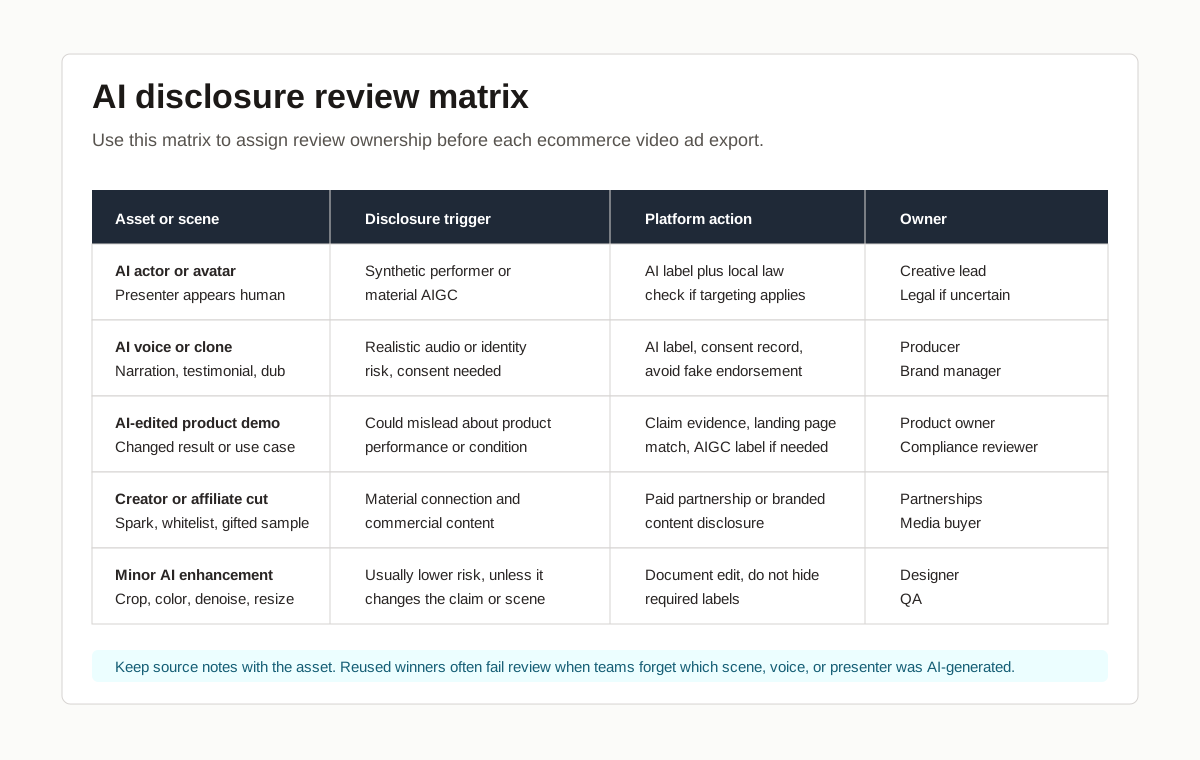
AI actor explaining a supplement, skincare, or wellness product
This is high risk. The ad may involve synthetic performer disclosure, platform AI labeling, health or beauty claim substantiation, and testimonial review. Avoid claims that imply personal product experience. Use clear educational or feature-based language instead.
AI model wearing apparel or beauty products
Check whether the AI scene changes fit, texture, color, body shape, skin result, or product appearance. If the model is synthetic, disclosure may be needed. If the product's real result differs from the generated scene, the issue is not just disclosure; it is misleading creative.
AI voiceover on real product footage
This is often lower risk than a full synthetic testimonial, but still needs review. If the voice is generic and does not impersonate anyone, record it as AI voice and follow platform prompts. If the voice resembles a real person or creator, check consent.
Creator Spark Ad with AI-generated captions and edits
The creator relationship still needs commercial disclosure. The AI edits may also need disclosure if they materially modify the video, voice, or image. Keep the creator approval record for captions, translation, claims, and usage scope.
Product-page video made from images
A product-page explainer can be a good use of AI video if it stays accurate. Show the product clearly, avoid fake reviews, avoid impossible before-after scenes, and include disclosure when the media could reasonably be mistaken for real footage or a real human performance.
Disclosure Wording Examples
These are operational examples, not legal templates. Adapt them to platform controls, geography, brand policy, and counsel review.
| Use case | Clearer wording | Avoid |
|---|---|---|
| Synthetic presenter | "AI-generated presenter." | "Virtual magic" |
| AI product explainer | "Video includes AI-generated scenes." | Hidden footer-only note |
| Paid creator post | "Paid partnership with Brand." | Only tagging the brand |
| Affiliate review | "I may earn a commission from this link." | "Thanks to Brand" |
| AI voiceover | "Narration generated with AI." | No note when the voice sounds human |
| Synthetic before-after | Avoid unless substantiated and reviewed | "Results may vary" as the only safeguard |
Plain language usually beats clever language. The goal is not to apologize for using AI. The goal is to help shoppers understand what they are seeing before they rely on the ad.
How ShopShot Teams Can Build Disclosure Into Production
ShopShot is useful when your team needs many ecommerce video variants: different hooks, product angles, creator-style scripts, thumbnails, captions, offers, and platform formats. That same scale makes review discipline more important. A single unsafe prompt can produce dozens of assets that repeat the same disclosure or claim problem.
Use this handoff for every AI-assisted product video batch:
| Production stage | Disclosure task | Output |
|---|---|---|
| Brief | Mark whether the video uses AI actor, AI voice, product demo, creator content, or real footage | Source map |
| Script | Flag testimonial, result, health, savings, ranking, or urgency claims | Claim review notes |
| Generation | Keep prompt, asset source, model type, and voice source | Asset provenance |
| Edit | Add readable disclosure where needed and protect it from crop | Export QA |
| Upload | Use platform AI and commercial disclosure controls | Platform review record |
| Reuse | Recheck rules, geography, and label visibility | Reuse approval |
If the asset includes an AI actor or influencer-style character, also read the AI actors for product videos and AI influencer generator for ecommerce product ads guides before scaling the concept.
FAQ
Do ecommerce AI video ads always need a disclosure?
No. Minor edits such as cropping, resizing, color correction, or noise reduction are usually different from fully AI-generated or significantly AI-modified image, video, or audio. But if AI materially changes what the shopper sees or hears, especially a human-like presenter, voice, product result, or testimonial, treat disclosure as required until your platform and legal review say otherwise.
Is an AI label enough for a paid creator ad?
No. AI disclosure and commercial relationship disclosure answer different questions. If a creator was paid, gifted a product, given commission, whitelisted, or otherwise connected to the brand, the audience still needs to understand that relationship. The AI label does not replace a paid partnership or branded content label.
Can an AI actor give a customer testimonial?
Avoid framing a synthetic person as a real customer unless your legal review has explicitly approved the wording and context. A safer pattern is to use the AI actor as a presenter for product features, use cases, or instructions, while reserving testimonials for real customers or real creators with proper permissions and evidence.
Should the disclosure be in the caption or inside the video?
Use the platform's required control first. If the AI element is central to the message, add visible on-creative disclosure as well, placed where it will not be cropped by mobile formats. Do not hide important disclosure only after a more click or in a low-contrast final frame.
What should we store after approval?
Store the final file, source map, prompt notes, creator or voice permissions, disclosure wording, screenshot or record of platform toggles, landing page checked, approval owner, and date. This record helps when the ad is duplicated, localized, or reused in a new channel.
Sources Checked
- Google Ads Help: Use AI content label settings and disclosures
- Google Ads Blog: Expanding AI transparency in ads
- TikTok Ads Manager: About ad disclaimers
- TikTok Ads Manager: Add disclaimers to ads
- TikTok Advertising Policies: Misleading and false content
- TikTok Commercial Content Disclosure for advertisers
- FTC: Disclosures 101 for Social Media Influencers
- FTC: Endorsement Guides, what people are asking
- New York State: synthetic performer disclosure law announcement
- New York State Senate Bill S8420A