
Quick Answer
A dropshipping product video checklist should prove the product honestly before it tries to sell. Start with supplier assets, but do not publish a video until you have checked product truth, shipping context, claim evidence, visual proof, platform crop, captions, landing-page consistency, and ad policy risk. For most dropshipping stores, the safest first video is a 15-30 second product demonstration that shows what the item is, who it helps, what is included, what problem it solves, and what the buyer should verify before ordering.
If you need a fast production path, use the ShopShot dropshipping video generator to turn supplier URLs or product images into draft videos, then run the checklist below before using the video on a Shopify product page, TikTok Shop listing, Meta ad, Pinterest ad, or email campaign.
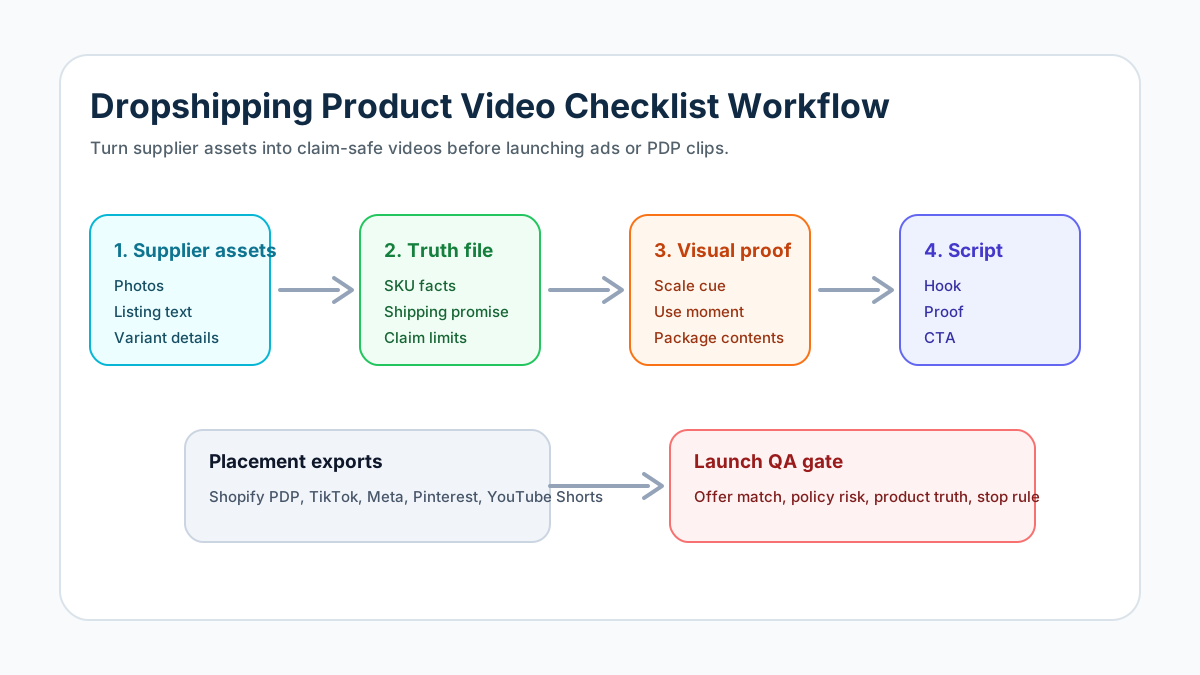
Why Dropshipping Videos Need a Different Checklist
Dropshipping videos are riskier than ordinary ecommerce product videos because the seller often starts with supplier photos, listing text, and incomplete product knowledge. That does not mean the video has to be weak. It means the video needs a stronger truth filter.
The common failure pattern is simple: a seller imports supplier images, adds aggressive captions, invents a result, and runs the same clip across every channel. The video may look polished, but it creates three problems. The first is buyer distrust when the delivered product does not match the creative. The second is ad rejection when the creative makes unsupported claims. The third is wasted testing data because the store never learns whether the product, offer, or video angle failed.
A better workflow treats the dropshipping product video as a controlled product proof asset. You can still move quickly, but each video needs a short evidence file, a visible product moment, a claim boundary, and a placement-specific export.
Dropshipping Product Video Checklist
Use this table before creating or publishing a dropshipping product video.
| Check | What to verify | Pass standard |
|---|---|---|
| Product truth | Product name, variant, size, material, quantity, contents, compatibility, color, and use case | The video matches the exact SKU and does not imply a premium version if the buyer gets a basic version |
| Supplier asset quality | Photos, clips, mockups, package images, and reviews from the supplier listing | Assets are clear enough to show the product without fake lifestyle scenes or misleading scale |
| Shipping context | Shipping time, origin, return policy, duties, warranty, and delivery promise | The video does not imply instant local delivery unless the store can fulfill it |
| Claim evidence | Performance, durability, skin, health, fitness, money, safety, or "before and after" claims | Every claim is backed by product facts, testing, or customer evidence you can defend |
| Visual proof | Product close-up, use moment, problem scene, result context, and included accessories | The buyer can understand what they will receive without relying on exaggerated text |
| Script fit | Hook, product moment, benefit, proof, objection, and CTA | Script is specific to the product and avoids fake review language |
| Platform crop | 9:16, 1:1, 4:5, or 16:9 as needed | Text, product, and CTA stay clear of interface overlays and safe zones |
| Landing-page consistency | Video offer, price, variant, bundle, guarantee, and shipping message | The ad and product page say the same thing |
| Compliance QA | FTC review rules, ad platform policies, and Google Merchant misrepresentation risk | No fake testimonial, hidden material condition, unrealistic outcome, or deceptive product representation |
| Testing plan | Hook variant, proof variant, offer variant, and stop rule | The video is part of a clean test, not a random creative dump |
Step 1: Build a Product Truth File
Before writing captions or generating a video, create a short product truth file. This is a one-page source of facts for the article, ad, product page, and video script.
Include:
- Product title and exact variant.
- Supplier URL and backup supplier URL.
- What is included in the package.
- Product dimensions, materials, capacity, color, and compatibility.
- Shipping promise you can actually meet.
- Return and refund policy.
- Claims you can prove.
- Claims you will not make.
- Customer objections from reviews, comments, or competitor ads.
- Visual assets you are allowed to use.
This step is especially important if you use AI. AI can make a dropshipping video look more finished than the store's evidence deserves. The truth file keeps the video grounded. When you use the product video ad script template, paste this truth file before asking for hooks, scenes, or voiceover.
Step 2: Choose the Right Video Type
Not every dropshipping product needs the same video. A cheap impulse product needs fast visual proof. A higher-ticket product needs risk reduction. A complicated product needs setup clarity.
| Product situation | Best first video | Why it works | Avoid |
|---|---|---|---|
| Simple impulse item | 15-second problem-solution demo | Shows the problem and product result quickly | Overproduced story scenes with no product close-up |
| Gadget or tool | Step-by-step use demo | Reduces confusion and shows what the buyer receives | Vague "life-changing" claims |
| Beauty or wellness item | Ingredient, routine, or texture video | Keeps the focus on product facts and use context | Unrealistic before/after or medical-style promises |
| Fashion accessory | Fit, scale, material, and styling clip | Helps buyers judge size and appearance | Fake luxury positioning or misleading brand comparison |
| Home or organization product | Room-use demo and size proof | Shows placement, capacity, and use case | Showing a larger room, set, or bundle than buyers receive |
| Print-on-demand product | Mockup-to-lifestyle proof | Shows design, placement, and variant options | Mockups that hide print quality or fabric limits |
If the product is still unproven, start with one product proof video and two hook variants. Do not build a full creative library until the product page, price, and offer have passed basic traffic tests.
Step 3: Turn Supplier Assets Into a Visual Evidence Plan
Supplier assets are usually incomplete. They may show the product from attractive angles but miss scale, package contents, setup steps, or real-world use. The job of a dropshipping video is to fill those gaps.
Use this visual plan:
- Show the product in the first two seconds.
- Add one scale cue: hand, desk, phone, shelf, model, or package.
- Show the product solving one visible problem.
- Show what is included, especially if the listing has bundles or variants.
- Add one buyer objection scene: size, setup, compatibility, material, cleaning, charging, or storage.
- End with the exact offer and CTA that appears on the product page.
If the supplier listing does not provide enough assets, do not fake product proof. Use a more conservative video: product photo, clear feature labels, honest "check size before ordering" note, and a softer CTA.
Step 4: Write a Claim-Safe Script
Dropshipping scripts often fail because they borrow the language of fake reviews: "I can't believe this changed my life," "doctors hate this," "everyone needs this," or "this fixed my problem overnight." Those lines may produce clicks, but they increase rejection and refund risk.
Use this safer structure instead:
| Script block | Safer prompt | Example |
|---|---|---|
| Hook | Name the situation, not a fake personal claim | "Small desk, too many cables?" |
| Product moment | Show the product doing one job | "This clip-on tray keeps the charger, cable, and earbuds in one spot." |
| Proof | Use observable proof | "The raised edge helps stop small items from sliding off." |
| Objection | Address one buying concern | "Check the clamp width before ordering." |
| Offer | Match the product page | "Choose the color and size on the product page." |
| CTA | Give a clear next action | "See the current bundle and shipping estimate." |
This structure also works for AI-generated scenes. The script tells the model what to show, not just what to say. For a more detailed scene map, pair this checklist with the product video storyboard template.
Step 5: Export by Placement
A dropshipping video can be one idea, but it should not be one file for every channel. The same creative needs different crops, captions, and CTAs depending on where it appears.
| Placement | Recommended cut | Main QA point | Useful internal guide |
|---|---|---|---|
| Shopify product page | 15-45 second product proof clip | Does the video reduce uncertainty about the exact product? | Shopify product video checklist |
| TikTok Shop or TikTok ad | 9:16 native-feeling demo | Is the product visible quickly and within safe zones? | TikTok Shop product video checklist |
| Meta feed or Reels ad | 9:16, 4:5, or square variant | Does the claim avoid personal attributes and exaggerated outcomes? | Meta video ad specs for ecommerce |
| Pinterest ad | Vertical product discovery cut | Does the creative match high-intent shopping behavior? | Pinterest video ads checklist |
| YouTube Shorts | 9:16 short-form proof clip | Does the opening explain the product without relying on sound? | YouTube Shorts specs for ecommerce |
When in doubt, create the Shopify product page video first. It becomes the factual anchor for paid ads. If the product page cannot support the claim, the ad should not make the claim either.
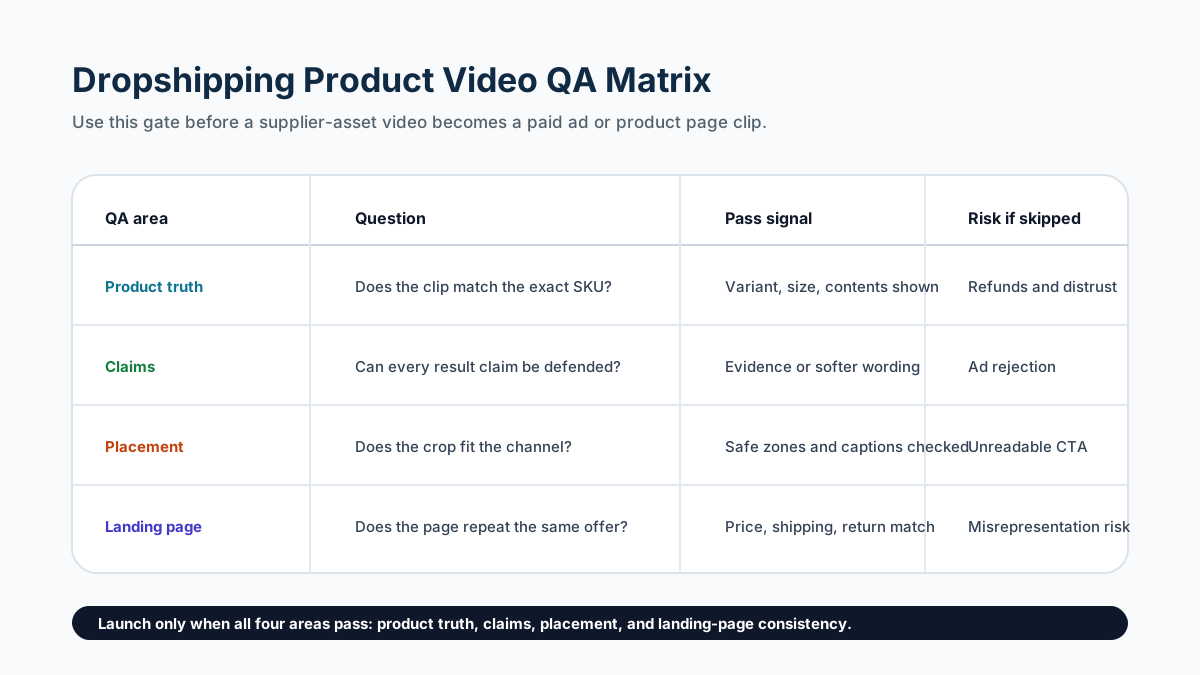
Step 6: Run the Policy and Trust Gate
The final gate is not only "does the video look good?" It is "would a buyer, ad reviewer, payment provider, or marketplace policy reviewer believe this is an honest representation of the offer?"
Check these points:
- Do not create fake customer reviews, fake creator experiences, fake celebrity endorsement, or AI-generated testimonials that pretend to be real people.
- Do not show a premium product, bundle, package, logo, or accessory if the buyer receives something else.
- Do not imply local shipping, guaranteed delivery dates, or easy returns unless the store operations support the promise.
- Do not make health, fitness, finance, safety, or durability claims without substantiation.
- Do not use "before and after" framing for sensitive categories unless the platform policy and evidence support it.
- Do not hide material conditions such as batteries not included, compatible models, assembly needs, subscription terms, or customs duties.
- Do not send ad traffic to a product page with inconsistent price, variant, shipping, or return messaging.
For Google Shopping or Merchant Center traffic, this matters even more. Google's misrepresentation policy expects promoted offers to be upfront and honest. A dropshipping store can look risky if the video, product page, checkout, policies, and business details do not match.
Step 7: Create a Small Testing Plan
Do not test ten unrelated dropshipping videos at once. Test one product with controlled variables.
Use this five-video starter plan:
| Variant | What changes | What stays fixed | Decision rule |
|---|---|---|---|
| A: Product proof | Straight demo hook | Product, offer, CTA, landing page | Baseline for conversion quality |
| B: Problem hook | First two seconds name the pain point | Product proof and CTA | Keep if thumb-stop improves without lowering conversion |
| C: Objection hook | Opens with size, setup, or compatibility question | Same offer and product page | Keep if comments ask fewer basic questions |
| D: Social proof style | Uses real review themes without fake testimonial | Same product facts | Keep only if the proof is authentic and compliant |
| E: Offer angle | Leads with bundle, discount, or free shipping | Same product proof | Keep if revenue per visitor improves |
Only scale a video if it passes both performance and trust checks. A high click-through rate with refund-heavy buyers is not a winning dropshipping creative.
Common Mistakes
The first mistake is using supplier video as-is. Supplier clips may not match your offer, store language, shipping promise, or target channel. Treat them as raw material, not finished ads.
The second mistake is writing a video before checking the product page. The product page must be able to support every promise in the video. If the page lacks dimensions, variant details, shipping estimates, or return policy clarity, fix the page first.
The third mistake is testing only hooks. Hooks matter, but dropshipping conversion often fails because of product uncertainty. Test proof scenes, package clarity, scale cues, and objection handling too.
The fourth mistake is using fake UGC. If the person in the video did not use the product, do not write the ad as if they did. Use presenter language, product demonstration language, or fictional concept language instead.
FAQ
What is a dropshipping product video?
A dropshipping product video is a product page or ad video made for a product the seller does not stock directly. It often starts from supplier photos, product URLs, mockups, or limited clips, so it needs extra checks for product accuracy, claims, shipping context, and landing-page consistency.
Can I use supplier videos in my dropshipping ads?
You can use supplier videos only if you have the right to use them and the footage accurately represents the exact product, variant, package, and offer you sell. Even then, edit the video for your store's claims, captions, crop, and CTA before publishing.
How long should a dropshipping product video be?
For ads, start with 15-30 seconds. For a Shopify product page, 15-45 seconds is usually enough unless the product needs setup, assembly, sizing, or compatibility explanation. The video should answer one buying question, not explain the entire store.
Should a dropshipping video show a person using the product?
Use a person when it helps prove scale, fit, setup, or real use. Do not use a person to imply a fake personal result, fake review, or unsupported transformation. A clear product demo is safer than a fake testimonial.
What should I check before launching a dropshipping video ad?
Check product truth, supplier asset rights, claim evidence, visible product proof, platform crop, captions, offer consistency, shipping promise, return policy, and ad policy risk. Then test a small number of controlled variants instead of publishing many unrelated videos.
Sources Checked
- Shopify dropshipping guide
- Shopify product media help
- FTC endorsements, influencers, and reviews guidance
- Google Merchant Center misrepresentation policy
- Meta Advertising Standards
- TikTok creative best practices for performance ads
- ShopShot live pages checked:
/tools/dropshipping,/tools/shopify,/tools/tiktok-shop,/blog/shopify-product-video-checklist,/blog/product-video-storyboard-template-ecommerce, and/blog/product-video-ad-script-template.