
Quick Answer
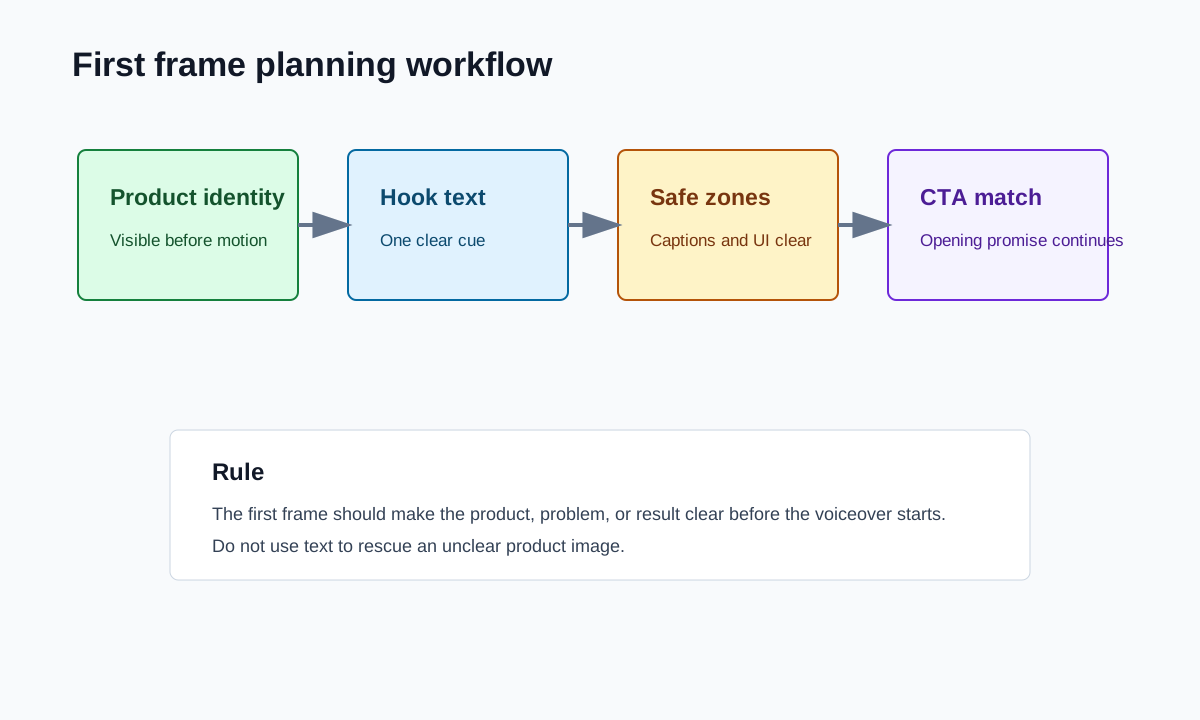
A product video first frame should make the product, buyer problem, or desired result clear before the viewer waits for narration. For ecommerce ads, the safest first frame usually includes the product in context, one short hook or proof cue, enough clean space for captions, and no visual promise that the landing page cannot support.
Use this guide when a product video looks polished but the opening still feels weak. The first frame is not only a thumbnail task. It is the first quality gate for every short product ad, especially on mobile feeds where the viewer may decide before the full motion begins.
Why the First Frame Matters in Ecommerce Ads
The first frame has to compete before the script has time to explain. If the opening is a logo, vague lifestyle shot, empty title card, or abstract AI scene, the shopper may not know what is being sold.
Current platform guidance supports this practical standard. Google and YouTube's ABCDs framework starts with attention. TikTok creative guidance emphasizes context, movement, text overlays, and clear CTAs. Meta recommends showing the brand or product early. Amazon video ad guidance keeps the product and shopper benefit central.
For ShopShot users, the first frame can be planned from a product image, product page, or generated scene. The key is to make it specific enough that a shopper can say, "I know what this is and why I might keep watching."
If you need the broader preview asset workflow, also use the product video thumbnail template and product video editing checklist.
The First Frame Decision Table
| First-frame angle | Best for | What the frame must show | Avoid |
|---|---|---|---|
| Product in use | Most ecommerce ads | Product, hand/body/context, visible action | Product too small or hidden by text. |
| Problem visible | Pain-point hooks | Messy, slow, broken, hard, or inconvenient moment | Overstating the problem. |
| Result visible | Beauty, home, food, apparel, organization | Finished state and product connection | Results the product page cannot prove. |
| Feature close-up | Materials, texture, mechanism, quality | Product detail with scale or label | Macro shot with no product identity. |
| Comparison frame | Before-after or old-new | Honest contrast and same conditions | Misleading transformation. |
| Offer frame | Retargeting and promo ads | Product, bundle, price or CTA space | Crowded coupon text. |
Choose one angle. A first frame that tries to show product, logo, discount, review, claim, CTA, guarantee, and shipping usually becomes unreadable.
Step 1: Put Product Identity Before Decoration
The first frame should answer at least one of these questions:
- What product category is this?
- What problem is it solving?
- What result can the viewer expect to see?
- What product detail should the viewer notice?
- Why is this relevant to the landing page?
If the answer is only "it looks nice," the opening is not ready.
Strong first-frame examples:
- A travel mug upside down over a bag, lid visible.
- A cable organizer beside a messy drawer.
- A skincare bottle in hand with texture on the finger.
- A chair cushion on the seat, not floating on a blank background.
- A ShopShot workflow screen showing product image input and generated video output.
Weak first-frame examples:
- Brand logo on a solid color screen.
- A creator face before the product appears.
- Generic city or lifestyle b-roll.
- A text-only hook with no product context.
- A generated scene that changes the product shape or packaging.
The best first frame does not need to explain everything. It only needs to make the next second feel worth watching.
Step 2: Match Hook Text to the Visual
Hook text should describe the frame, not fight it. If the frame shows a compact product, the text can name the space-saving benefit. If the frame shows a problem, the text can name the pain. If the frame shows a result, the text can name the outcome.
| Frame shows | Strong hook text | Weak hook text |
|---|---|---|
| Product packed in a small bag | "Fits your work bag" | "You need this now" |
| Messy drawer before organizer | "Cable drawer chaos?" | "Amazing organizer" |
| Before-after cleaning result | "One pass on the spill" | "Best cleaning tool" |
| Product texture close-up | "Soft grip, no slip" | "Premium quality" |
| ShopShot input and output | "Product image to ad variant" | "AI video generator" |
This is also a pSEO boundary. A support article or ad should not turn the first frame into a generic generator/tool pitch when the search intent is production QA. Keep the frame tied to the product-video task.
Step 3: Reserve Safe Space for Captions and UI
A strong first frame can fail after upload because the product sits under UI controls, captions cover the proof, or the crop removes the object. Plan safe space before export.
| Placement | First-frame planning note | Practical fix |
|---|---|---|
| TikTok, Reels, Shorts | Keep core product action away from lower UI areas. | Center product and keep text short. |
| Meta feed | Feed crops and placements can vary. | Prepare square or 4:5 crops from the same idea. |
| YouTube Shorts | Vertical opening should be readable quickly. | Use one product cue and one caption cue. |
| Amazon video ads | Product and shopper benefit should be clear. | Avoid crowded lifestyle-only opening. |
| Product detail page | Shoppers may pause or scrub. | Use a clean product-specific frame. |
For deeper crop review, use the product video aspect ratio guide and product video captions guide for caption placement.
Step 4: Test First Frames Without Changing the Whole Ad
First-frame testing works best when the rest of the ad stays stable. Otherwise, you cannot tell whether the opening frame, script, offer, or CTA caused the difference.
Use three controlled variants:
| Variant | First frame | Keep constant |
|---|---|---|
| A | Product in use | Voiceover, proof shot, CTA, landing page. |
| B | Buyer problem | Voiceover, proof shot, CTA, landing page. |
| C | Result or detail | Voiceover, proof shot, CTA, landing page. |
Judge the variants with the right metric. A curiosity-heavy frame may improve clicks while hurting purchase quality. A proof-heavy frame may get fewer clicks but stronger landing-page match. Watch hold rate, CTR, conversion quality, and comments together.
For a larger testing workflow, use how many UGC video ads to test and the video ad creative fatigue guide.
Step 5: Run the First Frame QA Matrix
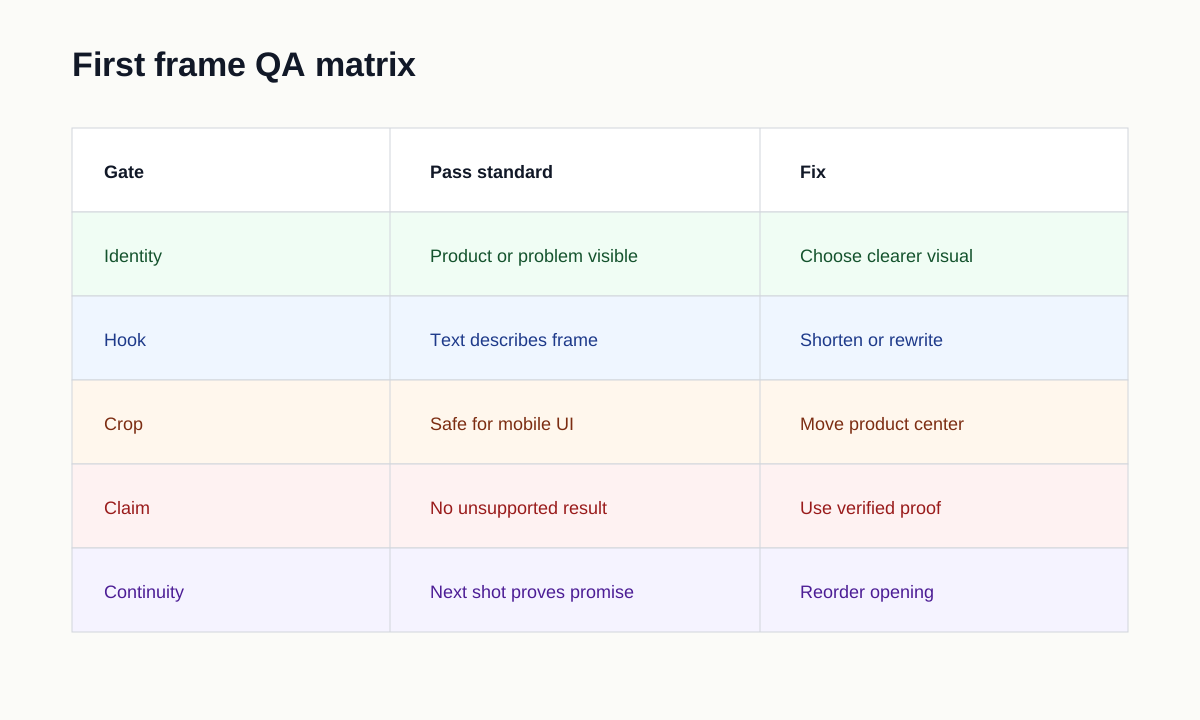
Before launch, pause the video on the first frame and review it like a standalone ad asset.
- Product category is visible or strongly implied.
- Product, problem, or result appears before decoration.
- Hook text is short and readable on a phone.
- Product is not hidden by captions, UI zones, stickers, or CTA buttons.
- Frame matches the product page variant, color, package, and offer.
- Claim does not imply a fake endorsement or unrealistic result.
- Brand appears naturally when useful, without delaying the product.
- Frame can survive the intended crop.
- The next shot continues the same promise.
- The CTA at the end matches the opening angle.
If a first frame fails product identity, proof, and crop at the same time, do not patch it with more text. Choose a clearer visual.
Example: First Frame Plans by Product Type
| Product type | First frame | Hook text | Next shot |
|---|---|---|---|
| Kitchen tool | Product solving the visible prep problem | "Prep without the mess" | Close-up of the mechanism. |
| Apparel | Fit on body with movement | "See the stretch" | Fabric texture or size detail. |
| Beauty product | Product and texture in hand | "Texture before makeup" | Application step with careful claim wording. |
| Organizer | Messy drawer beside product | "Drawer chaos?" | Before-after organization shot. |
| Digital product workflow | Product image input and generated video output | "One image, new ad angle" | ShopShot output preview and CTA. |
These frames work because they connect the visual, hook, proof, and landing-page expectation.
FAQ
What should the first frame of a product video show?
Show the product, buyer problem, or result in a way that is understandable before the viewer hears the voiceover. Avoid logo-only and generic lifestyle openings.
Is the first frame the same as a thumbnail?
Sometimes, but not always. A thumbnail is a selected preview image when the placement supports it. The first frame matters wherever the video autoplays, loads, or is previewed from the actual opening.
Should I put text in the first frame?
Use short hook text only when it clarifies the visual. If the text is doing all the work, the frame probably needs a stronger product or problem image.
How many first-frame variants should I test?
Start with three controlled variants: product in use, problem visible, and result or feature detail. Keep the rest of the ad consistent so the test is readable.
Can ShopShot generate first-frame variants?
Yes. Use product images and product-page inputs to create controlled first-frame ideas, then review each output for product accuracy, crop, caption space, and claim safety.