
Quick Answer
Product video pacing is the timing of buyer information, not just how fast the edit feels. A strong ecommerce ad usually shows the product or result in the first 1-3 seconds, explains one mechanism or proof point in the middle, and ends with a clear CTA while the product is still visible. Use faster pacing for cold TikTok, Reels, and Shorts tests; use slower pacing for retargeting, Amazon, product detail pages, and products that need inspection.
If you already know the target length, use this guide with the product video length guide. Length decides the container. Pacing decides what every second is allowed to do.
Why Pacing Fails Even When the Video Length Is Right
Many ecommerce teams make 15-second or 30-second videos and assume the timing problem is solved. It is not. A 15-second ad can still feel slow if the first three seconds are a logo animation, a vague lifestyle shot, or a creator saying "I just found this." A 30-second explainer can feel useful if the product appears immediately and each scene answers a buyer question.
Pacing fails when the edit follows production order instead of buyer order. The team shows packaging, then unboxing, then setup, then the product benefit, because that is how the footage was captured. The shopper needs a different order: problem, result, product, proof, objection, offer, next step.
The job is not to make every product video fast. The job is to remove dead seconds. A dead second is any second where the buyer cannot identify the product, understand the value, see proof, or move closer to a decision.
Use a Buyer-Job Timeline
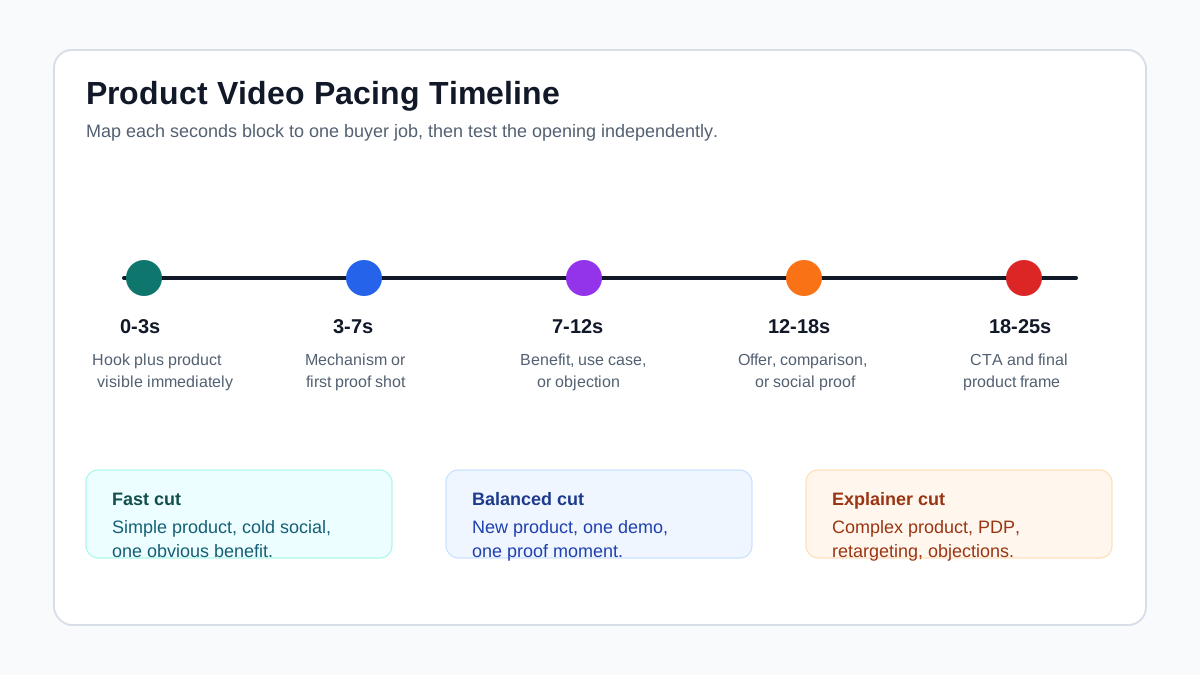
Start by assigning one job to each seconds block. For most short ecommerce ads, this structure is practical:
| Seconds | Buyer job | What to show | What to avoid |
|---|---|---|---|
| 0-3 | Stop and identify | Product in use, visible outcome, pain point, or surprising result | Logo-only intros, abstract lifestyle, empty packaging |
| 3-7 | Explain the mechanism | One clear demo step, before-after moment, or product feature in context | Listing features without showing them |
| 7-12 | Prove the claim | Review snippet, close-up proof, comparison, material detail, or measurement | Unsupported performance claims |
| 12-18 | Remove friction | Sizing, compatibility, cleaning, setup, warranty, shipping, bundle, or use case | Repeating the same benefit |
| 18-25 | Direct action | Offer, CTA, final product frame, landing-page match | Ending on a face or background without the product |
This is a starting map, not a rule for every ad. A simple beauty tool might need 10 seconds. A technical home product might need 25 seconds. A product detail page video might need 45 seconds. The pacing rule stays the same: every scene must earn its place.
Match Pacing to Searcher Temperature
Cold social viewers do not owe you attention. They are scrolling through TikTok, Instagram Reels, Shorts, or Facebook Reels with no plan to inspect your product. The pacing must make the product easy to understand before they leave.
Retargeting viewers are different. They may have seen the product page, added to cart, watched a previous video, or clicked an ad before. They can handle a slower second half if the video answers the objection that stopped them.
| Audience stage | Pacing style | Best opening | Middle section | CTA |
|---|---|---|---|---|
| Cold prospect | Fast and explicit | Product result, problem, or use-case contrast | One demo plus one proof point | Short CTA before final frame |
| Warm visitor | Balanced | Product reminder or buyer objection | Proof, offer, comparison, or guarantee context | Offer-led CTA |
| Cart abandoner | Direct | Product plus reason to finish purchase | Price, bundle, shipping, reviews, urgency if true | Clear return-to-cart CTA |
| PDP visitor | Slower inspection | Product and main outcome | Setup, dimensions, texture, feature details | Subtle buy or learn-more CTA |
| Marketplace shopper | Product-first | Product in motion and feature context | Demonstration, compatibility, variation, or detail | Keep product page alignment clear |
If two audiences need different pacing, do not force one export to do both jobs. Create separate cuts and test them with the ecommerce video ad testing plan.
Plan the First Three Seconds Separately
Treat the first three seconds as a standalone asset. Do not simply trim the first scene shorter. Write and test several openings while keeping the middle of the ad mostly stable.
Good first-three-second options include:
- A product already solving the problem.
- A before-after contrast, if the proof is accurate and allowed.
- A hand demo that makes the product category obvious.
- A buyer objection stated in plain language.
- A close-up of a material, texture, size, or mechanism that matters.
- A creator holding the product while naming the use case.
For more hook patterns, use the UGC video hooks for product ads article. The pacing addition is this: a hook is not complete until the viewer can understand what the product is and why the next scene matters.
Choose the Right Pacing Pattern
Different products need different pacing. Pick the pattern before writing the script or storyboard.
| Product type | Recommended pacing | Why it works | Watch-out |
|---|---|---|---|
| Simple impulse product | Fast hook, fast proof, fast CTA | The buyer understands the product quickly | Do not hide price, size, or quantity if it affects trust |
| Beauty or skincare | Texture, application, result, proof | Shoppers need to see feel and finish | Avoid implying medical or guaranteed results |
| Apparel or accessories | Fit, movement, detail, styling | The buyer needs body or lifestyle context | Show sizing and color accurately |
| Home and kitchen | Problem, demo, before-after, cleanup | The product benefit is visual | Do not over-edit the mechanism so it looks fake |
| Electronics | Use case, feature, screen/detail, compatibility | The buyer needs clarity before desire | Slow the middle enough to inspect specs |
| Premium product | Slower reveal with crisp proof | Perceived quality matters | Do not spend the opening on mood only |
When you use ShopShot's AI video generator, create one product truth sheet first: product name, target buyer, main pain, proof assets, forbidden claims, and landing-page facts. Then generate pacing variants from the same facts instead of rewriting the product story from scratch every time.
Build a Scene Rhythm Before Editing
Scene rhythm is the order of visual changes. For ecommerce ads, rhythm should usually follow buyer comprehension:
- Show what is being sold.
- Show why it matters.
- Show how it works.
- Show why the claim is believable.
- Show what to do next.
The edit can be fast, but comprehension must stay clean. If a viewer has to pause the ad to understand the product, the pacing is too dense. If the viewer waits five seconds before knowing what is sold, the pacing is too slow.
Use this workflow:
| Step | Action | Output |
|---|---|---|
| 1 | Write the buyer question for each scene | A scene list with one purpose per beat |
| 2 | Assign seconds to each beat | A timing map before editing |
| 3 | Mark required proof assets | Reviews, product close-ups, measurements, demos, claim support |
| 4 | Decide which beats can be removed | Short social version and longer explainer version |
| 5 | Create two opening variants | Hook test without rebuilding the full ad |
| 6 | Export placement-specific cuts | TikTok/Reels/Shorts, Feed, Amazon, PDP, retargeting |
This also makes storyboarding more useful. A product video storyboard template should include timing, not only scene descriptions.
Pacing by Placement
Platform specs tell you what can be uploaded. Pacing tells you what can be understood in that environment.
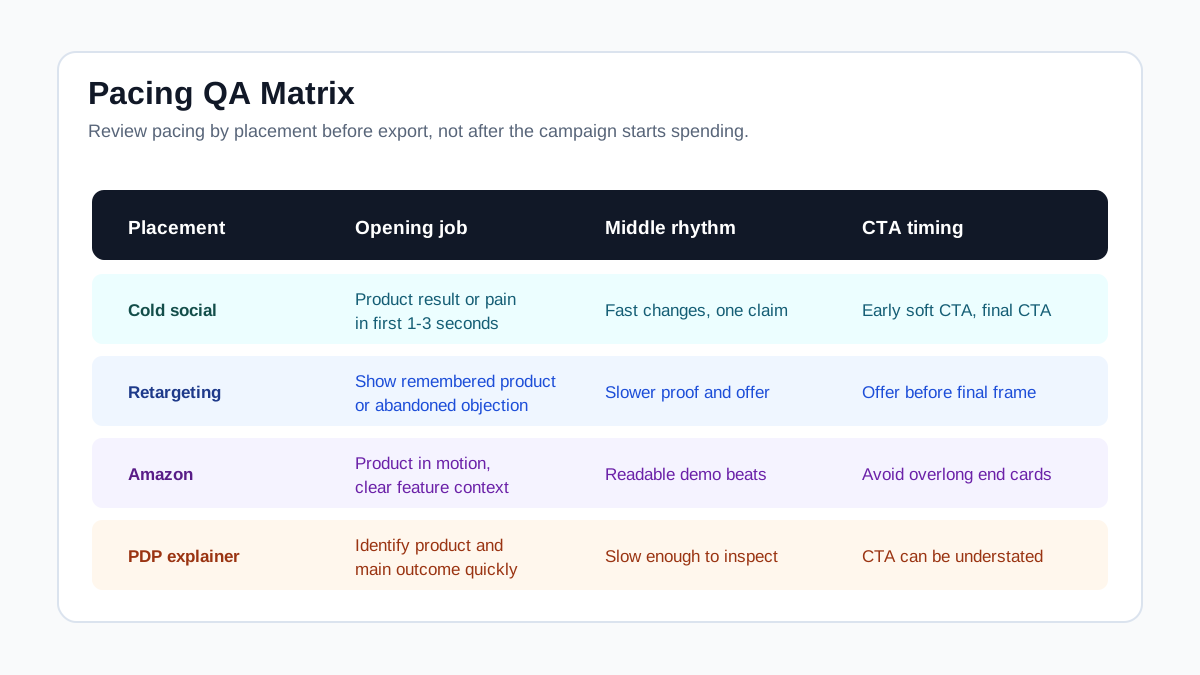
| Placement | Pacing recommendation | Practical rule |
|---|---|---|
| TikTok cold ad | Fast, native, product visible early | Put the content proposition in the first few seconds and avoid slow intros |
| Instagram/Facebook Reels | Fast opening, safe-zone text, audio-aware | Use vertical framing and keep key message clear without covering UI |
| YouTube Shorts | Fast visual setup, clear brand or product role | Use a hook that works even when the viewer enters mid-scroll |
| Facebook/Instagram Feed | Slightly slower than Reels | Use product, caption, offer, or proof in the first screen |
| Amazon Sponsored Brands video | Product-first, clear demonstration | Show the product or an interesting feature early and keep claims aligned to the detail page |
| Product detail page | Slower and more inspectable | Let shoppers see texture, size, setup, use, and final result |
| Retargeting ad | Objection-led pacing | Open with the known product, then answer the reason not to buy |
The same raw concept can become multiple useful cuts. For example, a portable blender could have a TikTok version that starts with blending in the first second, a retargeting version that starts with "easy to clean," an Amazon version that shows capacity and parts, and a PDP version that explains setup more slowly.
Use Captions as Timing Markers
Captions and overlay text are not only accessibility aids. They are pacing controls. A caption tells the viewer what each scene is supposed to mean.
Use captions to mark:
- The buyer problem.
- The product mechanism.
- The proof point.
- The limitation or fit.
- The CTA.
Keep each caption short enough to read before the scene changes. If the text requires two reads, slow the shot down or split the idea into two scenes. If your caption says one thing while the visual shows another, the ad feels faster than it really is because the buyer has to decode two messages at once.
Pair this section with the product video captions QA guide when preparing final exports.
When to Slow Down
Fast pacing is useful only when the buyer can still understand the product. Slow down when the ad needs inspection, trust, or compliance clarity.
Slow down for:
- Texture, material, sizing, fit, ingredients, compatibility, or setup.
- Technical products where the buyer needs to inspect the mechanism.
- Premium products where visual quality is part of the value.
- Regulated or sensitive claims that need careful wording.
- Product page or marketplace videos where shoppers are evaluating details.
Do not slow down for:
- A logo intro.
- A generic lifestyle shot with no product signal.
- A creator setup line that repeats the caption.
- A transition that looks polished but adds no information.
- A final screen where the product disappears.
If pacing slows because the team needs more proof, add proof. If pacing slows because the edit has filler, cut the filler.
Pacing QA Checklist Before Publishing
Use this checklist before upload, ad review, or handoff to a media buyer.
| Check | Pass condition | Fix if it fails |
|---|---|---|
| Product identification | Viewer can identify what is sold in the first 1-3 seconds | Replace intro with product-in-use or outcome shot |
| Hook clarity | Opening names a buyer pain, desire, product result, or proof angle | Rewrite the first scene, not the whole ad |
| Scene purpose | Every scene answers one buyer question | Delete or merge scenes with duplicate jobs |
| Caption timing | Text can be read before the shot changes | Shorten caption or hold the shot longer |
| Product proof | At least one scene supports the main claim | Add review, demo, close-up, measurement, or comparison |
| CTA timing | CTA appears while product or offer is still visible | Move CTA before the product disappears |
| Placement fit | Vertical, feed, marketplace, and PDP cuts are reviewed separately | Export placement-specific versions |
| Landing-page match | Claims, product name, price, offer, and proof match the destination page | Revise the ad or landing page before launch |
This checklist also reduces approval risk. For a broader review, use the video ad approval checklist before sending spend to a new creative.
How to Test Pacing Without Rebuilding Every Video
Do not test five completely different ads when the question is pacing. Keep the product, offer, core proof, and CTA mostly stable. Change only the timing and opening order.
A simple pacing test can use three versions:
| Version | Opening | Middle | CTA | What it tests |
|---|---|---|---|---|
| Hook-fast | Product result in first second | Short demo, quick proof | Direct CTA at 12-15 seconds | Whether cold viewers need instant outcome |
| Proof-first | Review or measurement first | Demo explains why proof is credible | CTA after objection | Whether trust is the bottleneck |
| Explainer | Product visible first, slower setup | More detailed mechanism | Softer CTA | Whether buyers need education |
Track early video views, hold rate, click-through rate, landing-page behavior, and conversion quality. A fast ad that gets clicks but poor downstream behavior may be attracting curiosity instead of qualified buyers. A slower ad that gets fewer clicks but stronger add-to-cart behavior may be better for retargeting or higher-ticket products.
When fatigue appears, pacing is one of the first variables to refresh. The video ad creative fatigue guide explains when to rotate hooks, proof, offers, and formats instead of replacing the whole creative system.
Common Pacing Mistakes
The most common mistake is saving the product reveal for later. That can work in entertainment, but it often weakens ecommerce ads because the buyer does not know what the promise is about.
Other mistakes:
- Using a fast edit to hide weak proof.
- Treating every platform like TikTok.
- Cutting away from the product before the CTA.
- Using long voiceover sentences over short visual scenes.
- Repeating the same benefit in hook, middle, and close.
- Showing three product features but no buyer outcome.
- Slowing down only because a transition looks expensive.
Good pacing feels simple because the buyer never has to ask, "What am I looking at?" or "Why should I care?"
FAQ
What is product video pacing?
Product video pacing is the timing and order of scenes, captions, proof, and CTA moments in a product video. For ecommerce ads, pacing should make the product, buyer problem, proof, and next step clear before the viewer loses attention.
How fast should an ecommerce product video be?
Simple cold social ads often need a fast opening and short middle, while product page and retargeting videos can move slower. Do not choose speed by habit. Choose it by buyer awareness, product complexity, placement, and how much proof the product needs.
Should the product appear in the first three seconds?
Usually yes for paid social and marketplace videos. The product, result, or buyer problem should appear early enough that the viewer understands what is being sold. A creator face can help, but it should not delay product clarity.
Is pacing different from video length?
Yes. Length is the total runtime. Pacing is how information is distributed inside that runtime. A 15-second ad can be slow if the opening is vague, and a 30-second ad can work if every scene answers a buyer question.
What should I test first: hook, length, or pacing?
Start with the hook if early views are weak. Test pacing if viewers start but drop before proof or CTA. Test length when the message is clear but the video feels either rushed or padded.
Conclusion
The best product video pacing is not always the fastest edit. It is the clearest sequence of buyer information. Put the product or result early, give each scene one job, slow down only where inspection or proof matters, and create separate cuts for cold social, retargeting, Amazon, and product detail pages.
If you use ShopShot for ecommerce video production, build pacing variants from the same product facts: a hook-fast cut, a demo-first cut, a proof-led cut, and a slower product page cut. That gives your testing plan cleaner signals than guessing one perfect version.
Sources Checked
- TikTok Ads Manager video advertising guide
- TikTok Ads Manager creative best practices
- TikTok For Business creative best practices for top-performing ads
- Think with Google YouTube ABCD creative playbook
- Think with Google video ad creative experiment learnings
- Amazon Sponsored Brands video ad specs and guidelines
- Amazon Sponsored Products video guide
- Meta Reels ads guidance, checked with login/rate-limit caveat.