
Quick Answer
A strong video ad approval checklist reviews more than the final MP4. Before an ecommerce product video goes live, check the visible claims, proof behind those claims, platform specs, landing-page consistency, creator or AI rights, required disclosures, tracking links, and launch timing. Treat approval as a production gate: if the product page, offer, file export, or rights record is not ready, the video is not ready for ad review.
This checklist is built for small ecommerce teams that create product videos with in-house editors, creators, or an AI video generator. It does not guarantee approval on TikTok, Meta, Google, Amazon, or any other platform. It gives you a repeatable review process so avoidable rejections are caught before submission.
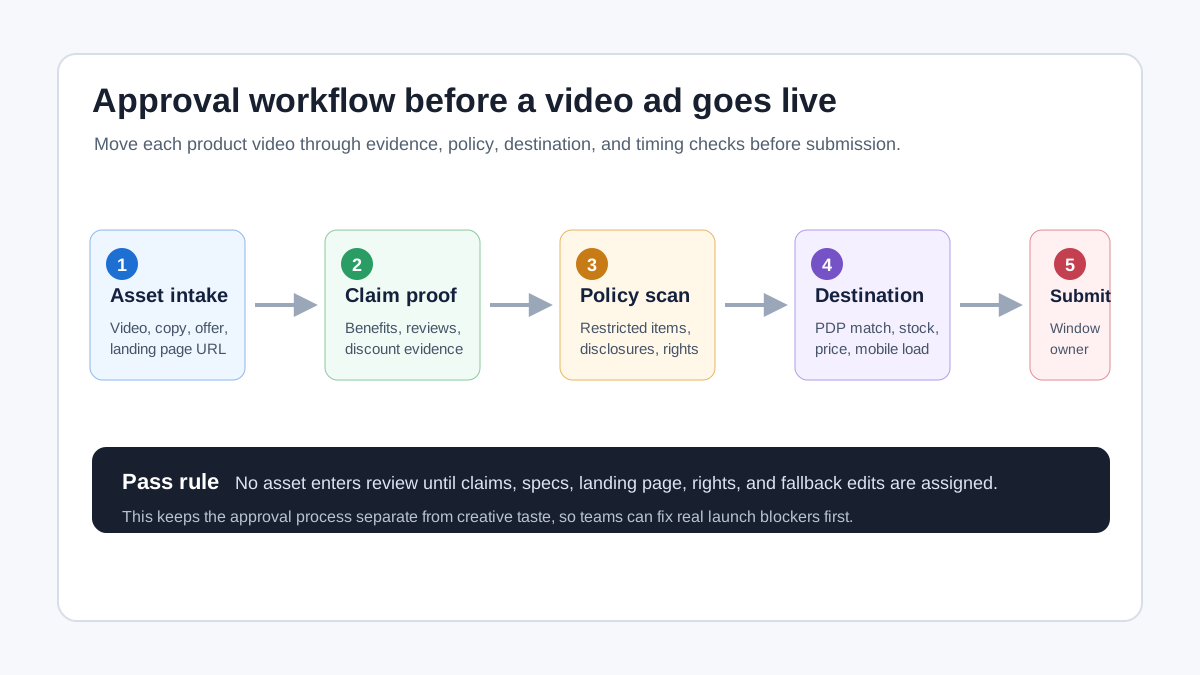
Why Ecommerce Video Ads Fail Review
Most approval problems start before the upload screen. The creative may look polished, but the claims, destination page, rights, or timing may not match what the platform expects.
TikTok says ad review can consider the promoted product, caption or text, visual content, audio content, target market, landing-page consistency, and landing-page functionality. Amazon Ads describes moderation as a way to make sure self-service ads meet customer experience standards before publication. Google Ads keeps platform policies across ad content and destinations. Meta's public Advertising Standards focus on preventing poor or deceptive ad experiences, although some Meta Business Help pages are login-gated during review.
For ecommerce teams, that means the approval checklist must connect creative review to product operations. A product video can be rejected or delayed because the discount ended, the landing page is out of stock, the testimonial rights are unclear, the AI actor disclosure is missing, the video has unreadable text, or the file does not match a placement spec.
The Approval Gate: What Must Be Ready
Use this table as the first-pass gate before a product video enters platform review.
| Gate | What to check | Pass condition | Common fix |
|---|---|---|---|
| Product eligibility | The product category, age targeting, and market are allowed | No restricted or unsupported product issue is present | Change campaign market or exclude the claim/product |
| Claim evidence | Every benefit, price, comparison, and review claim has proof | Evidence exists in product records or on the landing page | Rewrite vague claims into observable facts |
| Landing page match | Product, price, offer, stock, and shipping terms match the video | A shopper sees the same offer after clicking | Update the page or remove the mismatch |
| Rights and consent | Creator footage, music, review text, and AI media rights are documented | The team can show permission and usage scope | Replace asset or collect written permission |
| Disclosure | Paid endorsements, AI-generated people, or synthetic media are labeled when needed | Disclosure is clear in the ad or connected context | Add on-screen or caption disclosure |
| Specs and quality | Aspect ratio, file type, duration, safe area, captions, and audio pass | The export matches the placement being submitted | Re-export with the correct preset |
| Launch timing | Review window, fallback edits, and owner are assigned | The ad can be revised without missing launch | Submit earlier and prepare backup variants |
If any gate fails, do not submit the ad yet. The fastest approval workflow is not the one that uploads first. It is the one that makes the first submission clean enough to avoid predictable rework.
Step 1: Confirm Product and Market Eligibility
Start with the product, not the video. Ask whether the item, claim category, and destination market are allowed for the channel.
For everyday ecommerce products, this step may be quick. For supplements, beauty, financial products, health-adjacent items, adult-oriented products, restricted goods, or products with age limits, it needs a stricter review. The video team should not decide this alone. Assign an owner who understands the product catalog, shipping markets, and platform restrictions.
Use a simple intake note for each video:
| Intake field | Example |
|---|---|
| Product SKU | summer-linen-shirt-blue |
| Destination URL | Product detail page, collection page, or landing page |
| Target channel | TikTok, Meta, Google, Amazon, YouTube, Pinterest |
| Target market | US, UK, CA, AU, or marketplace-specific locale |
| Sensitive category | None, beauty, supplement, kids, finance, regulated |
| Reviewer | Growth lead, compliance owner, merchandiser, founder |
This is especially important when you create many variants from the same product image or product page. A rejected base claim can multiply across every cutdown.
Step 2: Map Every Claim to Evidence
The most useful approval habit is to highlight every claim in the video and ask, "What proves this?"
Claims include more than obvious promises. They include on-screen text, voiceover, captions, discount badges, before-and-after visuals, product comparisons, review snippets, "best seller" labels, speed claims, ingredient claims, durability claims, and customer result claims.
For claim-heavy creative, use the evidence matrix below.
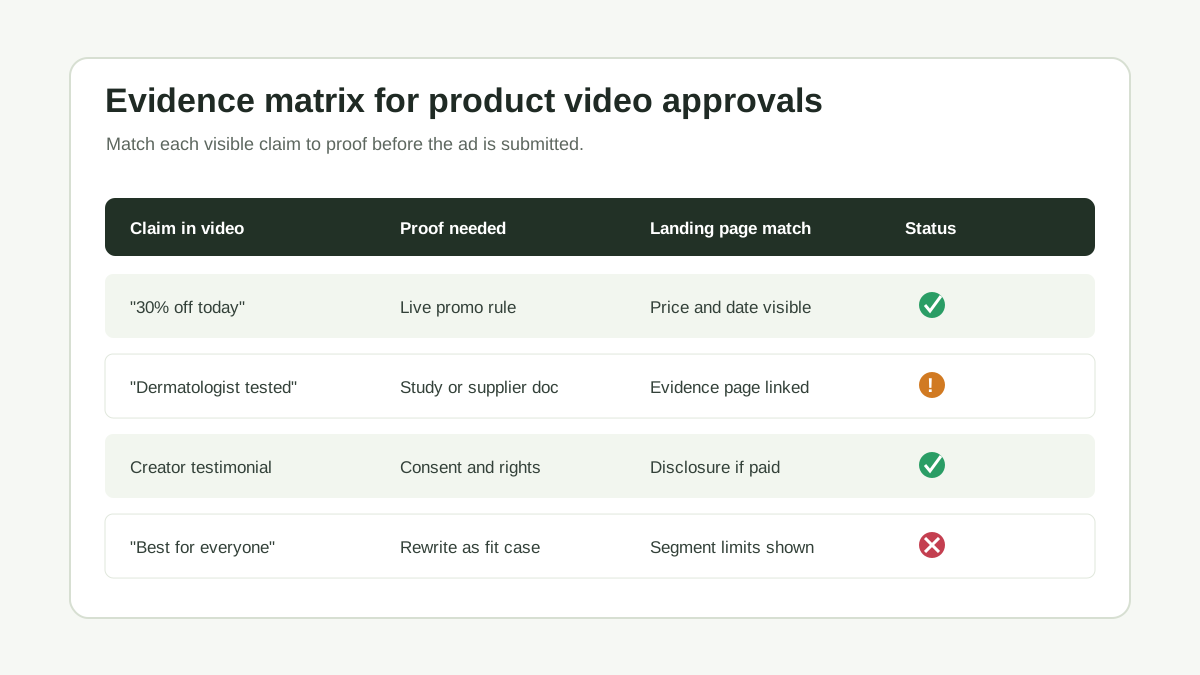
| Claim type | Risk level | Evidence to keep | Safer rewrite if proof is weak |
|---|---|---|---|
| Price or discount | High | Active promotion rule, product page price, date range | "Limited-time offer on selected styles" |
| Performance result | High | Test report, customer data, methodology | "Designed to help with..." |
| Review or testimonial | High | Source review, consent, material connection record | "One customer said..." with context |
| Superlative | Medium | Sales rank, award, verified review data | "A customer favorite" |
| Comparison | Medium | Competitor basis, date, feature proof | "Compared with our previous version" |
| Feature statement | Low | Product spec, supplier record, PDP copy | Keep if it matches the product page |
ShopShot already has a deeper product video proof points guide for turning claims into usable evidence. Use that page before writing high-risk hooks.
Step 3: Match the Landing Page to the Video
Ad review is not limited to the video file. Platforms can review the destination experience too, and TikTok explicitly includes landing-page consistency and functionality in its ad review considerations.
Check the destination page on mobile before submitting:
| Landing-page item | Approval question |
|---|---|
| Product identity | Does the page show the exact product featured in the video? |
| Price and promo | Does the visible offer match the on-screen offer? |
| Availability | Is the item in stock for the target market? |
| Claims | Are material claims repeated or supported on the page? |
| Shipping and returns | Are major purchase conditions easy to find? |
| Mobile loading | Does the page load without broken media, popups, or blocked content? |
| Tracking | Do UTM parameters, pixels, and product links resolve correctly? |
This check matters for AI-generated product videos because the creative can be created faster than the store page is updated. Do not let the video become more current than the product page.
Step 4: Review Rights, Reviews, and Disclosures
Rights are an approval issue and a business risk. Keep a record for every asset used in the video:
| Asset | What to document |
|---|---|
| Creator footage | Contract, usage window, allowed channels, paid partnership terms |
| Customer review | Review source, permission if required, no fabricated review text |
| Music or sound | License, platform library source, territory, usage limits |
| Stock footage | License type and allowed advertising use |
| AI actor or voice | Persona rights, consent if cloned, disclosure decision |
| Product photo | Brand-owned asset or supplier permission |
FTC guidance for endorsements, influencers, and reviews emphasizes disclosure and honest review practices. If a creator was paid, gifted, or otherwise connected to the brand, the ad workflow should decide where the disclosure appears. If the ad uses synthetic people or AI-generated presenters, review the separate AI video ad disclosure checklist before launch.
Do not hide this work in a private chat thread. Store the proof next to the ad name, creative brief, or task record so the growth team can find it when a platform asks for edits.
Step 5: Check Format, Readability, and Export Quality
A video can be policy-safe but still fail the practical quality bar. Before upload, compare the exported file against the destination placement.
| Quality check | Why it matters |
|---|---|
| Aspect ratio | A square, vertical, or landscape version may be needed for different placements |
| Duration | Some placements have strict limits or strong best-practice ranges |
| File type and size | Large or unsupported exports create upload and serving problems |
| Safe area | Product price, CTA, or claim text can be covered by platform UI |
| Captions | Many users watch without sound, and captions can clarify claims |
| Audio | Music rights, loudness, language, and intelligibility affect review and performance |
| Opening frame | Black frames, blank intros, or unclear product shots can weaken or block moderation |
For export settings, use the product video export settings guide. For placement-specific requirements, keep the Meta video ad specs guide and Amazon Sponsored Brands video checklist close to the production workflow.
Amazon Sponsored Brands video specs, for example, list fixed technical requirements such as MP4 or MOV file format, 16:9 aspect ratio, and a recommended duration of 20 seconds or less within the allowed duration range. Those details are not creative preferences. They are upload and acceptance constraints.
Step 6: Assign a Launch Owner and Backup Variant
Approval delays hurt most when nobody owns the next move. Before submitting, assign:
| Role | Responsibility |
|---|---|
| Creative owner | Fixes copy, captions, frames, and exports |
| Product owner | Confirms price, inventory, claims, and PDP accuracy |
| Rights owner | Confirms usage permission, music, creator terms, and disclosures |
| Media buyer | Submits the ad, checks review status, and manages appeals or edits |
| Launch approver | Decides whether to ship, revise, pause, or replace the ad |
Also create one backup variant before a major launch. A backup does not need to be a new concept. It can be the same product video with a softer claim, different CTA, no testimonial, a shorter duration, or cleaner text overlay.
This matters because review windows vary. TikTok says most ads are reviewed within 24 hours, while Amazon recommends submitting ads at least one week before launch to allow for approvals and possible resubmissions. Treat review time as part of the launch schedule, not as an afterthought.
A Practical Approval Checklist You Can Copy
Use this checklist for each ecommerce product video ad:
- Product category is allowed in the target market.
- Target age and audience settings match the product.
- Every price, sale, and shipping claim matches the landing page.
- Every benefit claim has product proof or has been rewritten.
- Review snippets are real, traceable, and used within rights.
- Paid creator relationships are disclosed where needed.
- AI-generated people, cloned voices, or synthetic presenters have been reviewed.
- Music, stock footage, and creator clips have documented ad usage rights.
- Landing page loads on mobile and shows the same product.
- Product is in stock for the target region.
- UTM parameters and product links resolve correctly.
- File format, duration, aspect ratio, size, and safe area match the placement.
- Captions and on-screen text are readable on mobile.
- No important text is hidden by platform UI.
- A backup edit exists for high-risk claims.
- A reviewer is assigned for rejection notices.
- Launch date includes time for review and resubmission.
Teams that run frequent tests should add this gate before the ecommerce video ad testing plan. Testing a rejected asset teaches you nothing about performance.
Example Workflow: From ShopShot Draft to Approved Ad
Here is a practical workflow for a small ecommerce team:
| Stage | Output |
|---|---|
| Generate the draft | Use product images, PDP copy, and offer notes to create a short video draft |
| Claim review | Highlight every visible claim and attach proof or rewrite it |
| Destination review | Open the PDP on mobile and compare price, stock, offer, and claims |
| Rights review | Confirm creator, music, review, AI actor, and stock media permissions |
| Export review | Produce placement-specific files and check captions, safe area, and file size |
| Submission review | Assign owner, upload early, and prepare fallback edits |
| Post-review learning | Record rejection reasons and performance metrics for the next test |
If you use ShopShot, the fastest way to keep this organized is to generate product-specific video variants from the same product source, then name each version by claim, platform, ratio, and offer. That makes it easier to pause only the risky version instead of blocking the entire product launch.
How This Differs From a Compliance Checklist
A compliance checklist asks, "Is this allowed?" An approval checklist asks, "Can this asset pass review and launch cleanly in this exact campaign?"
That means approval review includes operational details:
| Compliance checklist | Approval checklist |
|---|---|
| Product category restrictions | Product category plus target market and age setting |
| Claim policy | Claim proof plus landing-page match |
| Disclosure rule | Disclosure placement in video, caption, or creator context |
| File spec | File spec plus placement, safe area, and fallback edit |
| Legal review | Launch owner, review window, and resubmission plan |
Use the product video compliance checklist for broad policy risk, then use this page as the final pre-upload gate.
FAQ
What is a video ad approval checklist?
A video ad approval checklist is a pre-submission review process for ad creative. It checks claims, landing pages, specs, rights, disclosures, and launch timing before a video is uploaded for platform review.
Does passing this checklist guarantee ad approval?
No. Platforms control their own review systems and policies. This checklist reduces avoidable rejection risks, but it cannot guarantee approval on TikTok, Meta, Google, Amazon, or any other ad network.
Should ecommerce teams review the landing page before submitting a video ad?
Yes. The landing page should match the product, offer, price, availability, and claims shown in the video. A mismatch can create review risk and can also hurt conversion after approval.
What is the most common approval mistake in product video ads?
The most common mistake is treating the video file as separate from the offer. Claims, price, product availability, review rights, and destination-page content all need to match the creative.
Where should this checklist sit in the production workflow?
Run it after the first export and before paid media upload. For larger launches, run it before final export too, so risky claims or missing disclosures are fixed before designers make every placement version.
Sources Checked
- TikTok Ads Manager, Ad Review FAQs: https://ads.tiktok.com/help/article/ad-review-faq
- TikTok Advertising Policies, Advertising & Ad Review: https://ads.tiktok.com/help/article/advertising-on-tiktok-first-things-to-note
- Google Ads policies: https://support.google.com/adspolicy/answer/6008942
- Google Merchant Center product data specification update 2026: https://support.google.com/merchants/answer/16989427
- Meta Advertising Standards: https://transparency.meta.com/policies/ad-standards/
- Meta Business Help ad review page checked but login/rate limited locally: https://www.facebook.com/business/help/204798856225114
- Amazon Ads moderation guide: https://advertising.amazon.com/library/guides/sponsored-brands-display-ads-moderation
- Amazon Sponsored Brands video specs: https://advertising.amazon.com/resources/ad-specs/sponsored-brands-video
- FTC endorsements, influencers, and reviews guidance: https://www.ftc.gov/business-guidance/advertising-marketing/endorsements-influencers-reviews
Conclusion
Approval is part of ecommerce video production, not an admin step after production. The best teams review claim proof, destination-page match, rights, disclosures, specs, and launch timing before the ad enters platform review.
Use ShopShot to create product video variants quickly, then use this checklist to keep those variants publish-ready. A clear approval gate helps your team spend less time fixing preventable rejections and more time learning which product videos actually sell.