
Quick Answer
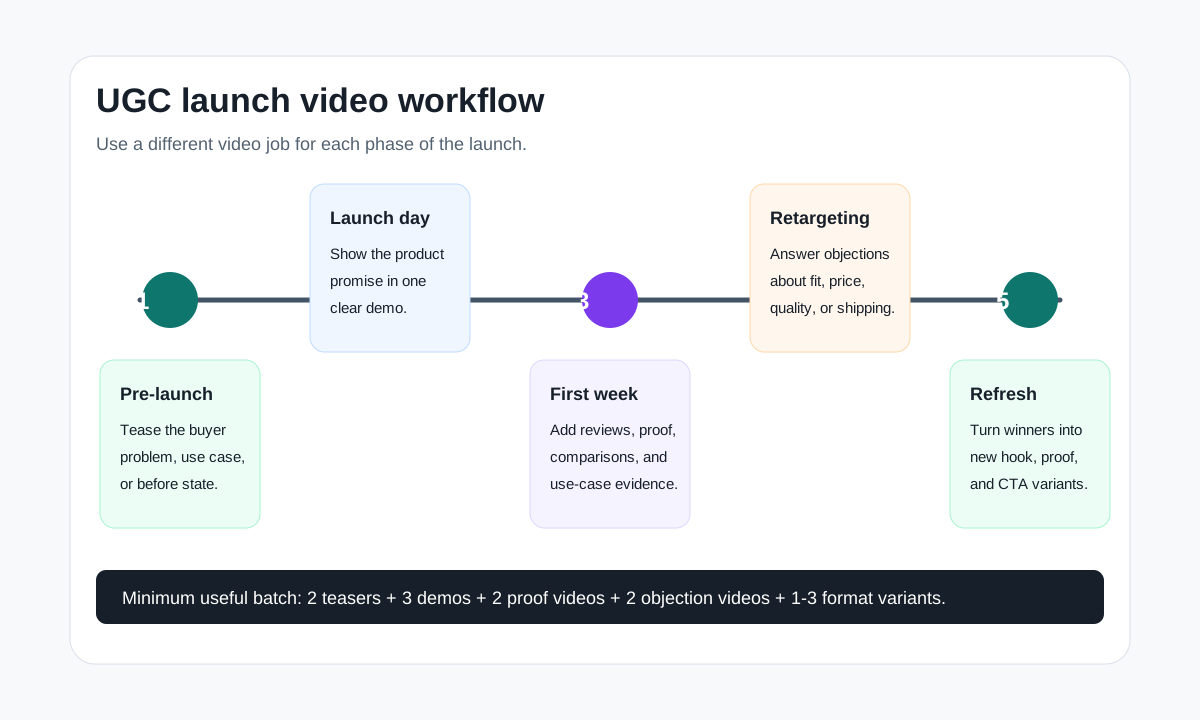
A UGC video workflow for product launches should produce different videos before, during, and after launch. Use teasers before launch, proof-led demos on launch day, objection-handling videos for retargeting, and controlled variants after the first performance data arrives.
The workflow is simple: define the launch promise, collect product proof, write a creator brief, build 8-12 short video concepts, generate or shoot the first batch, run claim and platform QA, publish by launch phase, then refresh winners before fatigue sets in.
Why Product Launches Need a UGC Workflow
A product launch is not one video. It is a short campaign with different buyer questions at each stage. Before launch, shoppers need a reason to care. On launch day, they need to understand what the product does. After launch, hesitant buyers need proof, answers, and a stronger reason to click.
That is why a launch workflow beats a one-off UGC video. A workflow keeps the message consistent while letting each video solve a different job: attention, education, proof, comparison, offer, or retargeting.
This article is a support guide, not a UGC tool list. If you need the upstream creator brief, start with the UGC video brief template. If you need reusable openings, use the UGC video hooks for product ads guide. If you are ready to generate launch variants from product assets, use ShopShot's AI video generator.
The Launch Asset Map
Use the table below to map each launch phase to the video type it needs. This prevents the common mistake of using one polished launch video everywhere.
| Launch phase | Buyer question | UGC video job | Best format |
|---|---|---|---|
| Pre-launch | Why should I care? | Tease the problem, use case, or before state | 6-12 second vertical teaser |
| Waitlist or early access | Is this for someone like me? | Show buyer context and product category | Creator-style problem video |
| Launch day | What does it do? | Demonstrate the core product promise fast | 15-25 second demo |
| First week | Can I trust it? | Show proof, reviews, comparison, or use-case evidence | Proof-led UGC ad |
| Retargeting | Why did I not buy yet? | Answer objections about size, fit, quality, shipping, or price | FAQ or objection video |
| Post-launch refresh | Which angle is working? | Turn winner into new hook, offer, and platform variants | Controlled test variants |
For most ecommerce launches, the minimum useful batch is 8-12 short videos: 2 teasers, 3 launch demos, 2 proof videos, 2 objection handlers, and 1-3 format variants for the best early angle.
Step 1: Define the Launch Promise
Start with one launch promise, not a list of every product benefit. A launch promise is the reason this product should exist in the buyer's life now.
Use this format:
For [buyer], this product helps [specific situation] by [approved product proof].
Examples:
| Product | Weak launch message | Stronger launch promise |
|---|---|---|
| Travel mug | New insulated mug is here | Keep coffee hot through the commute without a spill in your bag |
| Closet organizer | Organize your closet today | Turn one crowded shelf into a visible shoe and sweater system |
| Pet hair roller | Removes pet hair | Keep couch, coat, and car seats clean without sticky refills |
| Desk cushion | Better comfort | Make a work-from-home chair feel more supportive without replacing it |
The promise should come from approved product copy, real use cases, reviews, or product testing. Do not let creators or AI invent claims just because the launch needs stronger language.
Step 2: Build a Product Truth File
Every UGC launch workflow needs a small truth file. This is the source of what creators, editors, and AI tools are allowed to say or show.
| Field | What to collect | Why it matters |
|---|---|---|
| Buyer | Persona, use case, pain point, buying trigger | Keeps videos specific |
| Product facts | Size, material, included parts, compatibility, care instructions | Prevents misleading demos |
| Approved claims | Benefits from PDP, reviews, tests, or brand approvals | Keeps ad copy safe |
| Disallowed claims | Medical, guaranteed, comparative, or unsupported claims | Reduces rejection risk |
| Visual proof | Product photos, demos, UGC clips, reviews, packaging, before state | Gives videos evidence |
| Offer | Discount, bundle, waitlist, limited launch bonus, free shipping | Aligns CTA and urgency |
| Platforms | TikTok, Reels, Shorts, Meta feed, PDP, email, Amazon, Shopify | Controls format and length |
This file should be short enough to use daily. A two-page launch truth file is better than a beautiful 20-page deck that nobody checks before publishing.
Step 3: Turn the Truth File Into Launch Concepts
Create concepts by combining a buyer moment with a proof type and a launch phase. Do not start by asking for "a viral UGC video." Start with the job the video needs to do.
| Concept type | Best launch phase | Script angle | Example hook |
|---|---|---|---|
| Problem-first teaser | Pre-launch | Show the painful before state | "If your coffee is cold by the time you sit down..." |
| Creator discovery | Pre-launch or launch day | Creator finds the product for a specific use case | "I found this for my tiny entryway shelf." |
| Product demo | Launch day | Show the product solving one visible problem | "Here is how it works in 15 seconds." |
| Review proof | First week | Turn a real review into a visual scene | "I bought a second one for my car." |
| Comparison | First week | Compare old workaround vs new product | "Sticky refills vs a reusable roller." |
| Objection handler | Retargeting | Answer one concern directly | "Will it fit under a small desk?" |
| Offer reminder | Retargeting | Restate launch bonus and deadline | "The launch bundle ends Sunday." |
If you need more prompt-level detail, pair this workflow with AI product video prompts for ecommerce ads. If you need scene planning, use the product video storyboard template.
Step 4: Produce the First Batch
The first batch should be diverse enough to learn, but not so random that you cannot compare results. Change one main variable at a time.
Use this production split:
| Batch slot | Video angle | Variable being tested |
|---|---|---|
| 1 | Problem-first teaser | Pain point |
| 2 | Use-case teaser | Buyer context |
| 3 | Launch demo A | Hook |
| 4 | Launch demo B | Scene order |
| 5 | Launch demo C | CTA |
| 6 | Proof video | Review or demo proof |
| 7 | Comparison video | Old solution vs new product |
| 8 | Objection video | Fit, quality, shipping, sizing, or price |
| 9 | Offer video | Bonus, bundle, or urgency |
| 10-12 | Format variants | TikTok, Reels, Shorts, Meta feed, PDP |
For AI-assisted production, lock the product truth file first, then generate controlled variants from that source. For creator-shot production, give creators the same truth file and ask them to film flexible raw footage: first-frame action, product close-up, use case, objection answer, and CTA.
Step 5: Match Each Video to the Platform
Platform guidance changes over time, so check official resources before final export. The current practical pattern is consistent: vertical-first videos, clear product visibility, early attention, and a direct action.
TikTok's Creative Center is useful for researching trends, ad examples, and creative resources. TikTok's performance creative guidance also emphasizes vertical 9:16, safe-zone awareness, sound, and people-led creative. Google frames YouTube video ads around the ABCD principles: attention, branding, connection, and direction. Google's creative guidance can flag missing attributes such as early brand visibility, voice-over, duration, and aspect ratio. Meta's own business guidance stresses engaging creative, templates, and clear calls to action.
Translate those sources into this export checklist:
| Channel | Launch video fit | Workflow rule |
|---|---|---|
| TikTok | Teasers, creator discovery, fast demos | Keep the first frame native, vertical, and safe-zone aware |
| Instagram Reels | Teasers, proof, lifestyle demos | Use readable captions and product-first framing |
| YouTube Shorts | Launch demo, proof, how-it-works | Use a clear hook, brand cue, and next action |
| Meta feed and Reels | Offer, proof, retargeting, comparison | Test hook, proof, and CTA variants separately |
| Product detail page | Slower explainer and objections | Prioritize clarity over trend language |
| Email or landing page | Launch story and feature explanation | Use the video as a proof block, not the whole message |
For technical channel checks, use the Meta video ad specs, TikTok ad specs for ecommerce product videos, and YouTube Shorts product video specs guides.
Step 6: Run QA Before Publishing
Launch pressure is where bad claims slip into ads. Use a hard QA gate before a video goes live.
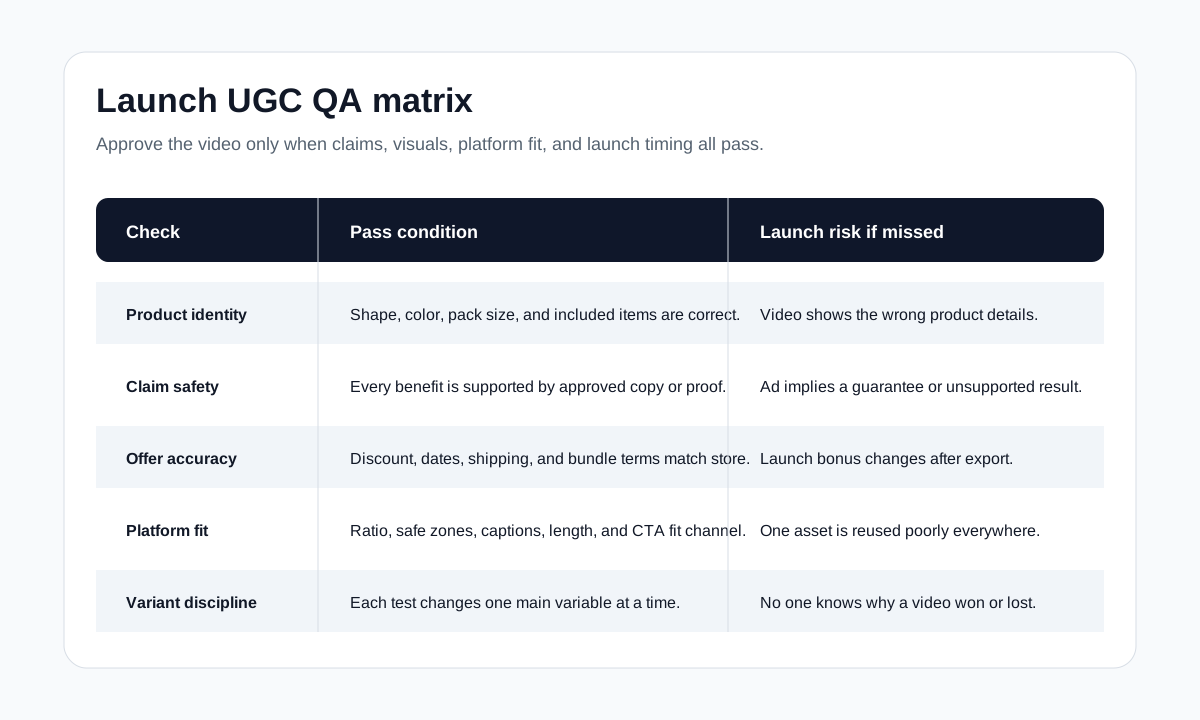
| QA area | Pass condition | Common launch failure |
|---|---|---|
| Product accuracy | Product shape, color, pack size, and included items are correct | AI or editor changes the product |
| Claim safety | Every benefit is in the PDP, review file, test result, or approval notes | Video implies a cure, guarantee, or impossible result |
| Offer accuracy | Discount, bundle, date, and shipping promise match the store | Launch bonus changes after videos are exported |
| Platform fit | Aspect ratio, safe zones, captions, length, and CTA fit the channel | One video is reused unchanged everywhere |
| Proof visibility | The viewer can see the product solving the problem | The script claims proof but the video only shows lifestyle shots |
| CTA clarity | The next action is obvious for the launch phase | Teaser uses a hard buy-now CTA before the page is ready |
| Variant discipline | Each test changes one main variable | Hook, offer, creator, and CTA all change at once |
For products in wellness, beauty, supplements, finance, child safety, medical-adjacent categories, or any category with regulated claims, add a legal review step. UGC tone should feel natural, but natural wording is not a substitute for claim support.
Step 7: Launch, Measure, and Refresh
Do not wait a month to learn from launch creative. Use the first 48-72 hours to identify weak signals, then use the first 7-10 days to decide which angles deserve refreshes.
Track the creative by angle, not just by filename:
| Metric | What it tells you | What to change |
|---|---|---|
| 3-second or hook retention | Whether the first frame earns attention | Change hook, framing, or visual start |
| Click-through rate | Whether the message and CTA create action | Change CTA, offer, proof order, or landing alignment |
| Add-to-cart or checkout rate | Whether the product promise matches the page | Improve proof, price framing, or PDP support |
| Comments and questions | What buyers still do not understand | Create objection videos |
| Cost per usable creative | Whether production volume is efficient | Reuse winners as variants instead of restarting |
Use the how many UGC video ads to test guide when deciding test volume. A launch usually needs enough variants to learn, but not so many that spend is spread too thin.
Example 10-Day UGC Launch Calendar
| Day | Creative action | Notes |
|---|---|---|
| -10 to -7 | Build truth file and launch promise | Lock claims, offer, product proof, and disallowed language |
| -7 to -5 | Produce teaser and creator-discovery videos | Focus on buyer problem and use case |
| -4 to -2 | Produce launch demos and proof videos | Prepare channel-specific exports |
| -1 | QA all videos and landing page | Check offer, product details, captions, safe zones, and links |
| 0 | Publish launch demo and strongest teaser | Use clear product visibility and launch CTA |
| 1-2 | Watch hook retention and CTR | Pause obvious mismatches, not slow learners |
| 3-4 | Publish proof and comparison videos | Use early comments and buyer questions |
| 5-7 | Publish retargeting objection videos | Answer sizing, quality, shipping, use case, or price concerns |
| 8-10 | Refresh winner into 3 variants | Change hook, proof order, or CTA while keeping product facts stable |
This calendar can shrink for small launches or expand for major seasonal pushes. The important part is sequencing: teaser first, proof during launch, objections after behavior appears, and refreshes once a winner is visible.
Internal Link Plan for This Workflow
This article should sit between the brief, script, prompt, and testing pages:
- Start planning with the UGC video brief template.
- Write launch scripts with the product video ad script template.
- Choose first-frame ideas from UGC video hooks for product ads.
- Generate prompt-led variants with AI product video prompts.
- Produce the final assets with ShopShot's AI video generator.
- Decide test volume with how many UGC video ads to test.
That internal link path keeps this page focused on the launch workflow and avoids competing with tool or generator pages.
FAQ
How many UGC videos do I need for a product launch?
For a small ecommerce launch, plan 8-12 short videos. That usually covers teasers, launch demos, proof videos, objection handlers, and a few platform variants. Bigger launches can scale the same structure across more creators and product angles.
What should the first UGC launch video show?
The first launch video should show the product solving one obvious buyer problem. Avoid abstract brand storytelling unless the product is already known. Most launches need a clear problem, visible product, proof moment, and next action.
Should launch UGC videos be shot by creators or generated with AI?
Both can work. Creator-shot footage is useful for trust, lifestyle context, and natural reactions. AI-generated or AI-assisted video is useful for fast variants, scene testing, format adaptation, and turning product assets into controlled ad drafts.
What is the biggest mistake in launch UGC ads?
The biggest mistake is making every launch video say the same thing. A launch needs different videos for awareness, demonstration, proof, objections, and retargeting. Repeating one generic announcement wastes the learning window.
When should I refresh launch videos?
Refresh once you have enough early signals to identify a promising angle, often after the first 3-7 days. Keep the product proof stable and change one variable at a time, such as hook, first scene, CTA, or offer framing.
Sources Checked
- TikTok For Business, "About Creative Center": https://ads.tiktok.com/help/article/creative-center
- TikTok For Business, "Creative best practices for performance ads": https://ads.tiktok.com/help/article/creative-best-practices
- TikTok For Business, "Top Ads": https://ads.tiktok.com/business/creativecenter/inspiration/topads/pc/en
- Google Ads Help, "About the ABCDs of effective video ads": https://support.google.com/google-ads/answer/14783551
- Google Ads Help, "About Creative guidance in Google Ads": https://support.google.com/google-ads/answer/13812351
- Google Ads Help, "YouTube Shorts ads: Asset specs and best practices": https://support.google.com/google-ads/answer/16041697
- Meta Business Help Center, "Best practices to make your ad more engaging": https://www.facebook.com/business/help/370852930116232