
Quick Answer
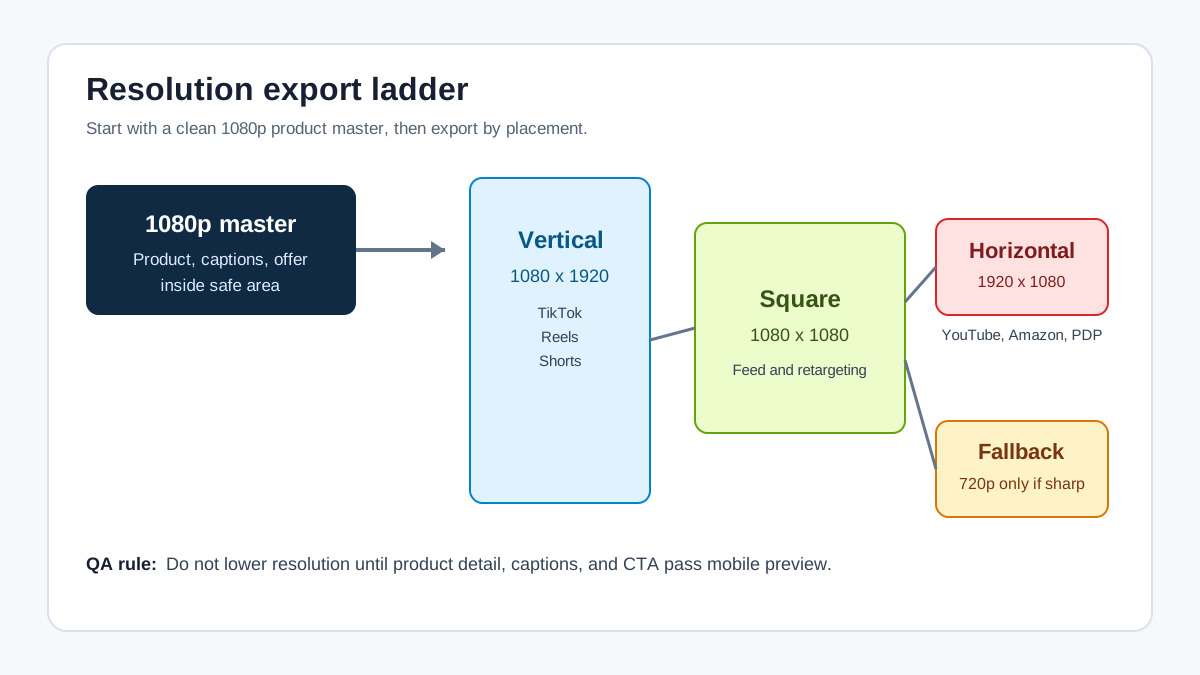
For most ecommerce ads, use a 1080p master and export separate versions for each placement: 1080 x 1920 for vertical video, 1080 x 1080 for square video, and 1920 x 1080 for horizontal video. Use 720p only when the platform accepts it and the product detail, captions, price, and CTA remain readable after compression. A good product video resolution guide is not just a pixel chart; it is a QA workflow that protects product clarity across TikTok, Meta, YouTube, Amazon, and retargeting placements.
Why Product Video Resolution Matters
Resolution affects how much product detail survives after upload, compression, cropping, and mobile playback. A low-resolution product video can still upload, but the first frame may look soft, the label may become unreadable, and the CTA may look cheap beside the product image.
For ecommerce sellers, that is not a cosmetic issue. Product videos often carry the buying evidence: texture, scale, packaging, fit, before-and-after proof, review quotes, price, and bundle details. If those details become fuzzy, the ad may still spend budget while doing less persuasion.
Resolution also interacts with aspect ratio. A 1920 x 1080 landscape video is high resolution, but it is not the right master for a TikTok-first product ad. A 1080 x 1920 vertical export is also high resolution, but it can fail on Amazon Sponsored Brands video because that placement requires a 16:9 video. If you have not already planned the crop, the export step becomes a series of compromises.
Use this guide with the related product video aspect ratio guide, product video length guide, and product video file size guide when you build a cross-platform creative set.
The Best Default Resolution For Product Video Ads
Start with a 1080p master for each major format. In practice, that means three production masters:
| Format | Recommended master | Use when | Why it works |
|---|---|---|---|
| Vertical | 1080 x 1920 | TikTok, Reels, Shorts, Stories-style placements | Fills the mobile screen and leaves enough pixels for captions and product close-ups |
| Square | 1080 x 1080 | Feed, carousel, retargeting, cross-platform tests | Flexible across feeds and easier to crop from vertical or horizontal footage |
| Horizontal | 1920 x 1080 | YouTube, Amazon Sponsored Brands video, PDP explainers | Keeps product demos readable on wider placements |
| 720p fallback | 720 x 1280 or 1280 x 720 | Fast drafts, low-bandwidth tests, accepted minimums | Useful only when text and product detail remain sharp |
Do not treat 4K as automatically better. A 4K source can be useful for cropping product close-ups, but most performance creative still needs a clean, fast-loading, platform-compliant export. If the 4K file creates a slow upload, a huge storage file, or a compression problem, it may be less practical than a well-built 1080p version.
Resolution By Channel
Platform specs change, and ad managers may accept more formats than they recommend. Use the table below as a production starting point, then check the final upload preview before spending.
| Channel or placement | Practical ecommerce export | What to inspect before launch |
|---|---|---|
| TikTok In-Feed or Spark-style creative | 1080 x 1920 vertical when possible; TikTok also lists lower accepted minimums for vertical, square, and horizontal ads | Product visible in the first seconds, no important text hidden by UI, file within limit |
| Instagram Reels or Stories | 1080 x 1920 vertical | Price, subtitle, discount, and CTA not too low or too close to the right rail |
| Facebook or Instagram Feed | 1080 x 1080 square or 1080 x 1350 portrait | Product detail readable without opening full screen |
| YouTube Shorts and vertical YouTube ads | 1080 x 1920 vertical | Main product moment inside the safe area and no tiny caption text |
| YouTube horizontal ads | 1920 x 1080 horizontal | Product appears early; captions and logos avoid overlay areas |
| Amazon Sponsored Brands video | 1920 x 1080 horizontal | 16:9 only, no letterboxing, clear product, language and policy fit |
| LinkedIn video ads for B2B ecommerce | 1080 x 1920, 1080 x 1350, 1080 x 1080, or 1920 x 1080 depending on placement | Product proof readable in feed and thumbnail matches the video |
The production rule is simple: build the video for the placement, not just the pixel count. A 1080 x 1920 vertical product video with the product hidden behind captions is still a bad export.
A Practical Export Workflow
Use this workflow when you are turning one product page, product image set, or ShopShot-generated draft into a full ad set.
- Choose the primary placement first. If the campaign is TikTok-first, start vertical. If it is Amazon Sponsored Brands-first, start horizontal.
- Build a 1080p master for that placement. Keep the product large enough to understand on a phone screen.
- Place captions, offer text, review quotes, and CTA inside a conservative safe area.
- Create format variants from the master: vertical, square, and horizontal.
- Replace weak crops instead of stretching or zooming too far. If the product becomes small or blurry, regenerate or recompose that version.
- Export in MP4 or MOV unless the platform requests otherwise.
- Check file size, duration, and readability before upload.
- Upload to the platform preview and inspect the ad on mobile if possible.
This is where an AI workflow helps. Instead of manually rebuilding every format, use ShopShot to create product video variants from the same product image, hook, script, and offer. Then use this resolution checklist to decide which variant is ready for paid distribution.
When 720p Is Good Enough
720p can be acceptable for some placements, drafts, or quick creative tests, but it should not be the default for finished ecommerce ads. The question is not "Will the platform accept this file?" The question is "Can a shopper understand the product in a fast scroll?"
Use 720p only when all of these are true:
- The product has large, simple visual features.
- The video has minimal overlay text.
- The landing page or PDP carries the detailed specs.
- The ad is a fast test, not the final evergreen creative.
- The uploaded preview still looks sharp after platform compression.
Avoid 720p when the product depends on fine detail: skincare labels, supplement facts, watch faces, apparel texture, size comparison, jewelry, small electronics, home decor materials, or before-and-after proof. These are exactly the cases where blurry video hurts trust.
How Resolution Affects Cropping
Cropping is where many product videos lose quality. If you crop a horizontal 1920 x 1080 video into vertical 1080 x 1920, you are not magically creating more vertical detail. You are cutting away most of the horizontal frame and enlarging what remains.
That can work for a talking-head or centered product demo, but it fails when the product moves across the frame, when text sits near the edge, or when the product is already small. A better approach is to create separate compositions:
- Vertical version: product centered, large, with captions above the lowest UI zone.
- Square version: product and offer centered, fewer words, strong first frame.
- Horizontal version: product action on one side, proof or benefit on the other side, no black bars.
The product video storyboard template can help you plan those versions before export.
Resolution QA Checklist
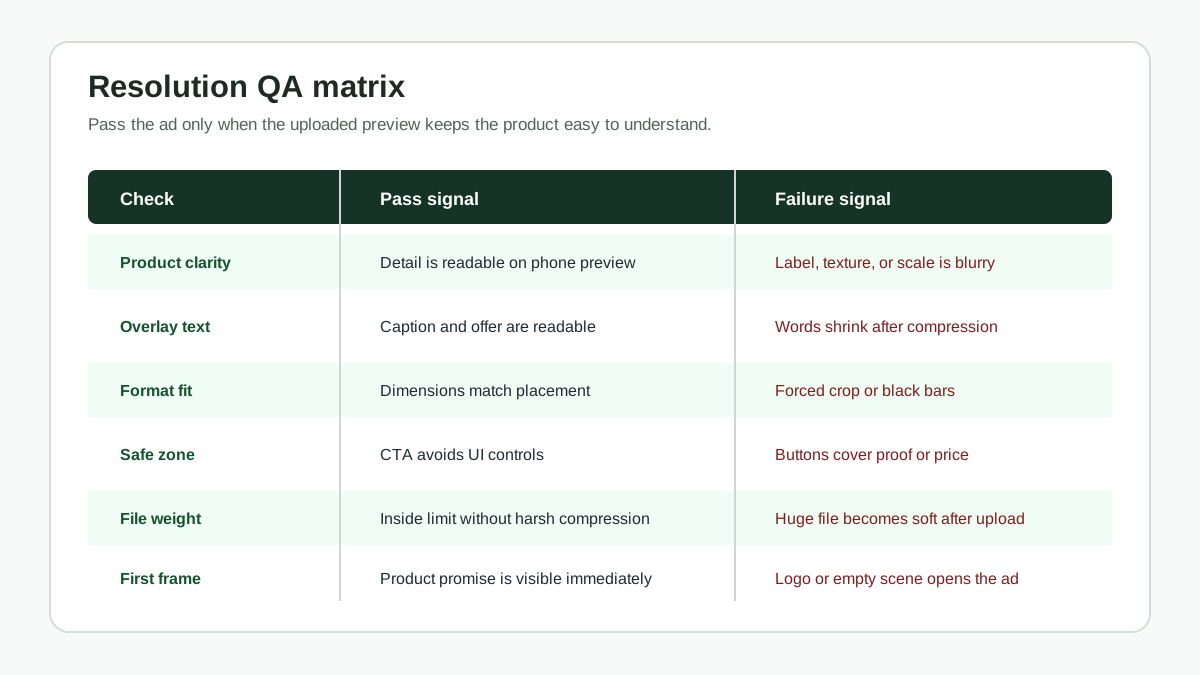
Before you publish or launch, run the exported file through this QA table.
| Check | Pass standard | Common failure |
|---|---|---|
| Product clarity | Product, texture, and use case are obvious on a phone screen | Product is visible in the editor but soft after upload |
| Overlay text | Caption, price, offer, and CTA are readable without pausing | Text was designed for desktop and shrinks too much |
| Format fit | Export dimensions match the placement | Landscape video is forced into a vertical placement |
| Safe zone | Key information avoids platform UI areas | CTA sits behind buttons, captions, or the right-side rail |
| File weight | File stays inside platform limit without extreme compression | Huge file gets compressed hard and loses sharpness |
| First frame | Product is identifiable before the viewer understands the full pitch | Opening frame is a logo, empty room, or blurry lifestyle shot |
| Thumbnail | Thumbnail matches the exported resolution and product promise | Thumbnail is sharp but the video body is soft |
Run this checklist again after upload. The local file is not the final customer experience. The platform preview is closer to what the shopper will actually see.
How To Handle AI-Generated Product Videos
AI-generated product videos need a stricter resolution review because the video can look clean while still distorting product evidence. Check the output at full size, half size, and mobile preview size.
Look for these issues:
- Product label text becomes invented or unreadable.
- Texture looks smoother than the real product.
- Edges shimmer after compression.
- Price or offer text is sharp, but the product itself is soft.
- Hands, packaging, or props distract from the product.
- The exported frame hides a disclosure or required label.
Google Ads has started rolling out AI content label settings for certain ad products and regions, so do not assume the export file is the only compliance step. If your product video is AI-created or materially AI-edited, keep a review step for disclosure, claims, and platform settings.
For scripting and generation, use the AI product video prompts guide before export and the product video compliance checklist before launch.
Resolution And File Size Tradeoff
Higher resolution usually means a larger file. Larger files are not always a problem, but they can create slower uploads, longer processing, or stronger compression by the platform. That is why resolution and bitrate should be decided together.
Use this working rule:
- Export at 1080p for finished paid creative.
- Use a reasonable bitrate that preserves product detail without creating an oversized file.
- Keep a high-quality source file for future resizing.
- Create compressed delivery files per platform.
- Do not shrink the resolution to fix file size until you have tested bitrate, duration, and unnecessary audio/data tracks.
If the file still exceeds platform limits, shorten the video before lowering product clarity. For most ecommerce ads, a concise 15-second video at 1080p is more useful than a long 720p video with weak detail.
Recommended ShopShot Workflow
Here is a practical workflow for ecommerce teams using ShopShot:
- Pull the product image, product page benefits, offer, reviews, and target channel.
- Generate a vertical product video concept first if the campaign is social-first.
- Generate square and horizontal variants from the same hook and proof point.
- Use this guide to choose the export resolution for each variant.
- Run the QA matrix for product clarity, caption readability, safe zone, and file size.
- Publish the strongest version to the primary channel and use the alternate versions for retargeting or placement tests.
The key is consistency. The same product promise should survive every resolution: what the product is, why it matters, why the viewer should trust it, and what to do next.
Common Mistakes
Exporting One File For Every Placement
One universal video usually means one or more placements are compromised. The product may look fine on YouTube but tiny on TikTok, or clean on Instagram Feed but cropped in Stories. Build variants.
Confusing Resolution With Creative Quality
A 1080p video can still fail if the opening scene is slow, the product is not visible, or the claim is vague. Resolution protects clarity; it does not replace a strong hook, useful proof, or readable captions.
Designing Text Too Small
Overlay text that looks elegant in an editor often fails on a phone. Keep fewer words, larger type, and stronger contrast. Use the product video captions guide to keep captions useful instead of decorative.
Keeping Black Bars
Letterboxing and pillarboxing waste space and can violate some placement guidelines. Recompose the creative instead of adding bars around a mismatched format.
Forgetting The Thumbnail
Some platforms use an uploaded or generated thumbnail. A sharp thumbnail can improve scanning, but it should match the actual video. Do not use a product close-up thumbnail if the video opens with a distant lifestyle scene.
FAQ
What resolution should ecommerce product videos be?
Use 1080p for finished ecommerce product videos: 1080 x 1920 for vertical, 1080 x 1080 for square, and 1920 x 1080 for horizontal. Use 720p only for accepted fallback exports where product detail remains readable.
Is 4K better for product video ads?
4K is useful as a source format when you need to crop close-ups, but it is not always better for delivery. A clean 1080p export with readable product detail and manageable file size is usually the better paid-ad file.
Can I resize one product video for TikTok, YouTube, Meta, and Amazon?
You can reuse the same concept, hook, and product proof, but you should export separate format versions. TikTok, YouTube Shorts, Reels, feeds, and Amazon Sponsored Brands video use different viewing contexts and crop risks.
Does resolution affect ad approval?
Resolution can affect acceptance when it falls below a platform's technical requirements, but approval also depends on format, file size, duration, policy compliance, claims, language, and creative quality. Always check the upload preview and current platform guidance.
What is the safest export setup for a small ecommerce team?
Create three 1080p masters: 1080 x 1920 vertical, 1080 x 1080 square, and 1920 x 1080 horizontal. Then compress each delivery file enough to meet platform limits while preserving product detail.
Sources Checked
- TikTok For Business, Auction In-Feed Ads specs, checked July 20, 2026.
- Google Ads Help, About video ad specs, checked July 20, 2026.
- Google Ads Help, Ad formats, sizes, and best practices, checked July 20, 2026.
- Amazon Ads, Sponsored Brands video specs and guidelines, checked July 20, 2026.
- LinkedIn Marketing Solutions, Video Ads specifications, checked July 20, 2026.
- Meta Ads Guide pages were checked through live URL and search-result snippets on July 20, 2026, but direct access redirected to a login/temporary-block page. The article therefore treats Meta numbers as practical export guidance and tells readers to verify in Ads Manager before launch.
Final Takeaway
The best product video resolution is the one that preserves buying evidence in the placement where the shopper sees the ad. Start with 1080p masters, export vertical, square, and horizontal variants, inspect the uploaded preview, and only use lower resolution when product clarity survives compression.