
Quick Answer
A practical product video file size guide should separate the master file from the files you upload. Keep one high-quality master, then export smaller MP4 or MOV versions for each channel. For ecommerce ads, the safest working target is usually a short 1080p file that is small enough to upload quickly, clear enough to show product details, and comfortably below each platform's maximum file size.
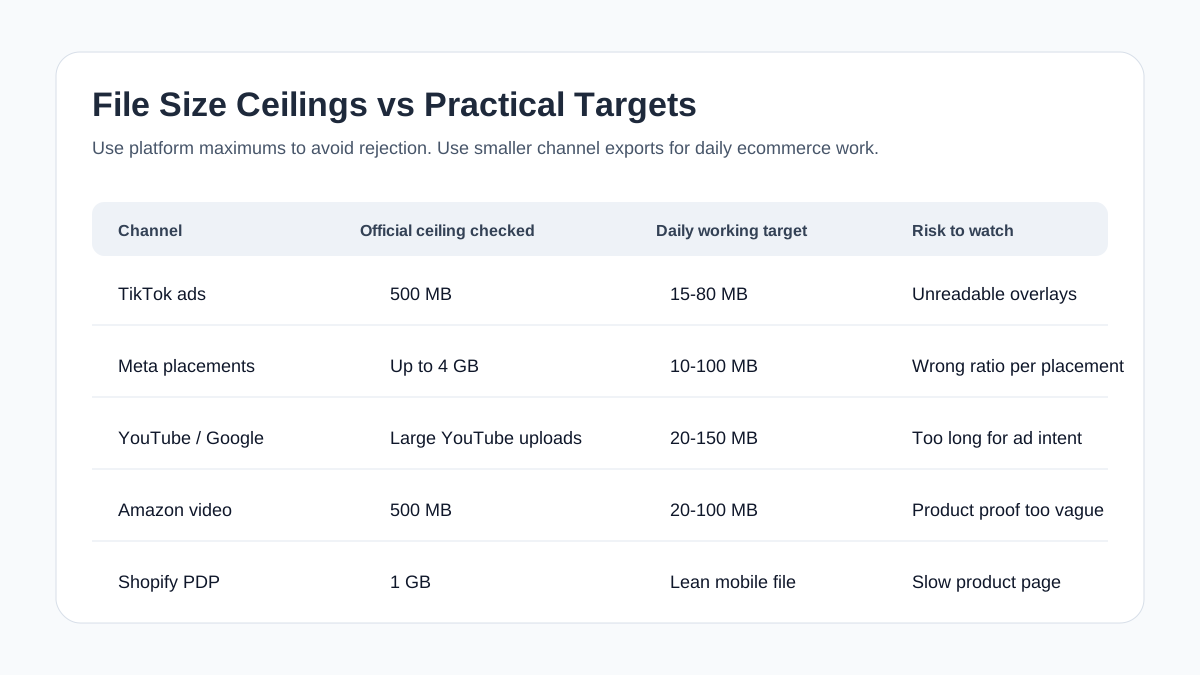
Do not treat a platform maximum as the best target. TikTok and Amazon Sponsored Brands allow files up to 500 MB, Meta can allow much larger video uploads, YouTube accepts very large files, and Shopify product media allows up to 1 GB. Those ceilings prevent rejection, but they do not guarantee a fast product page, clean mobile playback, or an efficient creative workflow.
Use file size as a QA layer after you already have the right product video aspect ratio, product video length, captions, proof scenes, and CTA.
Why Product Video File Size Matters
File size is not just a technical export setting. For ecommerce teams, it affects four practical outcomes:
| Outcome | What goes wrong when the file is too large | What goes wrong when the file is too compressed |
|---|---|---|
| Product page speed | The PDP feels heavy, especially on mobile networks. | Product detail can look soft or pixelated. |
| Ad upload workflow | Uploads fail, time out, or take too long during launch QA. | The platform may recompress an already damaged file. |
| Product clarity | Large files may still be poorly framed if exported from the wrong master. | Text overlays, ingredients, texture, or usage details become hard to read. |
| Creative testing | Teams avoid making variants because each export is slow to move. | Variant performance can be distorted by low visual quality. |
The goal is not to make the smallest possible file. The goal is to make the smallest file that still preserves the product proof a shopper needs to see.
If a skincare texture, fabric weave, product label, kitchen tool movement, or before-after result becomes unclear after compression, the file is too small even if the upload succeeds.
Platform File Size Limits Are Ceilings, Not Targets
Official platform limits vary by placement and upload path. Before every major campaign, recheck the current platform docs. For planning, use this matrix:
| Channel | Common ecommerce use | Official file-size ceiling checked | Practical export target |
|---|---|---|---|
| TikTok Auction In-Feed ads | Short product ad, UGC-style demo, TikTok Shop support | Up to 500 MB | 15-80 MB for most 9:16 ad cuts |
| Meta Feed, Stories, Reels | Prospecting, retargeting, offer videos | Up to 4 GB on common video placements | 10-100 MB depending on length and detail |
| YouTube / Google Ads | Shorts ads, skippable ads, product consideration | Very large uploads are supported for YouTube-hosted video | 20-150 MB for short ecommerce versions |
| Amazon Sponsored Brands video | Search/result placement product video | Up to 500 MB | 20-100 MB for 16:9 product videos |
| Amazon Sponsored Products video | Product-focused ad assets | Up to 500 MB | 20-100 MB, with product detail preserved |
| Shopify product media | PDP gallery, product explanation, demo clip | Up to 1 GB | Keep PDP files as lean as quality allows |
The wide gap between official ceiling and practical target matters. A 300 MB product video may upload, but it is often a bad default for a product page or routine ad testing. A 7 MB video may load quickly, but it can fail the buyer if the product label, stitching, app screen, texture, or before-after detail is unreadable.
Recommended Product Video Export Settings
For most ecommerce teams, start with these defaults:
| Use case | Aspect ratio | Resolution | Length | Format | Practical file-size range |
|---|---|---|---|---|---|
| TikTok / Reels / Shorts ad | 9:16 | 1080 x 1920 | 10-30 seconds | MP4 H.264 | 15-80 MB |
| Meta feed variant | 4:5 or 1:1 | 1080 x 1350 or 1080 x 1080 | 10-30 seconds | MP4 H.264 | 10-70 MB |
| Amazon Sponsored Brands video | 16:9 | 1920 x 1080 | 6-45 seconds | MP4 or MOV | 20-100 MB |
| Shopify PDP demo | 1:1, 4:5, or 16:9 | 1080p or 4K only when needed | 20-90 seconds | MP4, MOV, or WebM | Lean enough for mobile UX |
| Retargeting reminder | 9:16 or 1:1 | 1080p | 6-15 seconds | MP4 H.264 | 5-40 MB |
Use 1080p as the default for most paid social product videos. Use 4K only when the product page needs zoom-like detail, the platform supports it, and the viewer experience justifies the heavier file.
For ads, the story and first three seconds usually matter more than a 4K export. A clear 1080p video with readable captions and a strong product demo will usually beat a heavy file that opens slowly, uploads slowly, or forces your team to skip variants.
A Simple File Size Workflow

Use this workflow before publishing or uploading product videos:
- Keep a clean master export.
- Duplicate the master for each channel.
- Set the correct aspect ratio and length first.
- Export a 1080p MP4 H.264 version as the default.
- Check file size against the platform ceiling.
- Watch the file on a phone, not only on a desktop monitor.
- Recompress only if product detail, captions, and motion still stay clear.
- Save final files with channel-specific names.
Example naming system:
| File name | Use |
|---|---|
sku123-master-4k.mov |
Archive-quality source file |
sku123-tiktok-9x16-15s.mp4 |
TikTok or Reels launch cut |
sku123-meta-4x5-20s.mp4 |
Meta feed cut |
sku123-amazon-16x9-30s.mp4 |
Amazon ad or product video cut |
sku123-shopify-pdp-45s.mp4 |
Product page gallery video |
This keeps your production system readable. If an ad upload fails, your team can find the exact export instead of opening a folder full of final-final-v3.mp4 files.
How To Reduce Product Video File Size Without Losing The Sale
Compression should protect the buying signal. For ecommerce, the buying signal is not cinematic polish. It is the detail that makes the shopper believe the product:
- The product appears clearly in the first seconds.
- The use case is visible without sound.
- Text overlays remain readable on mobile.
- Important claims have visual proof.
- The CTA and offer are not blurred.
- The final frame gives the shopper a next step.
Use this compression checklist:
| Compression choice | Better default | Why |
|---|---|---|
| Codec | H.264 MP4 for broad compatibility | It is widely accepted by ad platforms and ecommerce workflows. |
| Resolution | 1080p for most social ads | It balances clarity and manageable file size. |
| Frame rate | Match the source or use a stable 24-30 fps | Unnecessary high frame rates increase file size. |
| Bitrate | Lower gradually, then watch on mobile | Bitrate controls quality/file-size tradeoff. |
| Audio | Keep clean AAC audio when audio is required | TikTok policies expect audio for ads, while some Amazon surfaces remove audio. |
| Captions | Burn in only when needed and readable | Tiny caption text gets damaged first during compression. |
Do not compress a video until the product is already framed correctly. Cropping from a weak export and then compressing again creates a soft file that still does not show the product well.
Channel Notes For Ecommerce Teams
TikTok Ads
TikTok's Auction In-Feed ad specs support common video formats such as MP4 and MOV and list a file-size ceiling of 500 MB. TikTok's ad format policy also emphasizes standard video sizes, legibility, audio quality, and dynamic ad content.
For ecommerce sellers, that means the file-size check should happen after creative checks:
- Is the product visible immediately?
- Is the opening dynamic instead of static?
- Are text overlays legible?
- Is the audio clear or intentionally built for the placement?
- Is the file comfortably under the upload ceiling?
For more TikTok-specific QA, use the TikTok ad specs checklist.
Meta Ads
Meta's Ads Guide surfaces placement-specific technical requirements, including file type, ratio, minimum dimensions, duration, and maximum file size. The practical challenge is that Meta placements differ. A feed video, Story, Reel, and Marketplace placement may accept different shapes and behave differently on mobile.
For ecommerce, export by placement group:
| Placement group | Safer creative file |
|---|---|
| Feed | 4:5 or 1:1 MP4 |
| Stories / Reels | 9:16 MP4 |
| Retargeting | Shorter, smaller variant with product and offer early |
| Catalog-style testing | Consistent size and naming across variants |
If you are already using the Meta video ad specs guide, treat this article as the file-size and compression layer.
YouTube And Google Ads
Google Ads and YouTube guidance separates video specs from creative best practices. YouTube-hosted video can support very large files, while Shorts ads guidance recommends shorter vertical assets for action-oriented campaigns.
The key ecommerce lesson: YouTube's large upload capacity does not mean your product ad should be large or long. Keep a clean source, then publish a short, vertical, product-first version for Shorts or a clearer 16:9 version for standard YouTube placements.
For Shorts and YouTube-specific production, pair this with the Google Ads video specs guide and product video length guide.
Amazon Video
Amazon Ads specs commonly use a 500 MB ceiling for video ad assets such as Sponsored Brands video and Sponsored Products video. Amazon also gives placement-specific guidance on duration, aspect ratio, codecs, audio, and product-focused content.
For Amazon, do not only ask whether the file uploads. Ask whether it explains the product in the way that placement expects:
- Sponsored Brands video should be concise and product-forward.
- Sponsored Products video should show features, benefits, or usage.
- Some Amazon surfaces handle audio differently, so visual clarity matters.
- Avoid black bars, unreadable overlays, and vague lifestyle footage.
For listing-focused QA, use the Amazon product video requirements guide.
Shopify Product Pages
Shopify Help Center guidance says uploaded product videos can be up to 10 minutes, up to 1 GB, up to 4K, and use MP4, MOV, or WebM. That is an upload allowance, not a recommendation to place a 1 GB video on every PDP.
For Shopify product media, optimize for shoppers:
| PDP question | File-size implication |
|---|---|
| Does the video answer a buying objection? | Keep the video focused, not decorative. |
| Is the product detail visible on mobile? | Avoid overcompression. |
| Does the page still feel fast? | Avoid unnecessarily large files. |
| Can the same asset be reused in ads? | Export separate ad files instead of reusing one PDP file everywhere. |
If you create product videos with ShopShot's AI video generator, keep one campaign master and export leaner files for the page, paid social, and marketplace uploads.
File Size QA Checklist Before Publishing
Run this checklist before you upload the video:
- [ ] The file uses the correct aspect ratio for the target placement.
- [ ] The video length matches the channel plan.
- [ ] The file format is accepted by the platform.
- [ ] The file is below the official platform ceiling.
- [ ] The file name includes SKU, channel, ratio, and duration.
- [ ] Product label, texture, size, app screen, or result is readable on mobile.
- [ ] Captions and overlay text survive compression.
- [ ] Audio is clear where audio is required.
- [ ] The CTA is visible and not hidden by platform UI.
- [ ] The product page version is not heavier than it needs to be.
This is also a good time to check your product video captions, thumbnail, and landing page match.
Common File Size Mistakes
Mistake 1: Uploading The Master File Everywhere
The master is for archiving and future edits. It is rarely the best file for TikTok, Meta, Amazon, YouTube, or Shopify.
Fix: export channel-specific files from the master.
Mistake 2: Compressing Before Cropping
If you compress first and then crop for 9:16 or 4:5, the final file may lose detail twice.
Fix: crop and resize first, then compress the final placement version.
Mistake 3: Judging Quality On Desktop Only
Most product videos are watched on phones. A file can look acceptable on a large monitor and still be unreadable on a mobile feed.
Fix: watch the final export on a phone before upload.
Mistake 4: Treating Smallest As Best
Small files are useful, but ecommerce product videos need enough detail to sell the product.
Fix: reduce file size until quality starts to break, then step back to the last clean export.
Mistake 5: Reusing One File For Product Pages And Ads
PDP videos and ads have different jobs. PDP videos answer objections. Ads stop the scroll and earn the click.
Fix: use a PDP version and separate ad versions, even when they come from the same source.
FAQ
What is the best product video file size for ecommerce ads?
There is no single best file size for every ecommerce ad. Use the platform maximum as a rejection ceiling, then export the smallest channel-specific file that keeps the product, captions, proof, and CTA clear on mobile.
Is 500 MB too large for a product video ad?
It may upload on platforms that allow 500 MB files, but it is often larger than needed for routine ecommerce ad testing. A short 1080p MP4 is usually more practical unless the product requires unusually high detail.
Should I use MP4 or MOV for product video ads?
MP4 with H.264 is the safest default for broad ecommerce ad workflows. MOV can be useful for higher-quality masters or platform-specific uploads that accept it.
How do I compress a product video without ruining quality?
Start from a clean master, export the correct aspect ratio and length, use 1080p for most social ads, reduce bitrate gradually, and review the final file on a phone before uploading.
Can I upload a 1 GB video to Shopify?
Shopify's product media guidance allows uploaded videos up to 1 GB and up to 10 minutes, but a product page video should still be as lean as possible while preserving product clarity and mobile playback quality.
Sources Checked
- TikTok Auction In-Feed Ads
- TikTok Ad Format and Functionality Policy
- Meta Ads Guide
- Google Ads video ad specs
- YouTube Shorts ads asset specs and best practices
- Amazon Video Ads specs
- Amazon Sponsored Brands video specs
- Amazon Sponsored Products video guide
- Shopify product media types
Bottom Line
Product video file size is a launch-readiness check, not an isolated export trick. Keep the master clean, export separate channel files, stay below official limits, and watch every final version on mobile. The right file is small enough to move quickly and clear enough to make the shopper believe the product.