
Quick Answer
A practical product video bitrate guide starts with the destination, not the editing app. For most 1080p ecommerce ad exports, use H.264 MP4, progressive scan, square pixels, AAC audio, the same frame rate as your edit, and a target video bitrate around 8-12 Mbps. Increase the bitrate when the product has fine texture, small packaging text, fast motion, animated captions, glitter, fabric detail, or before-after proof. Lower it only when the destination has tight file-size limits or the video is a lightweight PDP asset.
Bitrate is not a ranking trick or a magic quality switch. It is the amount of data allocated to each second of video. Too little data creates blur, blocky shadows, soft text, and banding. Too much data creates slow uploads, bloated storage, slower approvals, and no visible improvement after the platform compresses the file again. The right ecommerce workflow is to keep a high-quality master, export platform-specific versions, then check the busiest three seconds on a phone before publishing.
If you already have separate decisions for product video resolution, product video frame rate, product video file size, and product video aspect ratio, bitrate is the final compression decision that decides whether those choices survive upload.
What Bitrate Actually Controls
Bitrate controls how much digital information is stored or delivered per second of video. Adobe describes bitrate as the amount of information per second, separate from frame rate, resolution, or format. In ecommerce terms, bitrate is the budget your video has to describe motion, product edges, text overlays, skin texture, fabric, liquid, shine, shadows, and background detail.
Resolution answers "how many pixels are in each frame." Frame rate answers "how many frames appear each second." Bitrate answers "how much data can the export spend describing those pixels over time." A 1080p video at a very low bitrate can look worse than a 720p video exported cleanly. A 4K file at an excessive bitrate can be harder to upload without making a TikTok or PDP viewer see more useful product detail.
For ecommerce ads, bitrate problems usually show up in five places:
| Problem area | What shoppers see | Why it hurts ecommerce |
|---|---|---|
| Packaging text | Ingredients, size, or claim copy turns soft | Viewers cannot verify the product quickly |
| Texture detail | Fabric, skincare texture, wood grain, or jewelry sparkle becomes mushy | The product feels cheaper than it is |
| Fast motion | Hand demos, pours, wipes, or transitions become blocky | The proof moment loses credibility |
| Captions and overlays | Subtitles shimmer or break after upload | The hook and CTA become harder to read |
| PDP load speed | Large files slow product pages or mobile browsing | The video can hurt the shopping experience |
This is why bitrate should sit inside the same QA system as captions, proof points, and video ad metrics. It is a creative quality setting, not just an export panel number.
Recommended Starting Settings
Use these numbers as a production starting point, then test the exported file against the platform and the product detail. They are deliberately conservative for ecommerce teams that need clear product proof and reliable uploads.
| Destination | Practical export target | When to increase | When to reduce |
|---|---|---|---|
| TikTok, Reels, Shorts vertical ads | 1080x1920, H.264 MP4, 8-12 Mbps | Dense captions, beauty texture, fast hand demos, sparkle, liquids | Simple talking-head or static product demos under tight upload constraints |
| Meta feed and Reels ads | 1080x1350 or 1080x1920, H.264 MP4, 8-12 Mbps | Small on-screen prices, comparison layouts, product UI, high-motion edits | Very short variants where file size is more important than fine detail |
| YouTube Shorts or YouTube ads | 1080p SDR at 8 Mbps for 24-30 fps, 12 Mbps for 48-60 fps | High-motion product tests, detailed product shots, longer explainers | Simple low-motion videos when upload time matters |
| Amazon Sponsored Brands video | 16:9, H.264 or H.265, 4 Mbps or higher | Premium product visuals, rich backgrounds, product detail close-ups | Only when the file remains clear and still meets Amazon specs |
| Amazon online video ads | 16:9 or supported 9:16, 8 Mbps recommended | Streaming-style creative or interactive vertical assets | Third-party served files when using the lower allowed minimum |
| Shopify PDP video | 1080p MP4 around 2.5-7.2 Mbps | Zoomable detail, premium product pages, desktop-first PDP layouts | Mobile PDP assets where load speed is the priority |
The table should not replace official platform documentation. TikTok's Auction In-Feed Ads page lists 500 MB as the file-size ceiling for non-Spark ads and 516 kbps as the minimum bitrate. YouTube's upload settings recommend variable bitrate and publish bitrate tables by resolution and frame rate. Amazon publishes separate Sponsored Brands, online video, and streaming specs. Shopify publishes its own video pipeline recommendations for uploaded files.
The useful takeaway: minimum bitrate is not a quality target. It is an acceptance floor. An ecommerce ad usually needs enough bitrate to preserve product evidence after the platform compresses the upload again.
A Simple Bitrate Formula for Ecommerce Teams
Use this formula when the export panel asks for a target bitrate:
Baseline bitrate + product detail load + motion load - platform/file-size pressure = target export bitrate
Start with 8 Mbps for a 1080p, 24-30 fps H.264 ad. Add 2-4 Mbps when the video has fine detail or fast motion. Add another 2 Mbps when text overlays, captions, price callouts, or comparison graphics must stay sharp. Subtract 2-4 Mbps when the destination is a product page where load speed matters more than preserving every texture.
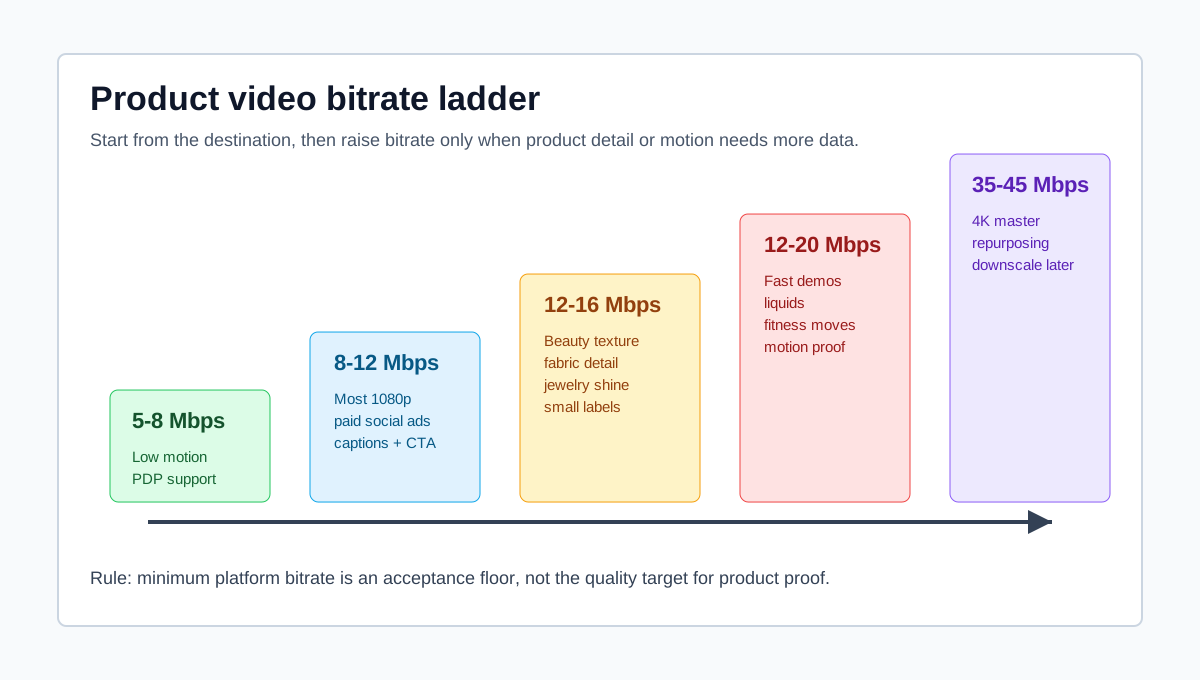
Here is a practical ecommerce ladder:
| Use case | Export target | Reason |
|---|---|---|
| Simple product spin, low motion | 5-8 Mbps | Enough for clean product shape without bloating the file |
| Standard product ad with captions | 8-12 Mbps | Balanced quality for most paid social uploads |
| Beauty, fashion, jewelry, food texture | 12-16 Mbps | Preserves small detail and compression-sensitive surfaces |
| Fast demo, liquid, fitness, tool use | 12-20 Mbps | Gives motion more data so proof moments stay readable |
| 4K master for repurposing | 35-45 Mbps or higher by destination | Keeps a clean source before downscaling platform versions |
Do not export every short product ad at a huge bitrate just because the source was AI-generated or shot in 4K. Most social platforms will re-encode the file. Your job is to upload a clean enough source without making the workflow slow, fragile, or hard to version.
Platform Notes for TikTok, Meta, YouTube, Amazon, and Shopify
TikTok and Spark Ads
TikTok's current Auction In-Feed Ads guidance says non-Spark ad videos can use vertical, horizontal, or square dimensions, with vertical recommended. It also lists a file-size ceiling of 500 MB and a minimum bitrate of 516 kbps. Treat that number as an upload floor, not the export target for product detail.
For most ecommerce TikTok and Spark Ads workflows:
- Export 1080x1920 vertical when the edit is intended for mobile.
- Keep the edit at 24, 25, or 30 fps unless the source and motion justify 60 fps.
- Use 8-12 Mbps for normal product videos.
- Use 12-16 Mbps for beauty texture, apparel weave, jewelry shine, product labels, and fast hands.
- Review the first hook, the product proof shot, and the CTA screen on a phone.
If you need help before export, build the creative with a TikTok-specific plan such as the TikTok Spark Ads product video checklist or the TikTok Shop product video checklist.
Meta Feed, Reels, and Advantage+ Creative
Meta's official business pages can be login-gated, but its ad specs and export guidance consistently emphasize accepted video types, H.264-style compression, fixed frame rate, progressive scan, and AAC audio. Because Meta placements vary across Feed, Reels, Stories, and Advantage+ delivery, the practical rule is to export a clean 4:5 or 9:16 file for the placement family rather than one oversized master for every placement.
For ecommerce Meta ads, bitrate problems often appear in comparison frames and offer frames. If the product price, discount, star rating, claim proof, or review quote is unreadable after upload, the creative fails even when the upload technically passed.
Use this QA:
- Export a 1080p H.264 MP4 at 8-12 Mbps.
- Watch the file locally at actual phone size.
- Upload to a draft ad or preview environment.
- Check the product label, CTA, and caption after platform processing.
- Re-export at a higher bitrate only if the preview shows visible compression.
For placement decisions, pair this guide with the Meta video ad specs guide and the live Facebook ads tool page.
YouTube Shorts and YouTube Ads
YouTube's recommended upload settings are useful because they publish bitrate tables by resolution and frame rate. For SDR uploads, YouTube lists 1080p at 8 Mbps for standard frame rates and 12 Mbps for high frame rates. It also recommends variable bitrate, H.264, progressive scan, and preserving the frame rate used during recording or editing.
That makes YouTube a good anchor for ecommerce export decisions. If your 1080p product ad looks poor at 8 Mbps, the problem may not only be bitrate. Check whether the edit has tiny text, noisy shadows, fast zooms, or low-quality source media. Raising bitrate can help, but it cannot restore detail that was never present in the source.
For Shorts, keep the mobile-first crop and title plan separate from the export settings. Use the YouTube Shorts product video specs guide, then export with enough bitrate for the proof shot and product text to survive.
Amazon Sponsored Brands and Online Video
Amazon has multiple video destinations, so the bitrate answer depends on where the creative will run. Sponsored Brands video specs list a minimum video bitrate of 1 Mbps, with 4 Mbps or higher recommended, and a 500 MB maximum file size. Amazon online video specs list 4 Mbps as a minimum for site-served files and 8 Mbps as the recommended bitrate.
This split matters for ecommerce teams. A Sponsored Brands video in shopping results is often short, product-specific, and 16:9. An online video ad can behave more like a media placement, where higher quality and a clean frame matter more. A PDP video may have a different hosting path altogether.
For Amazon product videos:
- Keep the file inside the exact format, ratio, duration, frame rate, and policy requirements.
- Use a higher bitrate for premium products, packaging detail, and demonstrations.
- Avoid letterboxing or pillarboxing.
- Check that disclaimers, product claims, and visual proof remain clear.
- Link the creative QA back to your Amazon Sponsored Brands video checklist or Amazon tool page.
Shopify Product Detail Pages
Shopify is different from paid social because shoppers may interact with the video on a product page, mobile PDP, theme section, or file-hosted asset. Shopify's file requirements allow videos up to 1 GB, up to 10 minutes, MOV, MP4, or WEBM, with maximum dimensions of 4096 pixels and maximum frame rate of 120 fps. Its video pipeline recommendations include HLS and MP4 bitrate ranges, including 2.5-7.2 Mbps for 1080p MP4.
For Shopify PDPs, a huge bitrate can work against the page. You want enough detail to sell the product, but not a file that slows browsing or creates an awkward first play. If the video is mainly a PDP support asset, start lower than you would for paid social and test page speed, mobile playback, and product detail visibility.
For a broader PDP production workflow, use the Shopify product video checklist and the Shopify tool page.
Bitrate Workflow: From Master File to Publish-Ready Ads
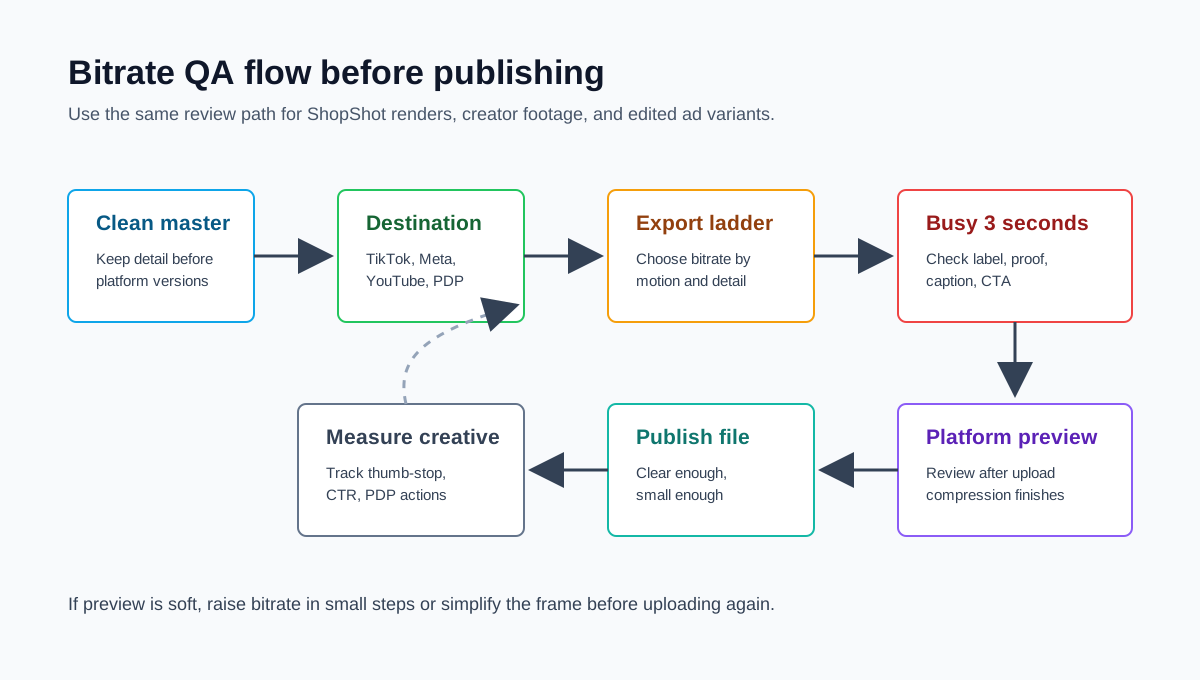
Follow this workflow whenever you export product videos from ShopShot, an editor, creator footage, or an AI video pipeline.
1. Keep a Clean Master
Keep one master file or project version that is higher quality than the final platform export. This can be a 4K or high-bitrate 1080p master depending on your source. Do not repeatedly download, compress, upload, and re-export the same file. Every generation loses information.
If the source already contains blurry product text, crushed shadows, or broken edges around AI-generated hands or packaging, no bitrate setting will fix it. Regenerate or edit the source before export.
2. Choose the Destination Before Export
Export by destination, not by habit. A TikTok Shop video, Meta Reels ad, YouTube Shorts version, Amazon Sponsored Brands video, and Shopify PDP asset should not automatically use the same bitrate, ratio, and file-size target.
Use your existing product video length guide and aspect ratio guide first, then choose bitrate last.
3. Test the Busiest Three Seconds
The most important QA moment is rarely the whole video. It is usually the busiest three seconds: a fast hand demo, a pour, a side-by-side comparison, a close-up label, a claim proof frame, or the CTA.
Export one test file, then check:
- Does packaging text remain readable?
- Do captions shimmer or break?
- Does skin, fabric, food, or glossy packaging turn blocky?
- Does the product edge stay clean against the background?
- Is the file still practical to upload and store?
4. Preview After Platform Processing
Local playback is not enough. TikTok, Meta, YouTube, Amazon, and Shopify can process the file after upload. Check a draft, preview, unpublished product media slot, or internal review link after the platform finishes processing.
If the post-upload preview is soft, increase the export bitrate, simplify the background, reduce tiny overlay text, or export a cleaner source. Do not blindly jump from 8 Mbps to 60 Mbps. Move in controlled steps.
5. Record the Export Setting in the Creative Brief
Bitrate QA should be part of the creative system, not a one-off editor decision. Add export settings to your product video brief and shot list, especially when multiple people create variants.
A simple handoff line is enough:
Export: 1080x1920 MP4, H.264, 30 fps, VBR 1-pass or 2-pass, target 10 Mbps, AAC stereo audio, check label close-up at 00:04.
Troubleshooting Bitrate Problems
| Symptom | Likely cause | Fix |
|---|---|---|
| Product label looks blurry | Bitrate too low, source too soft, or platform compression hit tiny text | Increase bitrate, enlarge the label shot, simplify the background, or use a closer crop |
| File is huge but not sharper | Bitrate is too high for visible benefit or source lacks detail | Lower bitrate, export from a cleaner source, avoid repeated re-compression |
| Upload fails or takes too long | File size exceeds destination or network constraints | Reduce bitrate, shorten the video, export per destination, avoid unnecessary 4K |
| Fast demo looks blocky | Motion needs more data | Increase bitrate, reduce motion blur, avoid noisy backgrounds, test 12-20 Mbps |
| Captions shimmer | Thin text, low bitrate, or bad scaling | Use larger captions, export at final resolution, increase bitrate moderately |
| PDP video slows the page | Export file is too large for storefront use | Use Shopify-friendly MP4 settings, shorten the clip, reduce bitrate, or use hosted video |
The best fix is often creative, not technical. A noisy background, tiny text, and rapid zoom can break after upload even at a higher bitrate. Ecommerce videos should make the product easy to inspect, not just pass an export checklist.
ShopShot Workflow for Cleaner Product Video Exports
ShopShot can help ecommerce teams reduce bitrate mistakes because the production workflow starts with product assets, scripts, and platform versions rather than a generic blank timeline.
Use this flow:
- Build the first product video from your product image, product page, or script in ShopShot's AI video generator.
- Choose the destination version: TikTok, Meta, Amazon, Shopify PDP, YouTube Shorts, or a general ecommerce ad.
- Keep the source render or project output as the master.
- Export platform versions with the bitrate ladder in this guide.
- Review the hook, proof shot, captions, and CTA on mobile.
- Track whether the compressed version affects thumb-stop rate, hold rate, click-through rate, or PDP engagement.
This connects export quality to outcomes. If a higher bitrate version looks better but does not improve the relevant creative metric, keep the lighter export. If a compressed version hides the proof point and weakens the ad, raise quality or simplify the frame.
FAQ
What bitrate should I use for ecommerce product videos?
For most 1080p ecommerce product videos, start around 8-12 Mbps with H.264 MP4. Use 12-16 Mbps when the ad has fast motion, small product text, beauty texture, fabric, jewelry, liquid, or dense captions. Use lower ranges for lightweight PDP assets where load speed is more important.
Is higher bitrate always better for product video ads?
No. Higher bitrate can preserve more detail, but it also increases file size and upload time. Most ad platforms re-encode uploaded videos, so extreme bitrates often add workflow friction without visible shopper benefit. Use the lowest bitrate that keeps the product proof, captions, and CTA clear after platform processing.
Why does my video look blurry after uploading to TikTok or Meta?
The upload may have been compressed again by the platform, or the source export may not have enough data for motion, small text, or detailed product shots. Check the busiest three seconds, increase bitrate in small steps, export at the final aspect ratio, and avoid tiny captions or noisy backgrounds.
Should I export ecommerce ads in 4K?
Use 4K for a master file when you need to crop, repurpose, or preserve detail before making platform versions. For most paid social uploads, a clean 1080p export at the right aspect ratio and bitrate is more practical than a huge 4K file. YouTube and some premium placements can justify higher-resolution exports.
What is the difference between file size and bitrate?
Bitrate is the data rate per second. File size is the total size of the exported file. A longer video at the same bitrate creates a larger file. A short video at a high bitrate can also be large. Use bitrate to control quality per second, then check file size against the destination's upload limits.
Sources Checked
- TikTok Ads Manager, Auction In-Feed Ads - checked for current dimensions, file-size ceiling, and minimum bitrate.
- Google Ads Help, About video ad specs - checked for YouTube ad resolution, aspect ratio, format, safe-zone, and file-size guidance.
- YouTube Help, Recommended upload encoding settings - checked for H.264, variable bitrate, frame-rate, and bitrate tables.
- Amazon Ads, Sponsored Brands video ad specs - checked for duration, dimensions, file size, codecs, frame rate, and bit-rate guidance.
- Amazon Ads, Online video ad specs - checked for online video file size, aspect ratio, minimum and recommended bitrate, frame rate, and audio specs.
- Shopify Help Center, Uploading and managing files - checked for video file requirements and recommended video pipeline bitrate ranges.
- Adobe, Explore video bitrate and Adobe, Best export settings for Premiere Pro - checked for bitrate definition and export setting context.
- Meta Business Help official pages were checked but are login-gated in this environment, so the article avoids relying on non-verifiable Meta-only numeric claims beyond general accepted export practices.